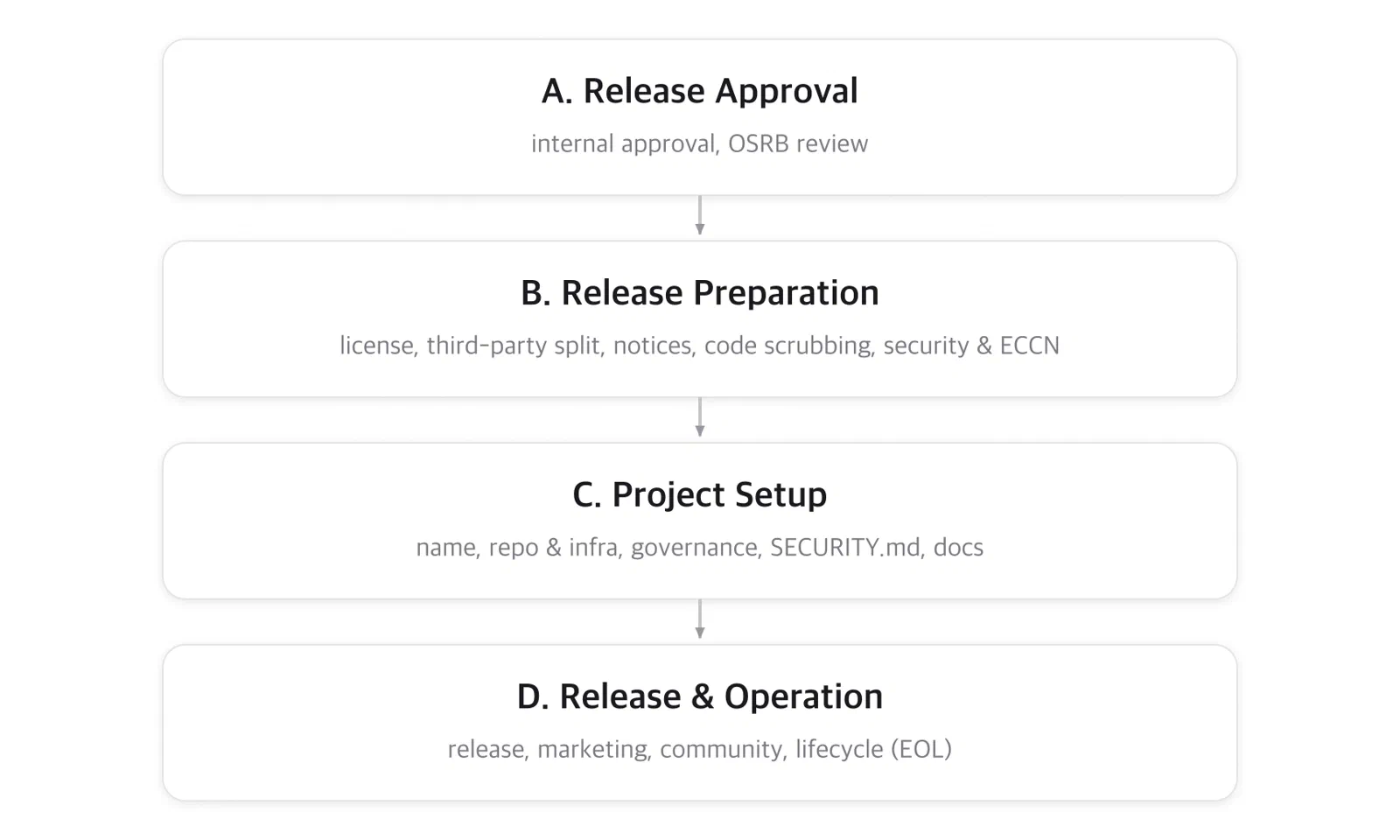
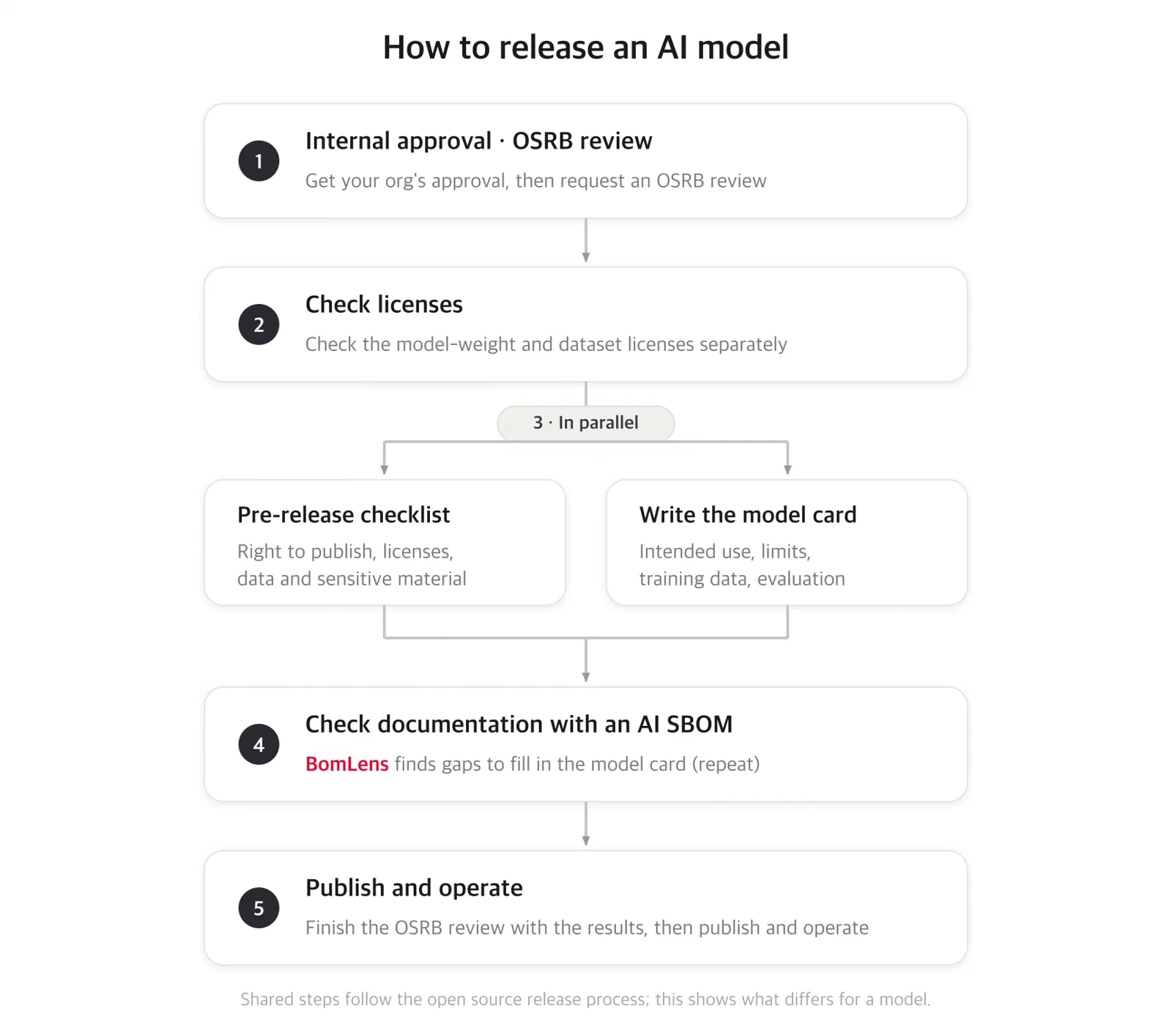
In the spirit of openness and sharing that defines open source, SK Telecom has made the open source guide originally created for its internal members publicly available for anyone to use. (Note that some content, such as internal system links, has been excluded.)
Introduction
"If software is eating the world, open source is eating the software world."
That open source has become the heart of the software world is now a self-evident fact that needs no further explanation.
SK Telecom already uses a great deal of open source across most of its services. Going further, SK Telecom contributes to numerous open source projects and releases key software as open source. This stems from a clear recognition that open source is an excellent tool for transforming software development culture, and from the belief that the greatest value can be created from open source when one actively participates in the open source community.
In recent years, alongside license compliance, security vulnerability management and software supply chain security have emerged as critical challenges in the open source ecosystem. As regulations in the United States and Europe have tightened, managing the SBOM (Software Bill of Materials) and responding systematically to vulnerabilities have become essential.
The SK Telecom OSRB (Open Source Review Board) provides guides to help members not only use and contribute to open source correctly, but also release SK Telecom’s software as open source.
Structure of This Guide
This guide is organized into the following three topics.
Open source has become such a core element of software development that developing a product or service without using open source can be considered virtually impossible. By using open source, you can shorten software development time while also strengthening service stability and security. However, when you use open source, you must check what its license is and comply with the obligations the license requires.
This section explains how to take external open source and use it correctly in SK Telecom’s products or services, along with the points that require attention.
Considerations When Choosing Open Source to Use
If you have decided to use open source to implement a needed feature, which one should you choose among the several open source projects that offer similar functionality? Let’s look at the points to consider from various angles.
To avoid creating legal problems when a company develops products/services using open source, it must check the open source licenses and comply with what each license requires. These activities are called open source compliance. SK Telecom members must carry out appropriate compliance activities while using open source.
What Is an Open Source License?
To use open source correctly, you must first understand copyright and open source licenses.
Copyright protects software. When software is developed, copyright law prohibits anyone other than the copyright holder from using, copying, modifying, or distributing that software.
The purpose of open source is to allow many people to freely use, modify, and distribute it. For this, a license that explicitly grants these rights is required. This is called an open source license, and software to which no open source license applies is not open source. If it is not open source, no one other than the copyright holder may use, copy, modify, or distribute that software.
For details about open source licenses, refer to the following page.
An open source license can be checked in several ways, even without using analysis tools. For how to check the license of the open source you intend to use, refer to the following page.
SK Telecom strongly encourages the use of open source when developing products/services. However, to protect SK Telecom’s intellectual property, the obligations required by each open source license must be observed. SK Telecom members must understand these, check the license when using open source, and comply with the obligations. To learn which open source licenses require caution, see the following page.
When distributing SK Telecom’s products/services that include open source, you must comply with what each open source license requires. Depending on the open source license, some require only notice obligations, while others go as far as requiring source code disclosure.
Notice obligation: At a minimum, you must comply with the notice obligations required by most open source licenses, such as “copyright notice” and “license notice.” For example, a mobile application distributed by SK Telecom can provide the required notices through an “About” page.
Source disclosure obligation: When distributing software that includes open source under a Copyleft license that requires source code disclosure, you must either provide the source code directly to the user or provide a written offer to supply the source code upon the user’s request.
Activities that minimize legal risk by complying with open source license obligations in this way are called open source compliance.
Requesting an Open Source Notice
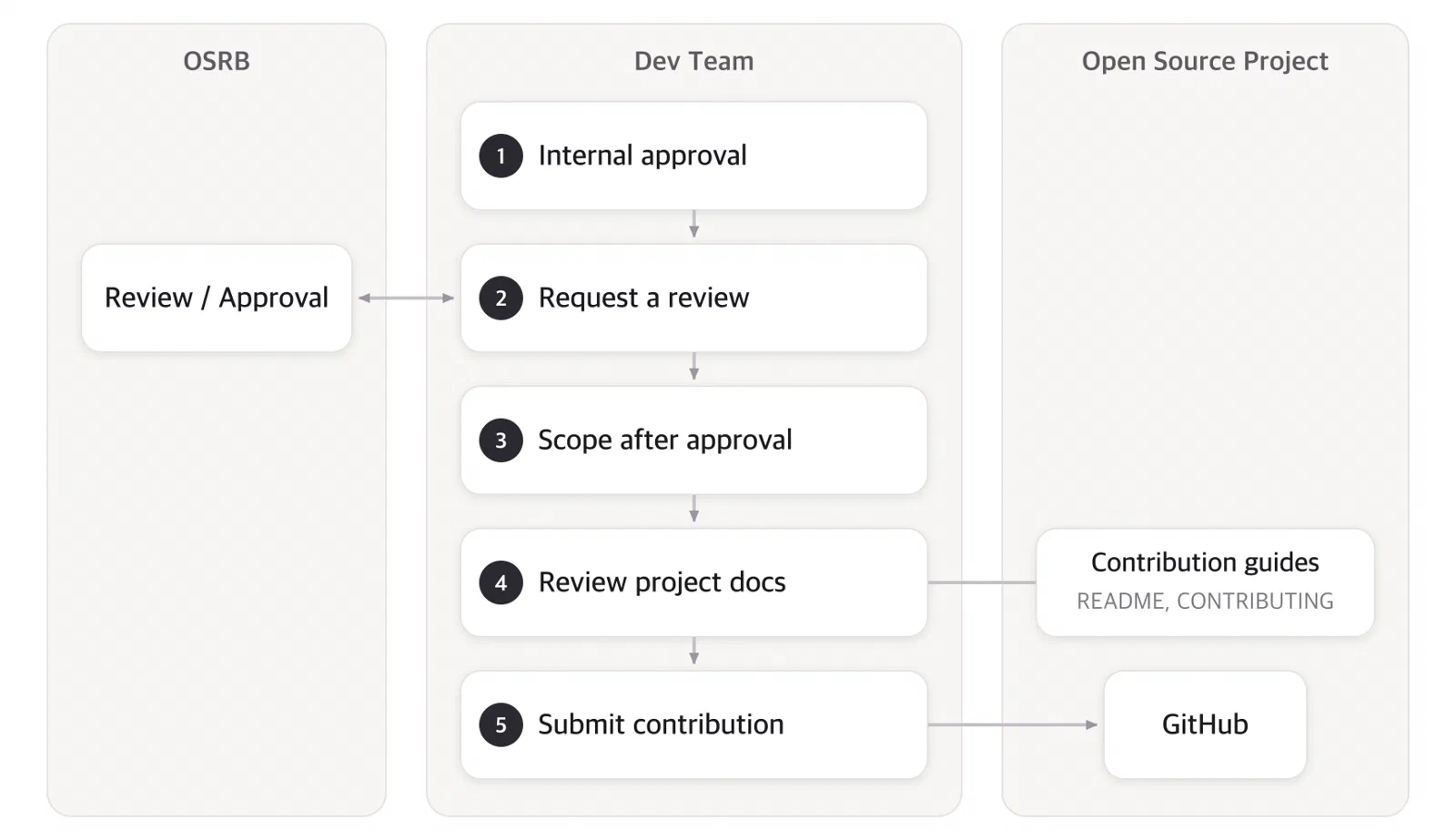
For open source compliance activities such as issuing notices, SK Telecom development organizations should finalize the open source to be used at the analysis/design completion stage of the development process and then request a review through ITGO.
http://link-removed
The responsible department (IPR Team, Legal & Compliance Management Group) reviews the request and issues the open source notice to be used for the notification.
Open Source Security Vulnerability Review Activities
Self-Inspection
Checking CVE
CVE provides a database of known open source security vulnerabilities. You can search for the open source you intend to use in CVE to check whether it has any known security vulnerabilities.
Checking GitHub
GitHub, the representative open source repository, detects vulnerable dependencies in public repositories and generates Dependabot alerts.
Requesting a Security Vulnerability Assessment
SK Telecom operates tools for assessing open source security vulnerabilities. You can request an assessment from the responsible department (Information Security).
Among several open source options that offer similar functionality, which one should you choose?
If you have decided to use open source to implement a needed feature, which one should you choose among the several open source projects that offer similar functionality? Let’s look at the points to consider from various angles.
Quality
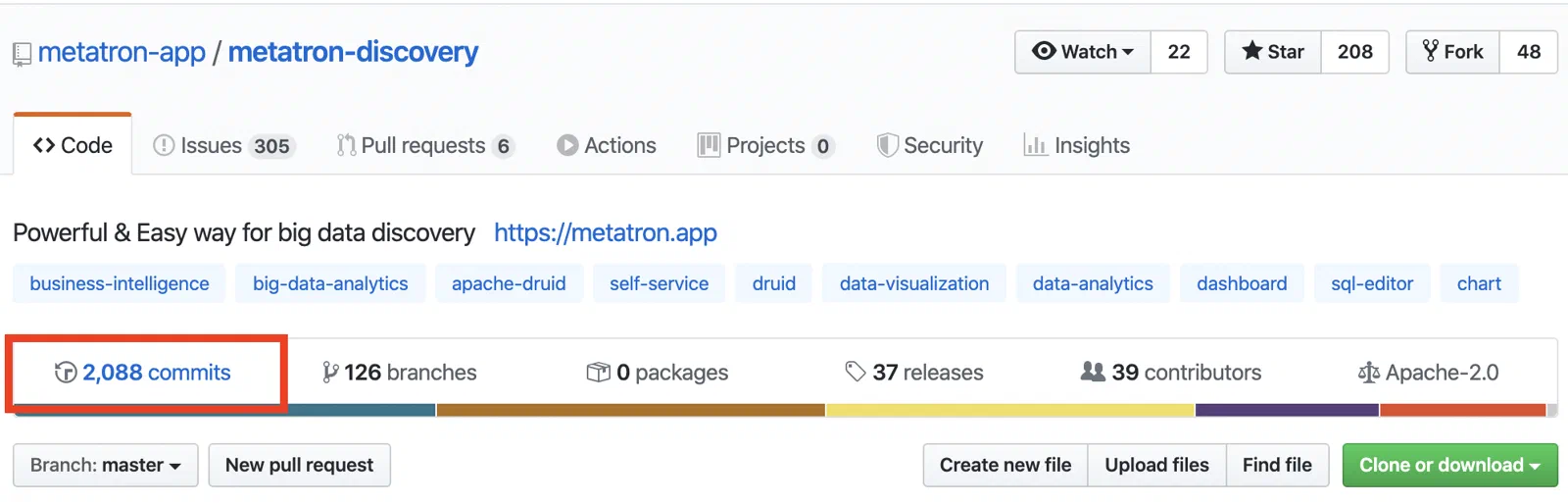
The quality of open source — including functionality, performance, and compatibility — is the most important factor when choosing open source. For a project hosted on GitHub, you can gauge the maturity of the open source by its number of stars and forks. A technical organization that intends to use open source should thoroughly verify its functionality and performance before adopting it into a product/service.
Community
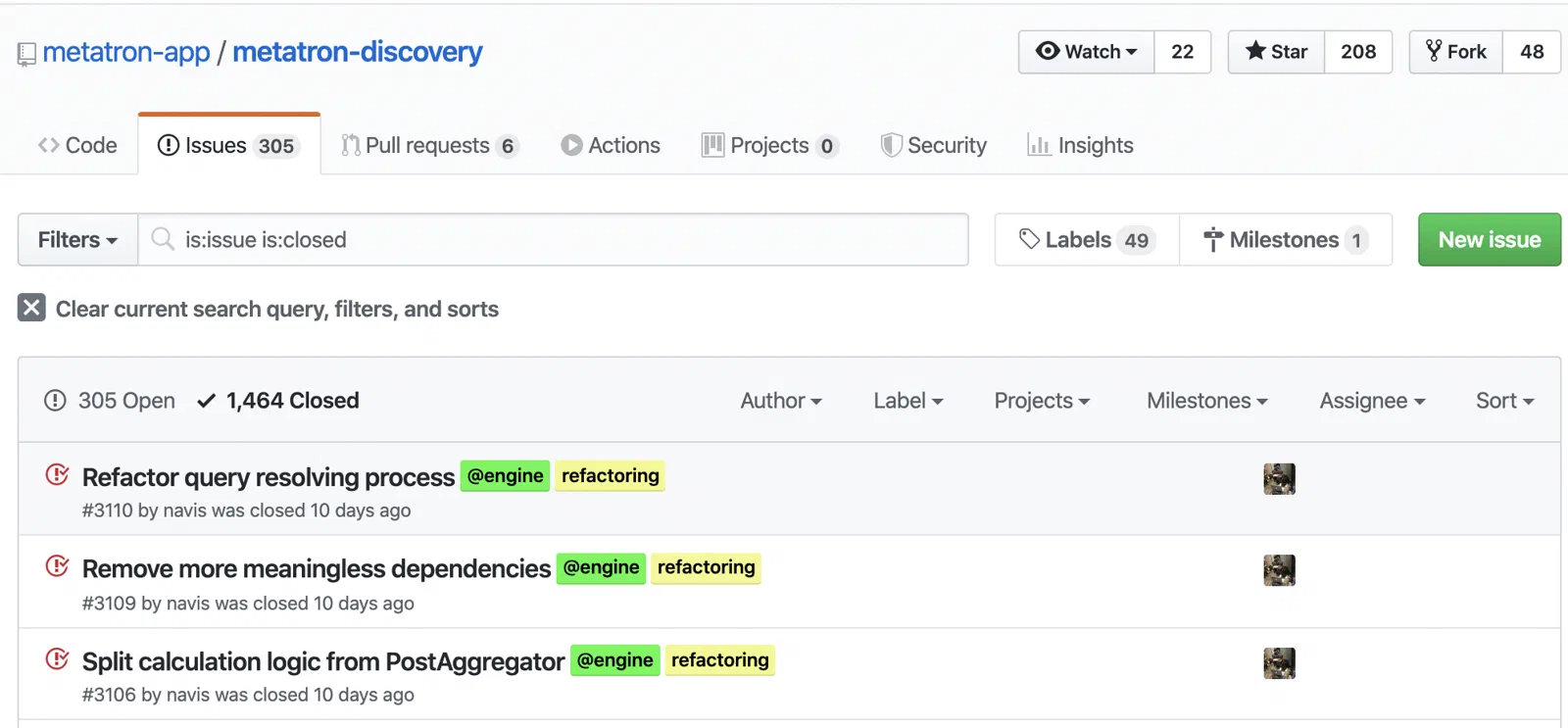
Whether the community is active — how many users the open source has, whether issues are well managed, and whether it is continuously updated — is also a consideration when choosing open source. It is more advantageous to choose open source with a community that is still active today than one whose community activity stopped years ago.
Documentation
To properly adopt and maintain open source, you should also check how thoroughly the project provides documentation. The deliverables of a well-documented project are easier for a company to adopt. It also makes it easier to contribute the company’s improvements back to the project as patches.
Security Vulnerabilities
Avoid versions of open source that have known, unpatched vulnerabilities. Versions in which security vulnerabilities have been found are tracked in databases such as CVE. Check whether the version you intend to use has known vulnerabilities, and if so, use a patched, newer version.
License
An open source license is a permit that grants everyone the right to use the software freely. However, most open source licenses impose obligations that must be observed when redistributing the open source — for example, notice obligations and source code disclosure obligations. GPL-2.0, a representative open source license, requires that even the source code of software combined with it be disclosed. Therefore, when choosing open source, you must check in advance what its license is and whether you can operate in an environment that complies with that license. The open source compliance activities for this are explained below.
1.2 - What Is an Open Source License?
What is an open source license?
What Is Open Source?
Open source refers to software whose source code, distributed through a licensing scheme, can be freely copied, modified, used, and redistributed. With open source, anyone can fix bugs or adapt the code to add features, and can participate in software development. In this way, open source provides developers with the right to distribute the program, the right to access the source code, and the right to modify the source code.
Open Source Carries Legal Responsibilities Too!
Open source is widely used because, when leveraged well, it can reduce development cost and time. However, quite a few users are not well aware of the legal responsibilities of open source and the risks that come with them.
Just like commercial software, to use open source you must comply with that open source’s license. If you violate it, your right to use it is revoked, and if you have turned it into a product, you cannot sell that product.
You may also face claims from the open source community, severely damaging your corporate image as a license-violating company.
In the worst case, you could become involved in legal litigation, so it is important to know about open source in advance and prepare accordingly.
The legal responsibilities of open source differ depending on the type of open source license, so when using open source you must understand the legal responsibilities of each license.
Software Intellectual Property Rights
To understand the legal risks of open source, you need to understand the basic concepts of intellectual property rights in software and of licenses, because an open source license is a type of software license.
The legal mechanisms that protect software — that is, the intellectual property rights related to software — include copyright, patent rights, trademark rights, and trade secrets.
Copyright
Copyright is the right that a creator (author) acquires over their creation; it protects the result of the creation and arises at the same time as the creation.
Therefore, when a programmer develops software, copyright arises automatically, and that right is granted to the programmer or the company they belong to. A copyrighted work may not be copied, distributed, or modified by anyone without the copyright holder’s permission.
Patent
A patent is an exclusive and exclusionary right that an inventor (patent holder) holds over an invention.
Unlike copyright, a patent must be filed in a prescribed manner and only takes effect once it has passed examination and been registered. To use a patented technology, you must obtain the patent holder’s permission.
Software that implements a patented method falls within the scope of the patent regardless of the programming language used.
Copyright
Patent
When the right arises
Arises at the same time as creation
Patent filing, examination, registration
Content of the right
Moral rights (right of publication, right of attribution, right to integrity) Economic rights (reproduction, adaptation, distribution, transmission)
Exclusive and exclusionary right; right to work the invention
Scope of effect
Substantial similarity of expression (code)
Identity of the idea (algorithm, function)
Software License
A rights holder who has an exclusive and exclusionary right over software may permit others to use or distribute that software. Simply put, a license is permission for others to use, copy, modify, distribute, and so on, one’s own work.
Typical commercial software requires a royalty in return.
Open Source License
Just like ordinary commercial software, open source also has intellectual property rights such as copyright. Therefore, if you use it carelessly without the rights holder’s permission, you may face litigation.
However, open source rights holders grant broad licenses so that many people can use the software freely.
For example, they grant users not only the right to use the software but also to copy and distribute it freely, and even provide the source code so that it can be modified freely. For this, an open source license that explicitly expresses these rights is required. Therefore, software to which no open source license applies is not open source, and no one other than the copyright holder may use, copy, modify, or distribute that software.
Caution
A point to be careful about here is that not every project published on GitHub is open source. GitHub’s public projects are subject to GitHub’s Terms of Service, under which others may view or fork your project but are granted no other rights. For a project to be open source, an open source license must be applied so that many people can freely use, modify, distribute, and contribute back to it.
What If the Code Has No License?
If a license is not specified for the code, the right to use that code still belongs solely to the copyright holder. Therefore, we have no right to use that code. We cannot include that code in the company’s product or service. If the code is truly necessary, contact the code’s author and make a request such as the following.
“We’d love to use this code in a project of ours and wanted to make sure that you are OK with it. Would you be willing to add an OSI-approved license like the MIT or the Apache License to the project so that we know this is really open source?”
Most authors will respond positively to this.
Open source licenses do not require a royalty like commercial software does; instead, they require a few obligations to be observed, such as providing the source code.
Key Obligations
It is important to understand and comply with the obligations of open source. The general obligations of open source licenses are notice and source code disclosure.
What If You Don't Redistribute?
Note that most open source licenses impose obligations when you redistribute the open source. In other words, you only need to comply with obligations for open source included in software or models that are redistributed outside the company. For example, if you use open source only for testing purposes within the company, no obligations are imposed.
Copyright Notice and License Notice
Most open source licenses require that information about the developers or contributors and about copyright be displayed in or included with the product, and they require the distributor to attach a copy of the relevant license so that users can clearly understand their rights regarding the open source.
e.g.) Apache License 2.0

4. a. You must give any other recipients of the Work or Derivative Works a copy of
this License;

4. c. You must retain, in the Source form of any Derivative Works that You distribute,
all copyright, patent, trademark, and attribution notices from the Source form of the
Work, excluding those notices that do not pertain to any part of the Derivative Works;
Source Code Disclosure
Representatively, GPL-family licenses allow software to be distributed in binary form but require that the source code corresponding to the binary be disclosed together with it.
e.g.) GPL 2.0

3. You may copy and distribute the Program (or a work based on it, under Section 2) in
object code or executable form under the terms of Sections 1 and 2 above provided that
you also do one of the following:
 a) Accompany it with the complete corresponding machine-readable source code,
Applying the Same License Upon Redistribution
The part that differs greatly depending on the license concerns ‘Copyleft’. Copyleft licenses, represented by the GPL, require that when users modify software and wish to distribute it, the modified software also be distributed under the same license.
e.g.) GPL 2.0

2. You may modify your copy or copies of the Program or any portion of it, thus forming
a work based on the Program, and copy and distribute such modifications or work under
the terms of Section 1 above, provided that you also meet all of these conditions:
 b) You must cause any work that you distribute or publish, that in whole or in part
contains or is derived from the Program or any part thereof, to be licensed as a whole
at no charge to all third parties under the terms of this License.
Next
The OSI (Open Source Initiative) defines the minimum criteria for a license to qualify as open source (Open Source Definition, OSD) and certifies open source licenses according to this definition. There are about 80 certified open source licenses. The obligations required by each license differ.
The obligations of each license and SK Telecom’s restriction policy are explained on the following page.
An open source license can be checked in several ways. You can check it manually without using analysis tools, or you can check it efficiently using automation tools.
Manual Methods
Method 1. Check the Comments at the Top of the Source Code File
Typical open source displays copyright and license information in the comments at the top of the source code file.
For large-scale projects or those with many dependencies, you can use automation tools to check licenses efficiently.
Syft
Syft is a tool that generates an SBOM from container images and file systems and extracts license information.
syft dir:. -o json
Trivy
Trivy is a tool that can check license information alongside vulnerability scanning.
trivy fs --scanners license .
Caution: Tools such as Trivy can be exposed to supply chain attacks through release tag tampering.
When installing the CLI, use the official release channels, and in GitHub Actions, use a verified pinned version
or a commit SHA instead of mutable tags (@latest, @master, etc.).
For reported cases and safe usage, refer to the SBOM Generation Guide.
If the information indicated by Methods 1-3 differs from one another, base your judgment on Method 1 — that is, give priority to the license information shown within the file.
1.4 - Obligations by Open Source License
Obligations by open source license
Free to Use If Not Redistributed
First, most open source licenses impose obligations only upon ‘redistribution’. In other words, if you do not ‘redistribute’ the open source, obligations such as notice and source code disclosure do not arise, so you can use it freely.
What Is Redistribution?
Here, redistribution means the act of providing a copy of the source code or binary of open source to another person. App store distribution, sale, provision to a 3rd party, delivery to a client company, and the like constitute redistribution. Using open source only for internal purposes — such as building an internal development environment or as a testing tool — does not constitute redistribution.
1. Unrestricted Licenses (Public Domain)
There are licenses, such as CC0 and Public Domain, that can be used for free without any restrictions.
Note that even software declared to be Public Domain may have complex underlying issues that require case-by-case legal review. If you need to confirm whether the code you intend to use is Public Domain, please contact the OSRB.
Open source licenses that can be classified as Permissive Licenses require notice obligations. The notice obligations of open source licenses are relatively easy to comply with.
When distributing software that includes open source under a Permissive license that requires notice obligations in this way, you must comply with obligations such as “copyright notice” and “license notice.” (Reference: Copyright Notice and License Notice)
Through the SK Telecom open source compliance process, you can issue an open source notice and enclose it when distributing software to fulfill the notice obligation.
2-1. Major Permissive Licenses
The following are the Permissive licenses most frequently used in practice, with use-case guides provided.
Weak Copyleft type licenses require source code disclosure, but have the characteristic that the scope of disclosure is more limited than that of Copyleft type licenses.
Use LGPL Libraries via Dynamic Linking
The LGPL (Lesser GPL) also requires the same conditions as the GPL, such as source code disclosure upon redistribution. However, it differs from the GPL in that, when combining LGPL open source in library form via linking, you only need to disclose the source code of the LGPL library portion, and the code that links to it has no disclosure obligation.
If you use an LGPL-licensed component in a dynamically-linked form, you can use it without disclosing your own code.
This dynamic-linking exception is specific to the LGPL. Even within Weak Copyleft, others such as MPL (per file), EPL, and CDDL define their disclosure scope differently, so check each license’s guide.
The open source licenses that can be classified as Weak Copyleft type licenses are as follows.
Caution: GPL/LGPL-3.0 Installation Information Obligation
To distribute a User Product on which open source under GPL-3.0/LGPL-3.0 is installed, you must provide not only the source code but also the installation information. Because this is a condition that is difficult for a company to comply with, note that GPL-3.0/LGPL-3.0 open source generally cannot be used when developing a User Product.
User Product: an embedded device such as an electronic device
Installation Information: all information and methods needed for a user to build the source code and install it back onto the product
When distributing software that includes open source under a Copyleft license, you must either provide the source code directly to the user or provide a written offer to supply the source code upon the user’s request.
4. Copyleft (Use with Caution)
The GPL (GNU General Public License) requires source code disclosure when redistributing open source. Because it requires that not only the open source’s own source code but also any combined source code be disclosed together under the same license terms, it is also called a Copyleft-type license. Since the Copyleft license type imposes the most obligations among open source licenses, open source distributed under this type of license requires caution when used.
How to Separate Your Own Code
A representative obligation is that, to include open source distributed under this license in a product and distribute it, the source code of that open source must be disclosed. Furthermore, even the source code combined with this open source must be disclosed under the same open source license.
Therefore, when including open source to which a Copyleft-type license applies in a product distributed by SK Telecom, you must exercise caution. Such open source must be designed from the design stage so that it is not integrated with your own software at build time and operates as an independent process at runtime as well.
The open source licenses that can be classified as Copyleft type licenses are as follows.
The AGPL (GNU Affero General Public License) extends the “distribution” concept of the ordinary GPL to treat the provision of a service over a network as distribution as well.
AGPL Cautions
If you run AGPL-licensed open source on a server to provide a network service (SaaS, API, etc.), the following obligations arise even if you do not distribute a binary:
Disclose the source code of the AGPL open source
Disclose the source code of software that combines with the AGPL code to form a single work (the scope follows the same derivative- and combined-work boundary as the GPL; independent processes that communicate via pipe, socket, or IPC are not subject to disclosure)
Provide a means for service users to download the source code
This carries the risk of having to disclose even SK Telecom’s core server programs.
Therefore, AGPL open source cannot be used when developing SK Telecom’s network services.
If you exceptionally need to use it, please contact the OSRB.
A Source Available license is one whose source code is publicly available but which is not an open source license approved by the OSI (Open Source Initiative). These place restrictions on things like commercial SaaS offerings and have conditions different from ordinary open source.
Source Available vs Open Source
SSPL, BSL, and Elastic License 2.0 are not OSI-approved open source.
These are “Source Available” licenses; their source code is publicly available, but there are restrictions on things like commercial SaaS offerings. Some convert to true open source after a certain period.
Be sure to contact the OSRB before using them in a product/service.
AI Model licenses are licenses applied to AI models (weights) and have characteristics different from ordinary software licenses. They allow use, modification, and distribution of the model but include restrictions on specific uses.
AI Model License Cautions
AI Model licenses have characteristics different from ordinary software licenses:
Use restrictions: Prohibit use for specific purposes such as military, criminal, surveillance, and discriminatory uses
Liability clauses: Require clear statements of responsibility for AI-generated outputs
Data provenance: Require checking the license of the training data as well
Commercial restrictions: Some licenses restrict large-scale commercial use
Be sure to contact the OSRB when developing AI services.
Even for research or learning purposes only, use within SK Telecom may be regarded as a commercial activity. Therefore, open source released under a license that restricts use to non-commercial purposes only cannot be used at SK Telecom. Such Non-Commercial licenses are as follows.
The BSD-4-Clause license requires that a specific phrase (“This product includes software developed by the .”) be included in all advertising that mentions the features/use of the open source. Because complying with this “advertising clause” requirement is not easy, its use is restricted.
Creative Commons licenses are licenses used mainly for content such as documents, images, and datasets. They are licenses better suited to creative works than to software code.
Software vs Document/Content
Creative Commons licenses are used mainly for documents, images, datasets, and content. They are not suitable for software code, so when developing software, please use software licenses such as MIT and Apache-2.0.
To use open source under a license not classified above in an SK Telecom product, prior review is required. Please ask the OSRB whether it can be used.
The Free Software Foundation released AGPL-3.0 in 2007. AGPL-3.0 is a license that adds a clause to GPL-3.0 requiring the source code of software that interacts over a network to be disclosed as well.
SPDX Identifier: AGPL-3.0-only or AGPL-3.0-or-later
Summary of Obligations
Redistribution in source form
Notice obligation: Redistribute while keeping the copyright/license information stated in the source code intact.
Obligations upon modification
Apply AGPL-3.0 to the added/modified portions.
Include a notice of the modifications. (e.g., include the modification date and modified content as comments)
Redistribution in binary form
Notice obligation: Generate an open source notice and enclose it when redistributing the binary.
Obligations upon modification
Apply AGPL-3.0 to the added/modified portions.
Include a notice of the modifications. (e.g., include the modification date and modified content in the open source notice)
Source code provision obligation
Provide the entire source code corresponding to the binary.
AGPL-3.0 requires that derivative works also be licensed under AGPL-3.0 and have their source code disclosed.
Provide a build environment that allows binary users to build an identical binary from the disclosed source code.
Installation information obligation: If the binary is distributed together with a User Product, provide the Installation Information.
Remote network interaction
If a modified version is used to interact with remote users over a network, the source code of the modified version must be made available to those remote users.
Copyleft Caution
AGPL-3.0 is the strongest Copyleft license. The obligation to disclose source code arises not only when distributing binaries but also when providing SaaS over a network. Particular caution is required when developing commercial software and cloud services.
License Statement in Source Code
Open source under the AGPL-3.0 license generally carries the following statement at the top of the source code.
Copyright (C) <year> <name of author>

This program is free software: you can redistribute it and/or modify
it under the terms of the GNU Affero General Public License as
published by the Free Software Foundation, either version 3 of the
License, or (at your option) any later version.

This program is distributed in the hope that it will be useful,
but WITHOUT ANY WARRANTY; without even the implied warranty of
MERCHANTABILITY or FITNESS FOR A PARTICULAR PURPOSE. See the
GNU Affero General Public License for more details.

You should have received a copy of the GNU Affero General Public License
along with this program. If not, see <http://www.gnu.org/licenses/>.
Obligations by Use Case
Case 1. Redistribution in Source Form
When redistributing open source under the AGPL-3.0 license in source form, observe the following.
1-1 Notice Obligation
Provide the copyright notice
Provide the warranty disclaimer
Provide a copy of the license
In other words, redistribute while keeping the copyright/license information stated in the source code intact.
Obligations upon Modification
If you add to or modify part of the open source code, observe the following.
Apply AGPL-3.0 to the added/modified portions.
Include a notice of the modifications. (e.g., include the modification date and modified content as comments)
Case 2. Redistribution in Binary Form
When building open source under the AGPL-3.0 license and redistributing it in binary form only, observe the following.
2-1 Notice Obligation
Provide the copyright notice
Provide the warranty disclaimer
Provide a copy of the license
Generate an open source notice containing the above and enclose it when redistributing the binary.
Obligations upon Modification
If you add to or modify part of the open source code, observe the following.
Apply AGPL-3.0 to the added/modified portions.
Include a notice of the modifications. (e.g., include the modification date and modified content in the open source notice)
2-2 Source Code Provision Obligation
Provide the source code corresponding to the binary. In doing so, observe the following.
AGPL-3.0 requires that derivative works also be licensed under AGPL-3.0 and have their source code disclosed. Referring to the content below, disclose the source code of the AGPL-3.0 open source and its derivative works.
Scope of AGPL-3.0 Derivative Works
The general scope of AGPL-3.0 derivative works is as follows.
Modified code
A Module running in the same process as the AGPL program
A Library linked with the AGPL program
A Class that inherits from the AGPL program
The following are not regarded as GPL derivative works.
An independent program that resides together on a medium such as a CD but does not interoperate with the AGPL program at all (#MereAggregation)
A program separate from the AGPL program that communicates with it via Pipe, Socket, IPC, or Command Line Arguments
Provide a build environment that allows binary users to build an identical binary from the disclosed source code. This includes the following.
Tool chain information
Build scripts
Build instructions (README)
Instead of the source code, you may provide a Written Offer. It must include the following statements.
The Written Offer is valid for three years after the product is sold.
It is offered to anyone.
No fee is charged. (excluding the cost incurred for delivering the source)
If you later receive a request, based on the Written Offer, to provide source code, you must provide the source code corresponding to the binary mentioned above. Therefore, the company must retain the source code for at least three years after the product is sold.
2-3 Installation Information Obligation
If the binary is distributed together with a User Product, provide the Installation Information.
User Product: An embedded device such as an electronic device
Installation Information: All information and methods the user needs to build the source code and reinstall it on the product
Usage Restriction
For most User Products, providing Installation Information is impossible for security reasons. Therefore, software distributed as a User Product should not use AGPL-3.0 open source.
Case 3. Remote Network Interaction
If you (1) modify open source under the AGPL-3.0 license and (2) the modified version interacts with remote users over a network:
You must provide a network server from which remote users can download the source code of the modified version.
The source code here is the same in scope as that required in “2-2. Source Code Provision Obligation” above.
Caution When Providing SaaS
Even when developing a network server (SaaS, cloud service) that does not distribute binaries, using AGPL-3.0 open source requires disclosure of the source code, so it should be avoided whenever possible.
Differences from GPL-3.0
AGPL-3.0 is a license that adds a network use clause to GPL-3.0.
GPL-3.0: Source code disclosure obligation only when distributing binaries
AGPL-3.0: Source code disclosure obligation when distributing binaries AND when providing a service over a network
This clause is intended to prevent circumvention of GPL’s source code disclosure obligation by providing software as SaaS or a cloud service.
License Compatibility
Compatibility with Major Licenses
License to Combine
Compatible
Remarks
MIT
Compatible
The entire project becomes AGPL-3.0
Apache-2.0
Compatible
The entire project becomes AGPL-3.0
GPL-3.0
Compatible
The entire project becomes AGPL-3.0
LGPL-3.0
Compatible
The LGPL portion can remain LGPL
Proprietary
Incompatible
Cannot be used in commercial software/SaaS
The Strongest Copyleft
AGPL-3.0 has the strongest Copyleft clause. When combined with other GPL-family licenses, the entire project must follow AGPL-3.0.
Apache-2.0 is an open source license created by the Apache Software Foundation. It is a Permissive license that does not require disclosure of source code.
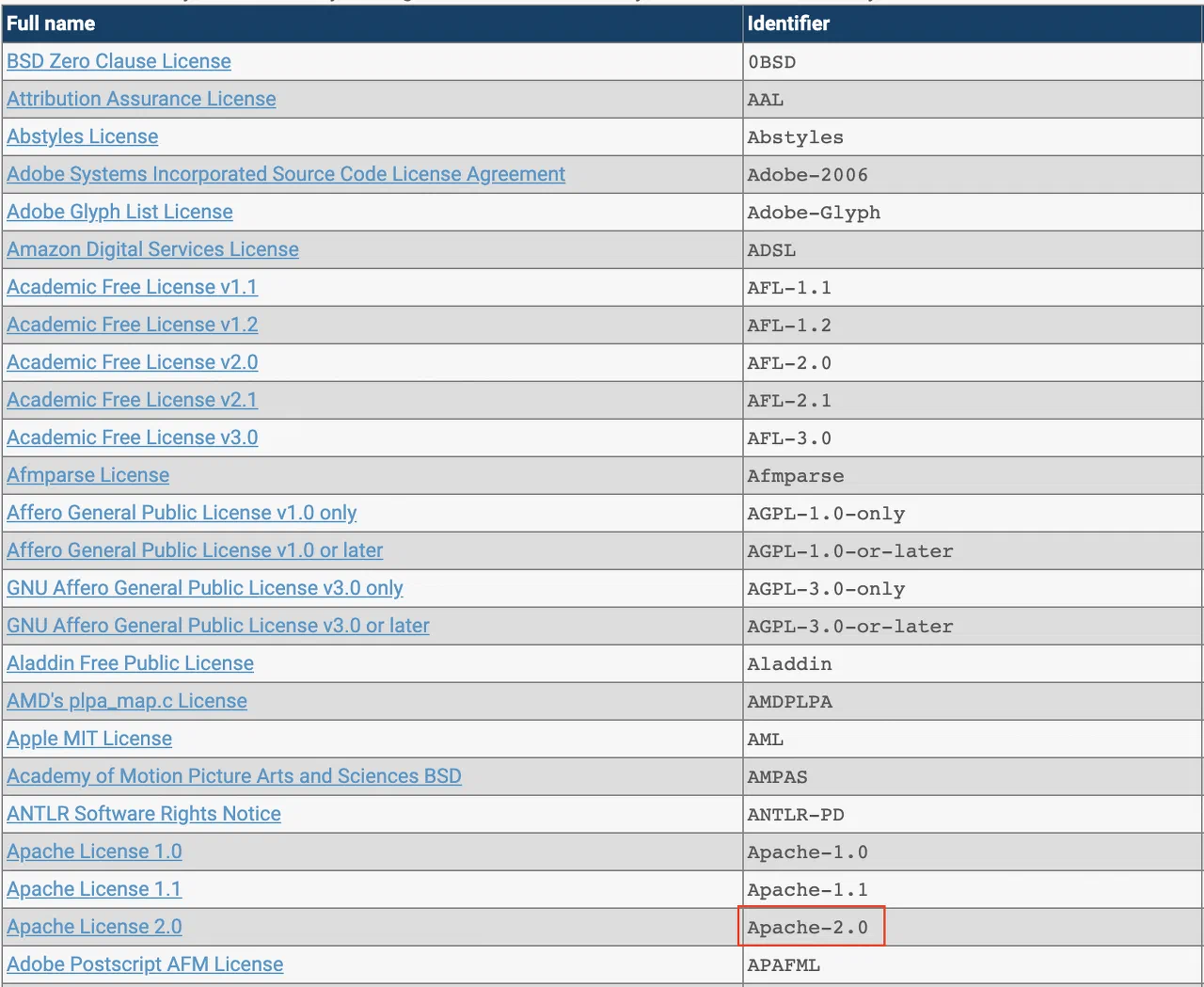
SPDX Identifier: Apache-2.0
Summary of Obligations
Redistribution in source form
Notice obligation: Redistribute while keeping the copyright/license information stated in the source code intact.
Include a notice of the modifications. (e.g., include the modification date and modified content as comments)
Redistribution in binary form
Notice obligation: Generate an open source notice and enclose it when redistributing the binary.
License Statement in Source Code
Open source under the Apache-2.0 license generally carries the following statement at the top of the source code.
Copyright [yyyy] [name of copyright owner]

Licensed under the Apache License, Version 2.0 (the "License");
you may not use this file except in compliance with the License.
You may obtain a copy of the License at

http://www.apache.org/licenses/LICENSE-2.0

Unless required by applicable law or agreed to in writing, software
distributed under the License is distributed on an "AS IS" BASIS,
WITHOUT WARRANTIES OR CONDITIONS OF ANY KIND, either express or implied.
See the License for the specific language governing permissions and
limitations under the License.
Obligations by Use Case
Case 1. Redistribution in Source Form
When redistributing open source under the Apache-2.0 license in source form, observe the following.
1-1 Notice Obligation
Provide a copy of the license
Retain information such as copyright, patent, and trademark notices.
If a NOTICE file is included, retain it.
In other words, redistribute while keeping the copyright/license information stated in the source code intact.
Obligations upon Modification
If you add to or modify part of the open source code, observe the following.
Include a notice of the modifications. (e.g., include the modification date and modified content as comments)
Case 2. Redistribution in Binary Form
When building open source under the Apache-2.0 license and redistributing it in binary form only, observe the following.
2-1 Notice Obligation
Provide a copy of the license
Retain information such as copyright, patent, and trademark notices.
If a NOTICE file is included, retain it.
Generate an open source notice containing the above and enclose it when redistributing the binary.
License Compatibility
The Apache-2.0 license includes an explicit patent grant clause, making it compatible with most licenses.
Compatibility with Major Licenses
License to Combine
Compatible
Remarks
MIT
Compatible
Keeping Apache-2.0 is recommended
GPL-3.0
Compatible
The entire project becomes GPL-3.0
GPL-2.0
Incompatible
Patent clause conflict
LGPL-3.0
Compatible
Recommended for dynamic linking
Proprietary
Compatible
Can be used in commercial software
Caution
Apache-2.0 is not compatible with GPL-2.0, because the patent grant clause of Apache-2.0 conflicts with GPL-2.0. It is compatible with GPL-3.0.
BigScience RAIL (Responsible AI License) is a license used for large language models (LLMs) such as BLOOM. It permits free use of the model while including ethical restrictions for responsible AI development.
SPDX Identifier: BigScience-RAIL-1.0
Summary of Obligations
A license dedicated to large language models
Model use, modification, and distribution: Freely allowed (including commercial use)
Notice obligation: State the license information and use restrictions
Use restrictions: Use for illegal, discriminatory, or harmful purposes is prohibited
Derivative models: Must apply the same restrictions
Generated outputs: User’s responsibility (separate from the model license)
BigScience RAIL Caution
BigScience RAIL is similar to CreativeML Open RAIL-M but is specialized for language models:
Applied to text generation models (LLMs)
More specific prohibited uses are stated (especially discrimination and disinformation)
Obligation to provide a Model Card
When developing an LLM-based service, please consult the OSRB.
What Is BigScience RAIL?
BigScience RAIL (Responsible AI License) is a license that the BigScience project released in 2022 together with the BLOOM language model.
The BigScience Project
BLOOM: A 176B-parameter multilingual language model
More than 1,000 researchers participated
Set responsible AI development as a core value
Two Versions of RAIL
Version
Target
Characteristics
RAIL-M
Model weights
Restrictions on the use of the model itself
RAIL++-M
Model + code
Includes both the model and the training/inference code
BigScience uses RAIL-M (applied only to the model)
Major Projects Using It
The BLOOM Family
BLOOM: BigScience’s 176B model
BLOOMZ: An instruction-following version
mT0: A multilingual zero-shot model
Other Models Adopting RAIL
Some open LLM fine-tuned models
Research language models
Permitted Items
What You Can Do Freely
Model use
Text generation
Translation, summarization, question answering
Building chatbots
Providing commercial services
Model modification
Fine-tuning
Additional training
Lightweighting such as LoRA, QLoRA
Model distribution
Releasing modified models
Distributing derivative models
Commercial API services
Use of generated outputs
Commercial use of AI-generated text
Creating secondary works
Prohibited Items (Restrictions)
BigScience RAIL cannot be used for the following purposes:
1. Illegal Activities
Supporting the planning or execution of crimes
Generating illegal content
Supporting terrorist activities
2. Child Protection
Generating child sexual exploitation material
Harmful content targeting children
Supporting child grooming
3. Discrimination and Hate
Discrimination based on race, ethnicity, or religion
Discrimination based on gender or sexual orientation
Discrimination based on disability or age
Generating hate speech
4. Disinformation and Manipulation
Intentionally generating fake news
Generating deepfake text (for identity theft)
Content for election manipulation
Content for fraud
5. Privacy Violations
Unauthorized collection of personal information
Supporting stalking and harassment
Use for surveillance purposes
6. Medical and Legal
Replacing professional medical diagnosis
Replacing legal advice
Replacing financial advice
7. Self-Harm and Violence
Encouraging suicide or self-harm
Inciting violence
Weapons manufacturing information
8. High-Risk Decision-Making
Automated credit scoring (sole decision-making)
Automated hiring decisions (sole decision-making)
Criminal justice decisions (sole decision-making)
Use Scenarios
Permitted Uses
1. Chatbot Service
Scenario: A customer consultation chatbot Method of use: Fine-tuning BLOOM to build a consultation bot Judgment: Allowed (commercial use is OK, not a prohibited use)
Scenario: A marketing copy generation tool Method of use: BLOOM-based text generation Judgment: Allowed (when not discriminatory/false content)
Prohibited Uses
1. Fake News Generator
Scenario: An automatic fake news generation tool Method of use: Mass generation of disinformation Judgment: Prohibited (generating disinformation)
2. Generating Discriminatory Content
Scenario: Generating text that demeans a specific group Method of use: Generating hate speech Judgment: Prohibited (discrimination and hate)
3. Automated Credit Scoring
Scenario: Automatically determining credit scores with an LLM Method of use: Automatic approval/denial of loans Judgment: Prohibited (high-risk decision-making)
Requires Review
1. Educational Chatbot
Scenario: A student counseling chatbot Method of use: Career counseling, psychological counseling Judgment: At the boundary of medical/psychological advice, expert review required
2. Hiring Assistance Tool
Scenario: Resume screening assistance Method of use: A human makes the final decision, but the AI recommends Judgment: Depends on the method of use, OSRB review
Model Card Obligation
BigScience RAIL recommends providing a Model Card.
The BSD-2-Clause license, also called the BSD 2-Clause “Simplified” License, is a Permissive license that does not require disclosure of source code. It is more concise than BSD-3-Clause.
SPDX Identifier: BSD-2-Clause
Summary of Obligations
Redistribution in source form
Notice obligation: Redistribute while keeping the copyright/license information stated in the source code intact.
Redistribution in binary form
Notice obligation: Generate an open source notice and enclose it when redistributing the binary.
License Statement in Source Code
Open source under the BSD-2-Clause license generally carries the following statement at the top of the source code.
Copyright (c) <YEAR>, <OWNER>
All rights reserved.

Redistribution and use in source and binary forms, with or without
modification, are permitted provided that the following conditions are met:

1. Redistributions of source code must retain the above copyright notice, this
list of conditions and the following disclaimer.
2. Redistributions in binary form must reproduce the above copyright notice,
this list of conditions and the following disclaimer in the documentation
and/or other materials provided with the distribution.

THIS SOFTWARE IS PROVIDED BY THE COPYRIGHT HOLDERS AND CONTRIBUTORS "AS IS" AND
ANY EXPRESS OR IMPLIED WARRANTIES, INCLUDING, BUT NOT LIMITED TO, THE IMPLIED
WARRANTIES OF MERCHANTABILITY AND FITNESS FOR A PARTICULAR PURPOSE ARE
DISCLAIMED. IN NO EVENT SHALL THE COPYRIGHT OWNER OR CONTRIBUTORS BE LIABLE FOR
ANY DIRECT, INDIRECT, INCIDENTAL, SPECIAL, EXEMPLARY, OR CONSEQUENTIAL DAMAGES
(INCLUDING, BUT NOT LIMITED TO, PROCUREMENT OF SUBSTITUTE GOODS OR SERVICES;
LOSS OF USE, DATA, OR PROFITS; OR BUSINESS INTERRUPTION) HOWEVER CAUSED AND
ON ANY THEORY OF LIABILITY, WHETHER IN CONTRACT, STRICT LIABILITY, OR TORT
(INCLUDING NEGLIGENCE OR OTHERWISE) ARISING IN ANY WAY OUT OF THE USE OF THIS
SOFTWARE, EVEN IF ADVISED OF THE POSSIBILITY OF SUCH DAMAGE.
Obligations by Use Case
Case 1. Redistribution in Source Form
When redistributing open source under the BSD-2-Clause license in source form, observe the following.
1-1 Notice Obligation
Copyright notice
Provide a copy of the license
Warranty disclaimer notice
In other words, keep the copyright, license, and so on within the source code intact.
Case 2. Redistribution in Binary Form
When building open source under the BSD-2-Clause license and redistributing it in binary form only, observe the following.
2-1 Notice Obligation
Copyright notice
Provide a copy of the license
Warranty disclaimer notice
Generate an open source notice containing the above and enclose it when redistributing the binary.
License Compatibility
The BSD-2-Clause license is the most concise among the BSD licenses and is compatible with most licenses.
Compatibility with Major Licenses
License to Combine
Compatible
Remarks
MIT
Compatible
A similar license
Apache-2.0
Compatible
Keeping the Apache-2.0 patent clause is recommended
The BSD-3-Clause license, also called the BSD 3-Clause “New” or “Revised” License, is a Permissive license that does not require disclosure of source code. The “advertising clause” that was problematic in BSD-4-Clause has been removed.
SPDX Identifier: BSD-3-Clause
Summary of Obligations
Redistribution in source form
Notice obligation: Redistribute while keeping the copyright/license information stated in the source code intact.
Redistribution in binary form
Notice obligation: Generate an open source notice and enclose it when redistributing the binary.
License Statement in Source Code
Open source under the BSD-3-Clause license generally carries the following statement at the top of the source code.
Copyright (c) <year>, <copyright holder>
All rights reserved.

Redistribution and use in source and binary forms, with or without
modification, are permitted provided that the following conditions are met:

* Redistributions of source code must retain the above copyright
notice, this list of conditions and the following disclaimer.
* Redistributions in binary form must reproduce the above copyright
notice, this list of conditions and the following disclaimer in the
documentation and/or other materials provided with the distribution.
* Neither the name of the <organization> nor the
names of its contributors may be used to endorse or promote products
derived from this software without specific prior written permission.

THIS SOFTWARE IS PROVIDED BY THE COPYRIGHT HOLDERS AND CONTRIBUTORS "AS IS" AND
ANY EXPRESS OR IMPLIED WARRANTIES, INCLUDING, BUT NOT LIMITED TO, THE IMPLIED
WARRANTIES OF MERCHANTABILITY AND FITNESS FOR A PARTICULAR PURPOSE ARE
DISCLAIMED. IN NO EVENT SHALL <COPYRIGHT HOLDER> BE LIABLE FOR ANY
DIRECT, INDIRECT, INCIDENTAL, SPECIAL, EXEMPLARY, OR CONSEQUENTIAL DAMAGES
(INCLUDING, BUT NOT LIMITED TO, PROCUREMENT OF SUBSTITUTE GOODS OR SERVICES;
LOSS OF USE, DATA, OR PROFITS; OR BUSINESS INTERRUPTION) HOWEVER CAUSED AND
ON ANY THEORY OF LIABILITY, WHETHER IN CONTRACT, STRICT LIABILITY, OR TORT
(INCLUDING NEGLIGENCE OR OTHERWISE) ARISING IN ANY WAY OUT OF THE USE OF THIS
SOFTWARE, EVEN IF ADVISED OF THE POSSIBILITY OF SUCH DAMAGE.
Obligations by Use Case
Case 1. Redistribution in Source Form
When redistributing open source under the BSD-3-Clause license in source form, observe the following.
1-1 Notice Obligation
Copyright notice
Provide a copy of the license
Warranty disclaimer notice
In other words, keep the copyright, license, and so on within the source code intact.
Case 2. Redistribution in Binary Form
When building open source under the BSD-3-Clause license and redistributing it in binary form only, observe the following.
2-1 Notice Obligation
Copyright notice
Provide a copy of the license
Warranty disclaimer notice
Generate an open source notice containing the above and enclose it when redistributing the binary.
License Compatibility
The BSD-3-Clause license includes a clause prohibiting unauthorized use of the organization’s name and is compatible with most licenses.
Compatibility with Major Licenses
License to Combine
Compatible
Remarks
MIT
Compatible
A similar license
Apache-2.0
Compatible
Keeping the Apache-2.0 patent clause is recommended
GPL-2.0/3.0
Compatible
The entire project becomes GPL
Proprietary
Compatible
Can be used in commercial software
BSD-3-Clause Characteristics
BSD-3-Clause adds to BSD-2-Clause a clause stating that “the name of the organization or its contributors may not be used for promotion without authorization.”
The BSD-4-Clause license, also called the BSD “Original” or “Old” License, is the original form of the BSD license. Although it does not require disclosure of source code, it includes an advertising clause that makes its use problematic.
SPDX Identifier: BSD-4-Clause
Summary of Obligations
Redistribution in source form
Notice obligation: Redistribute while keeping the copyright/license information stated in the source code intact.
Include the following statement in all advertising that mentions features or use of the BSD-4-Clause open source “This product includes software developed by the <organization>."
Redistribution in binary form
Notice obligation: Generate an open source notice and enclose it when redistributing the binary.
Include the following statement in all advertising that mentions features or use of the BSD-4-Clause open source “This product includes software developed by the <organization>."
License Statement in Source Code
Open source under the BSD-4-Clause license generally carries the following statement at the top of the source code.
Copyright (c) <year>, <copyright holder>
All rights reserved.

Redistribution and use in source and binary forms, with or without
modification, are permitted provided that the following conditions are met:

1. Redistributions of source code must retain the above copyright
notice, this list of conditions and the following disclaimer.
2. Redistributions in binary form must reproduce the above copyright
notice, this list of conditions and the following disclaimer in the
documentation and/or other materials provided with the distribution.
3. All advertising materials mentioning features or use of this software
must display the following acknowledgement:
This product includes software developed by the <organization>.
4. Neither the name of the <organization> nor the
names of its contributors may be used to endorse or promote products
derived from this software without specific prior written permission.

THIS SOFTWARE IS PROVIDED BY <COPYRIGHT HOLDER> ''AS IS'' AND ANY
EXPRESS OR IMPLIED WARRANTIES, INCLUDING, BUT NOT LIMITED TO, THE IMPLIED
WARRANTIES OF MERCHANTABILITY AND FITNESS FOR A PARTICULAR PURPOSE ARE
DISCLAIMED. IN NO EVENT SHALL <COPYRIGHT HOLDER> BE LIABLE FOR ANY
DIRECT, INDIRECT, INCIDENTAL, SPECIAL, EXEMPLARY, OR CONSEQUENTIAL DAMAGES
(INCLUDING, BUT NOT LIMITED TO, PROCUREMENT OF SUBSTITUTE GOODS OR SERVICES;
LOSS OF USE, DATA, OR PROFITS; OR BUSINESS INTERRUPTION) HOWEVER CAUSED AND
ON ANY THEORY OF LIABILITY, WHETHER IN CONTRACT, STRICT LIABILITY, OR TORT
(INCLUDING NEGLIGENCE OR OTHERWISE) ARISING IN ANY WAY OUT OF THE USE OF THIS
SOFTWARE, EVEN IF ADVISED OF THE POSSIBILITY OF SUCH DAMAGE.
Obligations by Use Case
Case 1. Redistribution in Source Form
When redistributing open source under the BSD-4-Clause license in source form, observe the following.
1-1 Notice Obligation
Copyright notice
Provide a copy of the license
Warranty disclaimer notice
Include the following statement in all advertising that mentions features or use of the BSD-4-Clause open source “This product includes software developed by the <organization>."
In other words, keep the copyright, license, and so on within the source code intact.
Case 2. Redistribution in Binary Form
When building open source under the BSD-4-Clause license and redistributing it in binary form only, observe the following.
2-1 Notice Obligation
Copyright notice
Provide a copy of the license
Warranty disclaimer notice
Include the following statement in all advertising that mentions features or use of the BSD-4-Clause open source “This product includes software developed by the <organization>."
Generate an open source notice containing the above and enclose it when redistributing the binary.
License Compatibility
Due to the advertising clause, BSD-4-Clause has compatibility issues with other licenses.
Compatibility with Major Licenses
License to Combine
Compatible
Remarks
MIT
Compatible
The advertising clause must be retained
Apache-2.0
Compatible
The advertising clause must be retained
GPL-2.0/3.0
Incompatible
The advertising clause conflicts with GPL
Proprietary
Compatible
The advertising clause must be complied with
Open source projects such as FreeBSD, NetBSD, and BSD originally applied BSD-4-Clause, but after recognizing the problem with the “advertising clause” they changed their license to BSD-3-Clause, BSD-2-Clause, and so on.
The Business Source License (BSL) is a Source Available license created by MariaDB. Its distinctive feature is that it automatically converts to an open source license after a certain period (usually 3-4 years).
SPDX Identifier: BUSL-1.1 (also referred to as BSL-1.1)
Summary of Obligations
BSL is not OSI-approved open source
Certain uses (specified in the Additional Use Grant) are restricted
Automatically converts to open source after the Change Date
Non-commercial/internal use: Generally permitted
Commercial production use: License terms must be checked
When redistributing: Retain copyright and license information
Caution When Using BSL
BSL can have different terms for each project:
Additional Use Grant: Which uses are permitted/restricted
Change Date: When it converts to open source
Change License: Which open source license it converts to
Be sure to check the LICENSE file of each BSL project and consult the OSRB.
What Is BSL?
BSL (Business Source License) is a license created by MariaDB Corporation in 2013. Its core characteristic is that it is a time-limited license.
How It Works
Initial period (before the Change Date)
Certain commercial uses are restricted
The source code is publicly available
Non-commercial/internal use is generally permitted
Conversion period (after the Change Date)
Automatically converts to a true open source license
Usually converts to Apache-2.0, GPL-2.0, MIT, etc.
All restrictions are lifted
The Three Main Parameters of BSL
1. Additional Use Grant
Specifies the particular uses that are permitted.
Examples:
“Services with 1,000 or fewer annual users are permitted”
“Free use is allowed in non-production environments”
“Use for the purpose of providing a competing service is prohibited”
2. Change Date
The date on which it converts to open source. Typically set to 3-4 years after release.
Example: If released on January 1, 2024, the Change Date is January 1, 2028.
3. Change License
The open source license it will convert to.
Typically:
Apache-2.0 (most common)
GPL-2.0
MIT
Major Projects Adopting BSL
Databases
MariaDB (some features): Change License GPL-2.0, Change Date 4 years after release
CockroachDB: Change License Apache-2.0 or MIT, Change Date 3 years after release
Others
Ceph (some features)
MinIO (some editions)
Sentry (some features)
Akka (since 2.7)
Determining Whether Use Is Permitted
Cases Generally Permitted
Internal development/testing
In-house development environments
Test servers
Prototype development
Non-production uses
Learning/research
Benchmarking
Proof of Concept (PoC)
Cases specified in the Additional Use Grant
Cases That Are Restricted
Commercial production use
Services provided to customers
Inclusion in and sale of a product
Provision as SaaS
Providing a competing service
Providing a service that competes with the BSL software
Cases Requiring Verification
Because the Additional Use Grant differs for each project, checking the LICENSE file of each project is essential.
Use After the Change Date
Once the Change Date passes, it automatically converts to the Change License.
Example: CockroachDB v20.1 (released May 2020)
Change Date: May 19, 2023
Change License: Apache-2.0
From May 19, 2023, it can be used freely under Apache-2.0
CDDL-1.0, also called the Common Development and Distribution License 1.0, is a Weak Copyleft license that requires disclosure of source code on a per-file basis.
SPDX Identifier: CDDL-1.0
Summary of Obligations
Redistribution in source form
Notice obligation: Redistribute while keeping the copyright/license information stated in the source code intact.
Obligations upon modification
Apply CDDL-1.0 to the modified files. (There is no obligation to apply CDDL-1.0 to separately added files.)
Redistribution in binary form
Notice obligation: Generate an open source notice and enclose it when redistributing the binary.
Obligations upon modification
Apply CDDL-1.0 to the modified files. (There is no obligation to apply CDDL-1.0 to separately added files.)
Source code provision obligation
Provide the source code of the files that fall under CDDL-1.0 within the binary.
Weak Copyleft Characteristics
CDDL-1.0 is a per-file Weak Copyleft license. It is based on MPL, and the source code disclosure obligation arises only when a CDDL-1.0 file itself is modified. Separately added files do not need to be disclosed, so it can also be used in commercial software.
Obligations by Use Case
Case 1. Redistribution in Source Form
When redistributing open source under the CDDL-1.0 license in source form, observe the following.
1-1 Notice Obligation
A copy of the license
Retain legal notices such as copyright, patent, and trademark notices
In other words, redistribute while keeping the copyright/license information stated in the source code intact.
Obligations upon Modification
If you add to or modify part of the open source code, observe the following.
Apply CDDL-1.0 to the modified files. (There is no obligation to apply CDDL-1.0 to separately added files.)
Case 2. Redistribution in Binary Form
When building open source under the CDDL-1.0 license and redistributing it in binary form only, observe the following.
2-1 Notice Obligation
Provide a copy of the license
Retain legal notices such as copyright, patent, and trademark notices
Generate an open source notice containing the above and enclose it when redistributing the binary.
Obligations upon Modification
If you add to or modify part of the open source code, observe the following.
Apply CDDL-1.0 to the modified files. (There is no obligation to apply CDDL-1.0 to separately added files.)
2-2 Source Code Provision Obligation
Provide the source code files that fall under CDDL-1.0 within the binary. In doing so, observe the following.
CDDL-1.0 requires that content added within a file also be licensed under CDDL-1.0 and have its source code disclosed. Therefore, disclose the modified files as well as the original files under CDDL-1.0.
You can fulfill the source code provision obligation by informing users in the open source notice of how they can obtain the source code.
MPL-Based License
CDDL-1.0 is a license created by Sun Microsystems (now Oracle) based on the Mozilla Public License (MPL).
MPL similarity: Per-file Copyleft applies
Main usage: Sun/Oracle projects (OpenSolaris, GlassFish, etc.)
Current status: The use of CDDL is currently in decline
License Compatibility
Compatibility with Major Licenses
License to Combine
Compatible
Remarks
MIT
Compatible
Only the CDDL files are disclosed
Apache-2.0
Compatible
Only the CDDL files are disclosed
GPL-2.0/3.0
Incompatible
Copyleft conflict
MPL-2.0
Compatible
Similar per-file Copyleft
Proprietary
Compatible
Can be used as long as only the CDDL files are disclosed
Incompatibility with GPL
CDDL-1.0 is not compatible with GPL-family licenses, because the Copyleft clauses of CDDL and GPL conflict with each other.
CreativeML Open RAIL-M is a license used for AI image generation models such as Stable Diffusion. It grants freedom to use the model while including restrictions intended to ensure responsible use.
SPDX Identifier: CreativeML-OpenRAIL-M
Summary of Obligations
A license dedicated to AI models (different from general software)
Use, modification, and distribution of the model: Freely permitted
Notice obligation: Retain the license information
Use-based restrictions: Use for illegal or harmful purposes is prohibited
Derivative models: The same restrictions apply (the RAIL clauses must be retained)
Generated output: Separately licensed (independent of the model license)
AI Model License Characteristics
CreativeML Open RAIL-M differs from general software licenses:
Permissive: Can be used freely, including for commercial purposes
Responsible AI: Certain uses are explicitly prohibited
Separate from output: Images generated by the AI have separate copyright
Consult the OSRB when developing AI services.
What Is CreativeML Open RAIL-M?
CreativeML Open RAIL-M (Responsible AI License - Model) is an AI model license released in 2022 together with Stable Diffusion.
Characteristics of RAIL (Responsible AI License)
Open: Anyone can use it freely
Responsible: Restrictions for responsible use
Permissive: Allows commercial use, like Apache-2.0
Use-Based Restrictions: Restrictions based on use
Differences from General Open Source Licenses
Category
Traditional Licenses (MIT, Apache)
RAIL
Subject
Software code
AI model weights
Use restrictions
None
Yes (harmful use prohibited)
Freedom of use
No restrictions
Responsible use only
Commercial use
Permitted
Permitted (when use restrictions are observed)
Major Projects Using It
Stable Diffusion
Stable Diffusion v1.x: CreativeML Open RAIL-M
Stable Diffusion v2.x: CreativeML Open RAIL++-M (improved version)
Stable Diffusion XL: CreativeML Open RAIL++-M
Other Image Generation Models
Waifu Diffusion
DreamBooth fine-tuned models
What Is Permitted
What You Can Do Freely
Using the model
Generating images
Generating images for commercial purposes
Providing API services
Modifying the model
Fine-tuning
Additional training
Model optimization
Distributing the model
Redistributing the modified model
Releasing derivative models
Integrating into commercial services
Using the output
Commercial use of generated images
Selling generated images
Creating derivative works from generated images
Prohibitions (Use-Based Restrictions)
CreativeML Open RAIL-M may not be used for the following purposes:
1. Violence and Crime
Generating content that promotes or glorifies violence
Assisting in planning or carrying out crimes
Supporting terrorist activities
2. Child Exploitation
Generating child sexual abuse material (CSAM)
Content that sexualizes minors
3. Invasion of Personal Privacy
Generating deepfakes without the consent of the individual
Generating images for the purpose of identity theft
For the purpose of spreading disinformation
4. Discrimination and Hate
Discriminatory content regarding race, gender, religion, etc.
Images that promote hate speech
5. Medical and Legal Advice
For the purpose of professional medical diagnosis
For the purpose of replacing legal advice
6. Other Harmful Uses
Promoting suicide or self-harm
Promoting illegal drugs
Promoting gambling addiction
Use Scenarios
Permitted Uses
1. Generating Marketing Images
Scenario: An image generation service for advertising Method of use: Generating product images with Stable Diffusion Determination: Permitted (commercial use OK, not a prohibited use)
2. Generating Game Art
Scenario: Creating background images for an indie game Method of use: Fine-tuning to generate a consistent style Determination: Permitted
3. Educational Content
Scenario: Generating thumbnails for online lectures Method of use: Providing an AI image generation API Determination: Permitted
Prohibited Uses
1. Deepfake Service
Scenario: A service that generates images using another person’s face Method of use: Compositing celebrities’ faces Determination: Prohibited (invasion of privacy)
2. Generating Fake News
Scenario: Generating fake photos of politicians Method of use: For the purpose of spreading disinformation Determination: Prohibited (invasion of personal privacy, disinformation)
Requiring Review
1. Generating Social Media Profiles
Scenario: Profiles of virtual characters generated by AI Method of use: Profile photos of non-existent people Determination: Depends on the purpose; review the potential for misuse
Licensing of Derivative Models
An important characteristic of CreativeML Open RAIL-M is the propagation of the RAIL clauses.
When distributing a derivative model:
The same use restrictions must be retained
The license may be changed, but the Use-Based Restrictions are retained
In other words, the “responsible use” clauses continue to apply
Example:
When fine-tuning Stable Diffusion and distributing a custom model, the same prohibited uses apply to the custom model as well.
Copyright of AI Output
Important: Generated images are separate from the model license
Model license: CreativeML Open RAIL-M (the model itself)
Output: Separate copyright (owned by the user)
Generated images:
The user owns the copyright (not the model provider)
Can be used freely for commercial purposes
However, the generation process must not violate the prohibited uses
Elastic License 2.0 is a Source Available license created by Elastic in 2021. It restricts cloud providers such as AWS from offering commercial services while providing terms that are less restrictive than SSPL.
SPDX Identifier: Elastic-2.0
Summary of Obligations
Elastic-2.0 is not OSI-approved open source
Prohibited uses:
Providing it as a managed service (Managed Service)
Using it as a core feature of a competing product
Circumventing licensing/protection mechanisms
Permitted uses:
Internal use
Integrating it into your own service/product (when not a competing service)
Modification and redistribution (when the conditions are observed)
Caution When Using Elastic-2.0
Elastic License 2.0 has three Limitations:
Prohibition on providing a managed service: You may not provide Elasticsearch/Kibana as a service
Prohibition on circumventing the license: You may not remove the software’s protection mechanisms
Trademark use restriction: You may not use the Elastic trademark in a misleading way
Be sure to consult the OSRB before including it in a product/service.
What Is Elastic License 2.0?
Elastic License 2.0 (ELv2) is the license that Elastic introduced in 2021 when it changed the license of Elasticsearch and Kibana from Apache-2.0.
Background of the License Change
Before January 2021: Apache-2.0
AWS provided Elasticsearch as a managed service (Amazon Elasticsearch Service)
This infringed on Elastic’s revenue model
After January 2021: Elastic License 2.0 + SSPL dual license
Restricted AWS from providing the managed service
Result: AWS forked it as OpenSearch
The Three Limitations
1. Prohibition on Providing a Managed Service
Prohibited:
Providing the substantial functionality of the software as a service to third parties
Specific examples:
Prohibited cases:
Providing “Elasticsearch as a Service”
Providing “Managed Kibana”
Providing Elasticsearch clusters to customers as a managed offering
Permitted cases:
Using Elasticsearch as the backend of your own service
Implementing internal search functionality
Building a log analysis system
2. Prohibition on Use as a Core Feature of a Competing Product
Prohibited:
Circumventing the software’s functionality or creating a competing product
Specific examples:
Prohibited cases:
Circumventing the restrictions on Elasticsearch’s paid features
Removing the license check of X-Pack features
Developing a product that provides Elastic’s commercial features for free
Permitted cases:
A general application that uses Elasticsearch as a search engine
Developing log collection and analysis tools
3. Trademark Use Restriction
Prohibited:
Using the Elastic trademark in a misleading way
Specific examples:
Prohibited cases:
“Powered by Elasticsearch” (without official approval)
EPL-2.0, also called the Eclipse Public License 2.0, is a Weak Copyleft license that requires disclosure of source code on a per-module basis.
SPDX Identifier: EPL-2.0
Summary of Obligations
Redistribution in source form
Notice obligation: Redistribute while keeping the copyright/license information stated in the source code intact.
Obligations upon modification
Apply EPL-2.0 to the modified modules.
Redistribution in binary form
Notice obligation: Generate an open source notice and enclose it when redistributing the binary.
Obligations upon modification
Apply EPL-2.0 to the modified modules.
Source code provision obligation
Provide the source code files of the modules that fall under EPL-2.0 within the binary.
Weak Copyleft Characteristics
EPL-2.0 is a per-module Weak Copyleft license. The source code disclosure obligation arises only when an EPL-2.0 module itself is modified, and separately added modules do not need to be disclosed. Therefore, it can also be used in commercial software.
License Statement in Source Code
Open source under the EPL-2.0 license generally carries the following statement at the top of the source code.
This program and the accompanying materials are made available under the
terms of the Eclipse Public License v. 2.0 which is available at
http://www.eclipse.org/legal/epl-2.0, or the Eclipse Distribution License
v. 1.0 which is available at
http://www.eclipse.org/org/documents/edl-v10.php.
Obligations by Use Case
Case 1. Redistribution in Source Form
When redistributing open source under the EPL-2.0 license in source form, observe the following.
1-1 Notice Obligation
Provide a copy of the license
Do not modify legal notices such as copyright, patent, trademark, warranty disclaimer, and indemnification notices
In other words, redistribute while keeping the license information stated in the source code intact.
Obligations upon Modification
If you add to or modify part of the open source code, observe the following.
Apply EPL-2.0 to the modified modules.
Case 2. Redistribution in Binary Form
When building open source under the EPL-2.0 license and redistributing it in binary form only, observe the following.
2-1 Notice Obligation
Provide a copy of the license
Do not modify legal notices such as copyright, patent, trademark, warranty disclaimer, and indemnification notices
Generate an open source notice containing the above and enclose it when redistributing the binary.
Obligations upon Modification
If you add to or modify part of the open source code, observe the following.
Apply EPL-2.0 to the modified modules.
2-2 Source Code Provision Obligation
Provide the source code files of the modules that fall under EPL-2.0 within the binary. In doing so, observe the following.
EPL-2.0 requires that content added within a module also be licensed under EPL-2.0 and have its source code disclosed. Therefore, disclose the original module as well as the content added/modified within the module under EPL-2.0.
You can fulfill the source code provision obligation by informing users in the open source notice of how they can obtain the source code.
Per-Module Copyleft
The key characteristic of EPL-2.0 is that Copyleft applies on a per-module basis.
When modifying an EPL-2.0 module: Disclose only that module under EPL-2.0
When adding a separate module: The added module does not need to be disclosed
When combining with another license: Combination is possible if the modules are separated
Because of these characteristics, Eclipse Foundation projects and commercial software can be developed together.
License Compatibility
Compatibility with Major Licenses
License to Combine
Compatible
Remarks
MIT
Compatible
Only the EPL modules are disclosed
Apache-2.0
Compatible
Only the EPL modules are disclosed
GPL-2.0
Incompatible
Incompatible by default
GPL-3.0
Conditional
Compatible when a Secondary License is designated
Proprietary
Compatible
Can be used as long as only the EPL modules are disclosed
Secondary License Clause
EPL-2.0 allows GPL-2.0 or GPL-3.0 to be designated as a Secondary License. In that case, it can also be used in GPL projects.
GPL-2.0, the representative Copyleft license created by the Free Software Foundation in 1991, requires disclosure of source code upon redistribution, so caution is needed when using it.
SPDX Identifier: GPL-2.0-only or GPL-2.0-or-later
Summary of Obligations
Redistribution in source form
Notice obligation: Redistribute while keeping the copyright/license information stated in the source code intact.
Obligations when modifying
Apply GPL-2.0 to the added/modified portions.
Include a notice of the modifications. (e.g., include the modification date and content in comment form)
Redistribution in binary form
Notice obligation: Generate an open source notice and include it when redistributing the binary.
Obligations when modifying
Apply GPL-2.0 to the added/modified portions.
Include a notice of the modifications. (e.g., include the modification date and content in the open source notice)
Obligation to provide source code
Provide the complete source code corresponding to the binary.
Provide a build environment that allows binary users to build an identical binary from the disclosed source code.
Copyleft Caution
GPL-2.0 is a strong Copyleft license. A derivative work that includes GPL-2.0 code must, in its entirety, follow GPL-2.0 and must disclose its source code. Caution is needed when using it in commercial software development.
License Text in the Source Code
Open source under the GPL-2.0 license generally includes the following text at the top of the source code.
Copyright (C) yyyy name of author

This program is free software; you can redistribute it and/or
modify it under the terms of the GNU General Public License
as published by the Free Software Foundation; either version 2
of the License, or (at your option) any later version.

This program is distributed in the hope that it will be useful,
but WITHOUT ANY WARRANTY; without even the implied warranty of
MERCHANTABILITY or FITNESS FOR A PARTICULAR PURPOSE. See the
GNU General Public License for more details.

You should have received a copy of the GNU General Public License
along with this program; if not, write to the Free Software
Foundation, Inc., 51 Franklin Street, Fifth Floor, Boston, MA 02110-1301, USA.
Obligations by Use Case
Case 1. Redistribution in Source Form
When redistributing open source under the GPL-2.0 license in source form, observe the following.
1-1 Notice Obligation
Provide a copyright notice
Provide a warranty disclaimer
Provide a copy of the license
That is, redistribute while keeping the copyright/license information stated in the source code intact.
Obligations When Modifying
If you add to or modify part of the source code of the open source, observe the following.
Apply GPL-2.0 to the added/modified portions.
Include a notice of the modifications. (e.g., include the modification date and content in comment form)
Case 2. Redistribution in Binary Form
When building open source under the GPL-2.0 license and redistributing it only in binary form, observe the following.
2-1 Notice Obligation
Provide a copyright notice
Provide a warranty disclaimer
Provide a copy of the license
Generate an open source notice that includes the above and include it when redistributing the binary.
Obligations When Modifying
If you add to or modify part of the source code of the open source, observe the following.
Apply GPL-2.0 to the added/modified portions.
Include a notice of the modifications. (e.g., include the modification date and content in the open source notice)
2-2 Obligation to Provide Source Code
Provide the source code corresponding to the binary. In doing so, observe the following.
GPL-2.0 requires that derivative works also apply GPL-2.0 and disclose their source code. Referring to the content below, disclose the source code of both the GPL-2.0 open source and the derivative work.
Scope of GPL-2.0 Derivative Works
The general scope of GPL-2.0 derivative works is as follows.
Modified code
A Module that runs in the same process as the GPL program
A Library linked with the GPL program
A Class that inherits from the GPL program
The following are not considered derivative works of the GPL.
An independent program that merely coexists on the same medium, such as a CD, but does not interact with the GPL program at all (#MereAggregation)
A program that is separate from the GPL program and communicates with it via Pipe, Socket, IPC, or Command Line Arguments
Provide a build environment that allows binary users to build an identical binary from the disclosed source code. This includes the following.
Tool chain information
Build scripts
Build instructions (README)
Instead of the source code, you may provide a Written Offer. It must include the following statements.
The written offer is valid for 3 years after the product is sold.
It is provided to anyone.
No charge is made. (excluding costs incurred for delivering the source)
If you later receive a request for source code based on the written offer, you must provide the source code corresponding to the binary mentioned above. Therefore, the company must retain the source code for at least 3 years after the product is sold.
GPL-2.0 is not compatible with Apache-2.0. This is because Apache-2.0 imposes additional restrictions (such as a patent retaliation clause) that GPL-2.0 does not allow, conflicting with GPL-2.0 section 6 (“no further restrictions”). GPL-2.0 itself has no patent clause. If you need Apache-2.0 code, consider using GPL-3.0.
The Free Software Foundation released GPL-3.0 in 2007. GPL-3.0 has obligations similar to GPL-2.0, but additionally requires the provision of Installation Information when distributing with a User Product.
SPDX Identifier: GPL-3.0-only or GPL-3.0-or-later
Summary of Obligations
Redistribution in source form
Notice obligation: Redistribute while keeping the copyright/license information stated in the source code intact.
Obligations when modifying
Apply GPL-3.0 to the added/modified portions.
Include a notice of the modifications. (e.g., include the modification date and content in comment form)
Redistribution in binary form
Notice obligation: Generate an open source notice and include it when redistributing the binary.
Obligations when modifying
Apply GPL-3.0 to the added/modified portions.
Include a notice of the modifications. (e.g., include the modification date and content in the open source notice)
Obligation to provide source code
Provide the complete source code corresponding to the binary.
Provide a build environment that allows binary users to build an identical binary from the disclosed source code.
Obligation to provide installation information: If you distribute the binary with a User Product, provide Installation Information.
Copyleft Caution
GPL-3.0 is a strong Copyleft license. A derivative work that includes GPL-3.0 code must, in its entirety, follow GPL-3.0 and must disclose its source code. Caution is needed when using it in commercial software development.
License Text in the Source Code
Open source under the GPL-3.0 license generally includes the following text at the top of the source code.
Copyright (C) <year> <name of author>

This program is free software: you can redistribute it and/or modify
it under the terms of the GNU General Public License as published by
the Free Software Foundation, either version 3 of the License, or
(at your option) any later version.

This program is distributed in the hope that it will be useful,
but WITHOUT ANY WARRANTY; without even the implied warranty of
MERCHANTABILITY or FITNESS FOR A PARTICULAR PURPOSE. See the
GNU General Public License for more details.

You should have received a copy of the GNU General Public License
along with this program. If not, see <http://www.gnu.org/licenses/>
Obligations by Use Case
Case 1. Redistribution in Source Form
When redistributing open source under the GPL-3.0 license in source form, observe the following.
1-1 Notice Obligation
Provide a copyright notice
Provide a warranty disclaimer
Provide a copy of the license
That is, redistribute while keeping the copyright/license information stated in the source code intact.
Obligations When Modifying
If you add to or modify part of the source code of the open source, observe the following.
Apply GPL-3.0 to the added/modified portions.
Include a notice of the modifications. (e.g., include the modification date and content in comment form)
Case 2. Redistribution in Binary Form
When building open source under the GPL-3.0 license and redistributing it only in binary form, observe the following.
2-1 Notice Obligation
Provide a copyright notice
Provide a warranty disclaimer
Provide a copy of the license
Generate an open source notice that includes the above and include it when redistributing the binary.
Obligations When Modifying
If you add to or modify part of the source code of the open source, observe the following.
Apply GPL-3.0 to the added/modified portions.
Include a notice of the modifications. (e.g., include the modification date and content in the open source notice)
2-2 Obligation to Provide Source Code
Provide the source code corresponding to the binary. In doing so, observe the following.
GPL-3.0 requires that derivative works also apply GPL-3.0 and disclose their source code. Referring to the content below, disclose the source code of both the GPL-3.0 open source and the derivative work.
Scope of GPL-3.0 Derivative Works
The general scope of GPL-3.0 derivative works is as follows.
Modified code
A Module that runs in the same process as the GPL program
A Library linked with the GPL program
A Class that inherits from the GPL program
The following are not considered derivative works of the GPL.
An independent program that merely coexists on the same medium, such as a CD, but does not interact with the GPL program at all (#MereAggregation)
A program that is separate from the GPL program and communicates with it via Pipe, Socket, IPC, or Command Line Arguments
Provide a build environment that allows binary users to build an identical binary from the disclosed source code. This includes the following.
Tool chain information
Build scripts
Build instructions (README)
Instead of the source code, you may provide a Written Offer. It must include the following statements.
The written offer is valid for 3 years after the product is sold.
It is provided to anyone.
No charge is made. (excluding costs incurred for delivering the source)
If you later receive a request for source code based on the written offer, you must provide the source code corresponding to the binary mentioned above. Therefore, the company must retain the source code for at least 3 years after the product is sold.
2-3 Obligation to Provide Installation Information
If you distribute the binary with a User Product, provide Installation Information.
User Product: An embedded device such as an electronic appliance
Installation Information: All the information and methods that a user needs to build the source code and reinstall it on the product
Usage Restriction
For most User Products, it is impossible to provide Installation Information for security reasons. Therefore, GPL-3.0 open source should not be used in software distributed as a User Product.
Major Improvements over GPL-2.0
GPL-3.0 retains the core principles of GPL-2.0 while improving the following.
Explicit patent grant: Explicitly stipulates the grant of contributors’ patent licenses
Anti-Tivoization: Adds the obligation to provide Installation Information for User Products
Internationalization: Improves legal terminology so it can be applied worldwide
License Compatibility
Compatibility with Major Licenses
Combining License
Compatible
Notes
MIT
Compatible
The entire project becomes GPL-3.0
Apache-2.0
Compatible
The entire project becomes GPL-3.0
GPL-2.0
Conditional
Compatible only if GPL-2.0-or-later
LGPL-3.0
Compatible
The LGPL portion can remain LGPL
AGPL-3.0
Compatible
The entire project becomes AGPL-3.0
Proprietary
Incompatible
Cannot be used in commercial software
Compatibility with GPL-2.0
The GPL-2.0-only license and GPL-3.0 are not compatible. However, the GPL-2.0-or-later license can be upgraded to GPL-3.0, so it is compatible.
LGPL-2.1, the representative Weak Copyleft license created by the Free Software Foundation, requires disclosure of source code upon redistribution, but if you use an LGPL Library via Dynamic Link, your own code is not included in the disclosure scope.
SPDX Identifier: LGPL-2.1-only or LGPL-2.1-or-later
Summary of Obligations
Redistribution in source form
Notice obligation: Redistribute while keeping the copyright/license information stated in the source code intact.
Obligations when modifying
Apply LGPL-2.1 to the added/modified portions.
Include a notice of the modifications. (e.g., include the modification date and content in comment form)
Redistribution in binary form
Notice obligation: Generate an open source notice and include it when redistributing the binary.
Obligations when modifying
Apply LGPL-2.1 to the added/modified portions.
Include a notice of the modifications. (e.g., include the modification date and content in the open source notice)
Obligation to provide source code
Provide the complete source code corresponding to the binary (library).
Provide a build environment that allows users to build an identical library from the disclosed source code of the LGPL library.
Weak Copyleft Characteristics
LGPL-2.1 is a Weak Copyleft license. The obligation to disclose source code arises only when the LGPL library itself is modified, and applications that use it via dynamic linking (Dynamic Link) do not need to be disclosed. Therefore, it can also be used in commercial software.
License Text in the Source Code
Open source under the LGPL-2.1 license generally includes the following text at the top of the source code.
Copyright (C) year name of author

This library is free software; you can redistribute it and/or
modify it under the terms of the GNU Lesser General Public
License as published by the Free Software Foundation; either
version 2.1 of the License, or (at your option) any later version.

This library is distributed in the hope that it will be useful,
but WITHOUT ANY WARRANTY; without even the implied warranty of
MERCHANTABILITY or FITNESS FOR A PARTICULAR PURPOSE. See the GNU
Lesser General Public License for more details.

You should have received a copy of the GNU Lesser General Public
License along with this library; if not, write to the Free Software
Foundation, Inc., 51 Franklin Street, Fifth Floor, Boston, MA 02110-1301 USA
Obligations by Use Case
Case 1. Redistribution in Source Form
When redistributing open source under the LGPL-2.1 license in source form, observe the following.
1-1 Notice Obligation
Provide a copyright notice
Provide a warranty disclaimer
Provide a copy of the license
That is, redistribute while keeping the copyright/license information stated in the source code intact.
Obligations When Modifying
If you add to or modify part of the source code of the open source, observe the following.
Apply LGPL-2.1 to the added/modified portions.
Include a notice of the modifications. (e.g., include the modification date and content in comment form)
Case 2. Redistribution in Binary (Library) Form
When building open source under the LGPL-2.1 license and redistributing it only in binary form, observe the following.
2-1 Notice Obligation
Provide a copyright notice
Provide a warranty disclaimer
Provide a copy of the license
Generate an open source notice that includes the above and include it when redistributing the library.
Obligations When Modifying
If you add to or modify part of the source code of the open source, observe the following.
Apply LGPL-2.1 to the added/modified portions.
Include a notice of the modifications. (e.g., include the modification date and content in the open source notice)
2-2 Obligation to Provide Source Code
Provide the source code corresponding to the binary (library). In doing so, observe the following.
LGPL-2.1 requires that derivative works also apply LGPL-2.1 and disclose their source code. Referring to the content below, disclose the source code of both the LGPL-2.1 open source and the derivative work.
Scope of LGPL-2.1 Derivative Works
The general scope of LGPL-2.1 derivative works is as follows.
Files modified/added within the library
The following are not considered derivative works of LGPL-2.1.
A program that uses the LGPL-2.1 library via Dynamic Link
Provide a build environment that allows users to build an identical library from the disclosed source code of the LGPL library. This includes the following.
Tool chain information
Build scripts
Build instructions (README)
When distributing an Executable created by Static Linking the LGPL library, provide the object code that makes up the executable so that users can modify the LGPL library and regenerate the executable. (#LGPLStaticVsDynamic)
Instead of the source code, you may provide a Written Offer. It must include the following statements.
The written offer is valid for 3 years after the product is sold.
It is provided to anyone.
No charge is made. (excluding costs incurred for delivering the source)
If you later receive a request for source code based on the written offer, you must provide the source code corresponding to the binary mentioned above. Therefore, the company must retain the source code for at least 3 years after the product is sold.
Dynamic Linking vs Static Linking
The key point of LGPL-2.1 is that the scope of source code disclosure differs depending on the linking method.
Dynamic Link: Only the LGPL library is disclosed; the application code does not need to be disclosed
Static Link: The LGPL library + object code must be provided
For commercial software development, the use of dynamic linking is recommended.
License Compatibility
Compatibility with Major Licenses
Combining License
Compatible
Notes
MIT
Compatible
Usable in commercial software with dynamic linking
Apache-2.0
Incompatible
Patent clause conflict
GPL-2.0
Compatible
The GPL portion remains GPL
LGPL-3.0
Conditional
Compatible only if LGPL-2.1-or-later
Proprietary
Conditional
Usable with dynamic linking
Conditions for Use in Commercial Software
If you use an LGPL-2.1 library via dynamic linking, it can also be used in commercial software. However, if you modify the LGPL library itself, you must disclose the source code of the modified portion.
The Free Software Foundation released LGPL-3.0 in 2007. LGPL-3.0 has obligations similar to LGPL-2.1, but additionally requires the provision of Installation Information when distributing with a User Product.
SPDX Identifier: LGPL-3.0-only or LGPL-3.0-or-later
Summary of Obligations
Redistribution in source form
Notice obligation: Redistribute while keeping the copyright/license information stated in the source code intact.
Obligations when modifying
Apply LGPL-3.0 to the added/modified portions.
Include a notice of the modifications. (e.g., include the modification date and content in comment form)
Redistribution in binary form
Notice obligation: Generate an open source notice and include it when redistributing the binary.
Obligations when modifying
Apply LGPL-3.0 to the added/modified portions.
Include a notice of the modifications. (e.g., include the modification date and content in the open source notice)
Obligation to provide source code
Provide the complete source code corresponding to the binary (library).
Provide a build environment that allows users to build an identical library from the disclosed source code of the LGPL library.
Obligation to provide installation information: If you distribute the library with a User Product, provide Installation Information.
Weak Copyleft Characteristics
LGPL-3.0 is a Weak Copyleft license. The obligation to disclose source code arises only when the LGPL library itself is modified, and applications that use it via dynamic linking (Dynamic Link) do not need to be disclosed. Therefore, it can also be used in commercial software.
License Text in the Source Code
Open source under the LGPL-3.0 license generally includes the following text at the top of the source code.
Copyright (C) <year> <name of author>

This program is free software: you can redistribute it and/or modify
it under the terms of the GNU Lesser General Public License as
published by the Free Software Foundation, either version 3 of the
License, or (at your option) any later version.

This program is distributed in the hope that it will be useful,
but WITHOUT ANY WARRANTY; without even the implied warranty of
MERCHANTABILITY or FITNESS FOR A PARTICULAR PURPOSE. See the
GNU Lesser General Public License for more details.

You should have received a copy of the GNU Lesser General Public License
along with this program. If not, see <http://www.gnu.org/licenses/>.
Obligations by Use Case
Case 1. Redistribution in Source Form
When redistributing open source under the LGPL-3.0 license in source form, observe the following.
1-1 Notice Obligation
Provide a copyright notice
Provide a warranty disclaimer
Provide a copy of the license
That is, redistribute while keeping the copyright/license information stated in the source code intact.
Obligations When Modifying
If you add to or modify part of the source code of the open source, observe the following.
Apply LGPL-3.0 to the added/modified portions.
Include a notice of the modifications. (e.g., include the modification date and content in comment form)
Case 2. Redistribution in Binary (Library) Form
When building open source under the LGPL-3.0 license and redistributing it only in binary form, observe the following.
2-1 Notice Obligation
Provide a copyright notice
Provide a warranty disclaimer
Provide a copy of the license
Generate an open source notice that includes the above and include it when redistributing the library.
Obligations When Modifying
If you add to or modify part of the source code of the open source, observe the following.
Apply LGPL-3.0 to the added/modified portions.
Include a notice of the modifications. (e.g., include the modification date and content in the open source notice)
2-2 Obligation to Provide Source Code
Provide the source code corresponding to the binary (library). In doing so, observe the following.
LGPL-3.0 requires that derivative works also apply LGPL-3.0 and disclose their source code. Referring to the content below, disclose the source code of both the LGPL-3.0 open source and the derivative work.
Scope of LGPL-3.0 Derivative Works
The general scope of LGPL-3.0 derivative works is as follows.
Files modified/added within the library
The following are not considered derivative works of LGPL-3.0.
A program that uses the LGPL-3.0 library via Dynamic Link
Provide a build environment that allows users to build an identical library from the disclosed source code of the LGPL library. This includes the following.
Tool chain information
Build scripts
Build instructions (README)
When distributing an Executable created by Static Linking the LGPL library, provide the object code that makes up the executable so that users can modify the LGPL library and regenerate the executable. (#LGPLStaticVsDynamic)
Instead of the source code, you may provide a Written Offer. It must include the following statements.
The written offer is valid for 3 years after the product is sold.
It is provided to anyone.
No charge is made. (excluding costs incurred for delivering the source)
If you later receive a request for source code based on the written offer, you must provide the source code corresponding to the binary mentioned above. Therefore, the company must retain the source code for at least 3 years after the product is sold.
2-3 Obligation to Provide Installation Information
If you distribute the library with a User Product, provide Installation Information.
User Product: An embedded device such as an electronic appliance
Installation Information: All the information and methods that a user needs to build the source code and reinstall it on the product
Usage Restriction
For most User Products, it is impossible to provide Installation Information for security reasons. Therefore, LGPL-3.0 open source should not be used in software distributed as a User Product.
Major Improvements over LGPL-2.1
LGPL-3.0 retains the core principles of LGPL-2.1 while improving the following.
Explicit patent grant: Explicitly stipulates the grant of contributors’ patent licenses
Apache-2.0 compatibility: Resolves the compatibility issue with Apache-2.0
Anti-Tivoization: Adds the obligation to provide Installation Information for User Products
License Compatibility
Compatibility with Major Licenses
Combining License
Compatible
Notes
MIT
Compatible
Usable in commercial software with dynamic linking
Apache-2.0
Compatible
Compatible, unlike LGPL-2.1
GPL-3.0
Compatible
The GPL portion remains GPL
LGPL-2.1
Conditional
Compatible only if LGPL-2.1-or-later
Proprietary
Conditional
Usable with dynamic linking
Apache-2.0 Compatibility
Unlike LGPL-2.1, LGPL-3.0 is compatible with Apache-2.0. This is because a patent grant clause has been explicitly added.
The Llama 2 Community License is a license applied to Meta’s Llama 2 language model. It permits most uses, but services with 700 million or more monthly active users require a separate license.
SPDX Identifier: Llama-2 (unofficial)
Summary of Obligations
Meta’s proprietary license (not OSI-approved open source)
Scale restriction: Services with 700 million or more monthly active users (MAU) require a separate license
Commercial use: Allowed (within the scale restriction)
Notice obligation: Retain the license information
Use restrictions: Use for illegal or harmful purposes is prohibited
Derivative models: State that they are based on Llama 2, and apply the same restrictions
Llama 2 Scale Restriction
To use Llama 2 in a product/service with 700 million or more monthly active users (MAU), you must obtain a separate license from Meta.
Fewer than 700 million: Free to use
700 million or more: A license request to Meta is required
Most companies and services have fewer than 700 million users, so they can use it freely.
When developing a Llama 2-based service, please consult the OSRB.
What Is the Llama 2 Community License?
The Llama 2 Community License is a proprietary license that Meta released in 2023 together with the Llama 2 language model.
Llama Model Lineage
Version
Release Date
License
Characteristics
Llama 1
2023.02
Research only
Commercial use not allowed
Llama 2
2023.07
Llama 2 Community
Commercial use allowed (scale restriction)
Llama 3
2024.04
Llama 3 Community
Similar to Llama 2 (updated)
Why a “Community License”?
Meta describes this license as follows:
Encouraging community innovation: Most developers and companies can use it freely
Checking large corporations: Restricting exclusive use by Big Tech
Responsible AI: Preventing harmful use
700 Million Scale Restriction
Definition of MAU (Monthly Active Users)
Monthly active users: the number of unique users who used the product/service in the previous calendar month
Examples:
Scenario 1: T phone app (MAU 5 million) Since the MAU is fewer than 700 million, it can be used freely.
Scenario 2: Facebook (MAU 3 billion) Since the MAU is 700 million or more, a separate license must be requested from Meta.
Services Exceeding the 700 Million Threshold
Services with 700 million or more MAU worldwide:
Facebook, Instagram, WhatsApp (Meta)
YouTube (Google)
TikTok
WeChat
Most companies are not affected
When the Scale Restriction Applies
It applies continuously from the time of license agreement and after use begins.
Important: What happens if you start below 700 million but later exceed it? At the point of exceeding it, you must notify Meta and negotiate a separate license.
Permitted Items (MAU Fewer Than 700 Million)
What You Can Do Freely
Commercial use
Providing paid services
Selling APIs
Integrating into products
Model modification
Fine-tuning
Quantization (4-bit, 8-bit)
Model merging
Model distribution
Releasing derivative models
Uploading to Hugging Face, etc.
Including in open source projects
Use of generated outputs
Commercial use of AI-generated text
Prohibited Items (Acceptable Use Policy)
Llama 2 cannot be used for the following purposes:
1. Illegal Activities
Supporting criminal acts
Trading illegal goods
Terrorist activities
2. Child Protection
Child abuse content
Child grooming
3. Discrimination and Hate
Generating discriminatory content
Hate speech
Harassment
4. Violence and Danger
Inciting violence
Encouraging self-harm or suicide
Weapons manufacturing
5. Privacy Violations
Unauthorized collection of personal information
Stalking, surveillance
6. Disinformation
Intentional fake news
Fraudulent content
7. High-Risk Domains (Sole Decision-Making)
Medical diagnosis
Legal advice
Financial advice
Emergency services
Prohibition on Training Competing LLMs with Llama 2
As a distinctive clause, you cannot use Llama 2 to train an LLM that competes with Meta.
Prohibited examples:
Training a new LLM with the outputs of Llama 2
Distillation using Llama 2 as a teacher model
Permitted examples:
Fine-tuning Llama 2 itself
Using the outputs of Llama 2 as a dataset (for a specific task)
Use Scenarios
Permitted Uses
1. Customer Service Chatbot
Scenario: A telecom customer consultation chatbot MAU: 10 million Judgment: Allowed (fewer than 700 million)
The MIT license was created by the Massachusetts Institute of Technology (MIT) and is a representative Permissive license that does not require disclosure of source code.
SPDX Identifier: MIT
Summary of Obligations
Redistribution in source form
Notice obligation: Redistribute while keeping the copyright/license information stated in the source code intact.
Redistribution in binary form
Notice obligation: Generate an open source notice and include it when redistributing the binary.
License Text in the Source Code
Open source under the MIT license generally includes the following text at the top of the source code.
Copyright (c) <year> <copyright holders>

Permission is hereby granted, free of charge, to any person
obtaining a copy of this software and associated documentation
files (the "Software"), to deal in the Software without
restriction, including without limitation the rights to use,
copy, modify, merge, publish, distribute, sublicense, and/or sell
copies of the Software, and to permit persons to whom the
Software is furnished to do so, subject to the following
conditions:

The above copyright notice and this permission notice shall be
included in all copies or substantial portions of the Software.

THE SOFTWARE IS PROVIDED "AS IS", WITHOUT WARRANTY OF ANY KIND,
EXPRESS OR IMPLIED, INCLUDING BUT NOT LIMITED TO THE WARRANTIES
OF MERCHANTABILITY, FITNESS FOR A PARTICULAR PURPOSE AND
NONINFRINGEMENT. IN NO EVENT SHALL THE AUTHORS OR COPYRIGHT
HOLDERS BE LIABLE FOR ANY CLAIM, DAMAGES OR OTHER LIABILITY,
WHETHER IN AN ACTION OF CONTRACT, TORT OR OTHERWISE, ARISING
FROM, OUT OF OR IN CONNECTION WITH THE SOFTWARE OR THE USE OR
OTHER DEALINGS IN THE SOFTWARE.
Obligations by Use Case
Case 1. Redistribution in Source Form
When redistributing open source under the MIT license in source form, observe the following.
1-1 Notice Obligation
Copyright notice
Provide a copy of the license
That is, keep the copyright, license, and so on within the source code intact.
Case 2. Redistribution in Binary Form
When building open source under the MIT license and redistributing it only in binary form, observe the following.
2-1 Notice Obligation
Copyright notice
Provide a copy of the license
Generate an open source notice that includes these items and include it when redistributing the binary.
License Compatibility
The MIT license is compatible with most other licenses.
Compatibility with Major Licenses
Combining License
Compatible
Notes
Apache-2.0
Compatible
Retaining the Apache-2.0 patent clause is recommended
GPL-2.0/3.0
Compatible
The entire project becomes GPL
LGPL-2.1/3.0
Compatible
Recommended with dynamic linking
Proprietary
Compatible
Can be used in commercial software
Caution
If MIT-licensed code is included in a GPL project, the entire project must follow the GPL license. This is because the Copyleft conditions of the GPL impose stronger constraints than MIT.
MPL-2.0, also called the Mozilla Public License 2.0, is a Weak Copyleft license that requires disclosure of source code on a per-file basis.
SPDX Identifier: MPL-2.0
Summary of Obligations
Redistribution in source form
Notice obligation: Redistribute while keeping the copyright/license information stated in the source code intact.
Obligations when modifying
Apply MPL-2.0 to the modified file.
Redistribution in binary form
Notice obligation: Generate an open source notice and include it when redistributing the binary.
Obligations when modifying
Apply MPL-2.0 to the added/modified file.
Obligation to provide source code
Provide the source code of the files under MPL-2.0 within the binary.
Weak Copyleft Characteristics
MPL-2.0 is a per-file Weak Copyleft license. The obligation to disclose source code arises only when an MPL-2.0 file itself is modified, and separately added files do not need to be disclosed. Therefore, it can also be used in commercial software.
License Text in the Source Code
Open source under the MPL-2.0 license generally includes the following text at the top of the source code.
This Source Code Form is subject to the terms of the Mozilla Public
License, v.2.0. If a copy of the MPL was not distributed with this file,
You can obtain one at https://mozilla.org/MPL/2.0/.
Obligations by Use Case
Case 1. Redistribution in Source Form
When redistributing open source under the MPL-2.0 license in source form, observe the following.
1-1 Notice Obligation
Provide or reference a copy of the license
Do not modify legal notices
That is, redistribute while keeping the license information stated in the source code intact.
Obligations When Modifying
If you add to or modify part of the source code of the open source, observe the following.
Apply MPL-2.0 to the modified file. (Separately added files are not obligated to apply MPL-2.0)
Case 2. Redistribution in Binary Form
When building open source under the MPL-2.0 license and redistributing it only in binary form, observe the following.
2-1 Notice Obligation
Provide a copy of the license
Generate an open source notice that includes the above and include it when redistributing the binary.
Obligations When Modifying
If you add to or modify part of the source code of the open source, observe the following.
Apply MPL-2.0 to the modified file. (Separately added files are not obligated to apply MPL-2.0)
2-2 Obligation to Provide Source Code
Provide the source code files under MPL-2.0 within the binary. In doing so, observe the following.
MPL-2.0 requires that content added within a file also apply MPL-2.0 and disclose its source code. Therefore, disclose both the original file and the modified file by applying MPL-2.0.
You can fulfill the obligation to provide source code by indicating in the open source notice how users can obtain the source code.
Per-File Copyleft
The key characteristic of MPL-2.0 is that Copyleft is applied on a per-file basis.
When modifying an MPL-2.0 file: Disclose only that file under MPL-2.0
When adding a separate file: The added file does not need to be disclosed
When combining with other licenses: Combination is possible if the files are separated
Because of these characteristics, it can be used flexibly in commercial software development.
License Compatibility
Compatibility with Major Licenses
Combining License
Compatible
Notes
MIT
Compatible
Disclose only MPL files
Apache-2.0
Compatible
Disclose only MPL files
GPL-2.0/3.0
Compatible
Leverage the Secondary License clause
LGPL-2.1/3.0
Compatible
Disclose only MPL files
Proprietary
Compatible
Usable as long as only MPL files are disclosed
Here, “Compatible” means the files can be combined or distributed together while the MPL files keep their source-disclosure obligation. It does not mean MPL is a permissive license.
Secondary License Clause
MPL-2.0 provides compatibility with GPL-2.0/3.0 through the Secondary License clause. This means MPL-2.0 files may also be distributed under the GPL (dual distribution); it does not relicense (convert) them to the GPL. This compatibility does not apply if a file is marked “Incompatible With Secondary Licenses”.
The Server Side Public License (SSPL) is a Source Available license created by MongoDB in 2018. It is not an OSI-approved open source license and imposes very strong restrictions on the provision of commercial SaaS.
SPDX Identifier: SSPL-1.0
Summary of Obligations
SSPL is not OSI-approved open source
Redistribution in source form
Notice obligation: Retain the copyright/license information
When modifying: The same obligations as AGPL-3.0
Redistribution in binary form
Notice obligation + provision of source code
The same obligations as AGPL-3.0
Additional obligations when providing SaaS
Disclose the SSPL software + all software needed to operate the service
Including infrastructure management tools, operations scripts, etc.
SSPL Use Prohibited
SSPL is a “Source Available” license that has not been approved by the OSI (Open Source Initiative). When providing commercial SaaS, it carries an obligation to disclose virtually all service infrastructure, so it cannot be used in any of SK Telecom’s products and services.
What Is SSPL?
SSPL (Server Side Public License) is a license that MongoDB created in 2018 to prevent cloud providers such as AWS from offering MongoDB as a commercial service.
Differences from AGPL-3.0
Item
AGPL-3.0
SSPL
OSI approval
Approved
Rejected
Network service
Disclose AGPL code + linked code
Disclose the entire service operation infrastructure
Disclosure scope
Application layer
Down to infrastructure management tools
SSPL modifies AGPL-3.0 Section 13 to require, when providing a service, the disclosure of all of the following:
The SSPL software itself
All software that interacts with the service
The management software needed to operate the service
Infrastructure provisioning, monitoring, backup tools, etc.
Major Use Cases
MongoDB’s License Change
Before October 2018: AGPL-3.0
After October 2018: SSPL-1.0
Other Projects Adopting SSPL
Graylog
Some NoSQL databases
Why Did the OSI Not Approve It?
In 2019, the OSI decided not to recognize SSPL as open source:
Overly broad disclosure requirement: The scope of “everything needed to operate the service” is unclear
Violation of non-discrimination: It effectively prohibits a specific business model (SaaS)
Restriction on free use: Providing a commercial cloud service is practically impossible
Reasons for the Usage Restriction
If you provide a service using SSPL software, you must disclose all of the following:
The source code of the SSPL software
The service application code
Kubernetes configurations
Terraform scripts
Monitoring tools (Prometheus, Grafana, etc.)
CI/CD pipelines
Backup and recovery systems
Since this would require disclosing all of SK Telecom’s core infrastructure information, its use is not possible.
Alternatives
If you need to use SSPL software, please consider the following alternatives.
MongoDB
MongoDB Community Edition: SSPL
Alternative 1: MongoDB Atlas (MongoDB’s official cloud service)
Alternative 2: PostgreSQL + JSON features
Alternative 3: FerretDB (a MongoDB-compatible AGPL project)
Graylog
Graylog Open Source: SSPL
Alternative 1: Elasticsearch + Kibana (Elastic License 2.0, separate review required)
SK Telecom actively encourages its members to contribute to external open source projects, for example by submitting patches. If you find a bug or improve some code, contribute it back to the project. Contributing benefits not only individuals but the company as well.
This page is the starting point. Before you begin, use it to decide what you need to do.
Summary
First, check whether your contribution needs approval (see the decision flow below).
If approval is needed, get internal approval from your organization and then request a review (Contribution Process).
The rules to follow when contributing to external open source projects.
SK Telecom respects the value of collaborating with the open source community and encourages its members to contribute to external open source projects. However, there are several rules to follow in order to protect SK Telecom’s intellectual property and to prevent unintentional copyright infringement.
Obtain Approval
From a copyright perspective, an open source contribution grants the project the right to modify, use, and distribute the author’s work. In some cases you may even have to assign your copyright to the project. Generally, the copyright of works created during employment is owned by the employer, so works created by SK Telecom members are owned by SK Telecom. Contributing at your own discretion can create unnecessary copyright-infringement issues.
Therefore, if there is a project you want to contribute to, follow the review request and approval steps in the Contribution Process before your first contribution.
Contribute Only Code You Have the Right to Contribute
Contribute only code you wrote yourself. Do not contribute third-party code at your own discretion.
Be Careful About Disclosing Intellectual Property
Do not contribute code or documents that risk disclosing the company’s intellectual property, such as sensitive information or patents. If the code contains a company patent, confirm whether the patent may be contributed under the project’s open source license. If anything is unclear, contact OSRB.
Note that when you contribute under a license with an explicit patent grant, such as Apache-2.0 or GPL-3.0, you may also grant a license to the company patents needed to implement the contributed code. If patents are involved, request an OSRB review before contributing.
Do Not Contribute Substandard Code
Do not contribute substandard code. It can affect the company’s reputation.
Be Careful When Signing a CLA
Some projects require all contributors to sign a CLA (Contributor License Agreement). This agreement reduces copyright disputes that may arise as a project manages works from many contributors. Projects led by large companies typically require one.
CLAs differ from project to project, but they mainly ask you to agree to the following.
I (or my company) have the right to contribute this contribution (that is, I am its author).
I (or my company) grant the project the authority to modify, distribute, and manage my contribution.
I (or my company) will not revoke the authority I have granted.
I (or my company) grant the project the authority to change the license in the future.
I (or my company) grant the project and its users a license to any patents embodied in the contribution.
In rare cases, some CLAs also require agreement to the following.
I (or my company) assign my copyright to the project or its managing organization upon contributing.
To protect its intellectual property, SK Telecom does not permit contributions to projects that require copyright assignment. Therefore, if a project requires a CLA, request an OSRB review before signing. Most CLAs are fine to sign, so approval does not take long.
Many projects require a DCO (Developer Certificate of Origin) instead of a CLA. A DCO does not assign or separately grant copyright or patent rights; it certifies, through a Signed-off-by line in the commit, that the contribution is yours and that you have the right to contribute it. See Submitting Contributions for how to sign off.
Indicate Copyright
The intellectual property of works a member creates during employment is, by default, owned by the company. So when contributing code to an external project, indicate SK Telecom’s copyright. When contributing one or more files, add the copyright and license at the top of the file as follows.
SPDX-FileCopyrightText: Copyright {year} SK TELECOM CO., LTD.
SPDX-License-Identifier: {SPDX_license_id}
Use the file’s creation year for {year}.
Set {SPDX_license_id} according to the project’s license policy.
If you are only modifying existing code (for example, a bug fix), you do not need to add a copyright notice for that change.
When contributing, use your SK Telecom email rather than a personal one. This gives members a sense of responsibility for representing the company in the community, and it improves SK Telecom’s recognition as an active open source contributor.
2.2 - SK Telecom Open Source Contribution Process
How to get a contribution approved and proceed.
In accordance with the SK Telecom Contribution Rules, members follow the process below when contributing to external open source projects. If your contribution falls under the cases that need no approval (see the overview decision flow), you may skip this process.
1. Internal Approval Within Your Organization
Before starting to contribute to an open source project, obtain approval from the responsible executive or leader of your organization.
2. Request a Review
After internal approval, request a review from OSRB (opensource@sktelecom.com). Filling in the checklist below speeds up the review.
Submission Checklist
Open source project name
Repository URL
Project license
Purpose of the contribution
Summary of the contribution
Internal approval status
Whether the project requires a CLA or DCO
GitHub Issue Template
Accepting requests through an internal issue tracker or GitHub organization with the template below lets contributors provide everything just by filling in the blanks.
The review covers the license and any CLA. Simple checks finish quickly; cases that need further review take longer.
OSRB reviews the project’s license and CLA and approves the request if there are no issues.
3. Scope After Approval
Once a project is approved, members may contribute to it at their own discretion thereafter. Request a new review when contributing to a different project.
4. Review the Project’s Contribution Documents
The required process differs slightly between projects. Before contributing, check the project’s CONTRIBUTING or README to understand the following.
Guidelines on coding style, language, formatting, issue/ticket management, release timing, and so on
Whether a CLA signature or a DCO Signed-off-by is required
How patches are submitted (GitHub Pull Request or mailing list)
How to submit a contribution to an open source project.
Once you have approval and your code is ready, submit your contribution in the way the project requires. The following is the typical flow for a GitHub-based project.
Check Prior History
Check whether your contribution has been addressed before. Search the project’s README, issues, and mailing list for a few keywords. If you find nothing related, open an issue or start a conversation through a Pull Request.
Before you start, it is best to open an issue describing what you intend to do. This helps you avoid duplicate or unnecessary work.
Create an Issue
Typically, create an issue when:
Reporting an error you cannot resolve on your own
Proposing a new feature or idea
Discussing the community vision or policy
Communication tips:
If an open issue already covers your topic, comment first so others do not work on it in parallel.
An old issue may already be resolved; check with a comment before starting.
If you opened an issue and later found the answer yourself, post the answer and close it. That documentation is itself a contribution.
Create a Pull Request
When your files are ready, submit the contribution as a Pull Request. Opening it early to get feedback is good practice; mark “WIP” (Work in Progress) in the title and add more commits later.
The Pull Request flow on GitHub is as follows.
Fork
Fork the upstream repository to your own GitHub account.
Clone
Clone your fork to a local working directory and add the upstream as a remote.
Bring the main branch up to date, then create a working branch.
$ git fetch upstream
$ git checkout main
$ git rebase upstream/main
$ git checkout -b myfeature
Work and commit
Make your changes and commit. If the project requires a DCO, add a Signed-off-by line with -s.
$ git commit -s -m '[commit message]'
Push
Push your branch to your own repository.
$ git push origin myfeature
Use the force option only in the rare case where you must re-push a branch you rewrote (for example, after a rebase), and never on a shared branch.
Create a pull request
On GitHub, use the Compare & pull request button on your repository to create the Pull Request. The upstream maintainer then reviews it and decides whether to merge.
DCO and CLA
Projects certify the origin of contributions with a DCO or a CLA. Check which one the project requires beforehand.
A DCO is a lightweight Signed-off-by line in the commit, added automatically with git commit -s.
A CLA is a separate agreement. If a CLA requires copyright assignment, request an OSRB review before signing, per the Contribution Rules.
Receive Feedback
After you submit, the project gives feedback. Treat it as a way to raise the quality of your contribution. Feedback usually falls into one of four kinds.
No response
Before contributing, check that the project is active. If you get no response for more than a week, politely ask for a review in the same thread, using an @-mention if you know the right person. Do not contact anyone privately; keep communication public. If there is still no response, look for another way to contribute or another project.
A request for changes
Being asked to explain your idea or revise your code is common. Respond promptly, since someone took time to review. If you can no longer proceed, tell the maintainer so someone else can take it over.
Rejected
A contribution may not be accepted. If the reason is unclear, ask the maintainer for an explanation, but respect their decision. If differences are never reconciled, you can fork and continue on your own project. Treat a rejection as a chance to improve your next contribution.
Accepted
Congratulations. You have contributed to open source.
What are the benefits of contributing to open source?
Today, any company that develops software naturally uses open source. And many companies do not stop at using open source; they also contribute back to the open source community. Why do they choose to contribute back to open source? Companies that encourage contribution to open source projects do so because they expect the following effects.
Why Should a Company Contribute to Open Source?
What are the purposes and benefits for a company contributing to open source? Why should a company encourage its members to contribute to open source? From a business perspective as well, the reasons a company should contribute to open source are as follows.
1. It Can Reduce Maintenance Costs.
A company uses open source to build products, fixing bugs and adding new features along the way. But what happens if it does not contribute these back to the open source project?
The open source project will keep releasing new versions, including important security patches. Each time, before applying a new version, the company must reapply its own modifications to the new version and then test every time whether the features work without problems and whether there is any impact on performance. If this effort is repeated, the management cost, including the personnel and time required, increases significantly. If the modifications had been contributed to the open source project, they would already be included when a new version is released, so there would be no need for additional maintenance.
Therefore, companies that use open source must educate their developers on the importance of contribution. Of course, contributing to an open source project can take considerable effort and time. Because of tight development schedules, developers may want to apply a patch only to the product right away and not contribute it to the open source project. However, it must be repeatedly emphasized that if the patch is not contributed, the developer will have to reapply their own patch every time a new version is released. The more this work is repeated, the more it becomes a vicious cycle of pouring in more time and effort.
2. It Can Influence the Direction of the Open Source Project.
Do you want an open source project that is important to your product development to add a feature that your company needs? If so, we recommend being active: propose the desired feature to that open source project and, in some cases, directly develop and contribute part of it. After the company contributes in this way, the participation of many people stabilizes and advances the feature, and as a result the project grows in the direction the company wants.
3. It Can Help Recruit Excellent Developers.
The best place to find excellent open source developers is the open source community itself. A company that actively contributes to open source builds a good reputation in the open source community. Excellent developers in the open source community know which companies actively contribute to open source, and they want to work at such companies. It is not easy for a company that does no open source contribution at all to recruit excellent open source developers.
Why Should a Developer Contribute to Open Source?
1. You Can Contribute to the Public Good
When you directly fix a bug or add a new feature to open source you are using, the software is improved and, moreover, everyone who uses the software benefits. With a small contribution, you contribute to the global community.
2. You Can Build Your Skills
Through contributing to open source, you can learn new technologies. Beyond that, you can improve your capabilities through repeated practice and training. Version control, unit testing, integration testing, CI/CD, and the like were born out of open source project development and are now used in almost all software development. You can learn these in open source projects. Furthermore, unlike company work, open source projects are relatively tolerant of beginners’ mistakes, so as long as your will is firm, they are the best space to build your technical capabilities. In open source projects, you can learn not only coding but also practical skills such as UI, graphic design, and writing documentation.
3. You Can Understand Open Source at a Deeper Level and Acquire the Technology
When you go beyond simply using open source and, for the sake of contribution, understand issues and solve problems, you acquire open source technology at a deeper level. Such activity makes it easy to identify and flexibly respond to future changes in the open source, and it can also help you expand your use of open source.
4. You Can Learn Collaboration
The open source community is a space where people from various regions and different time zones around the world come together. Under such constraints, a high level of collaboration ability is needed to carry out a common task. In open source projects, true collaboration that takes into account division of labor and risk management takes place. In addition, you can become familiar with the various tools that support collaboration. Issue trackers, version control systems, and mailing lists are representative examples.
5. You Can Meet New People
Open source has community. People with common interests participate and meet, and through this they can build relationships. Whom you meet can have a major impact on the direction of your career. Once you have a trusting relationship, you can lead each other to new work or jobs. This is possible because in the open source community you always collaborate professionally and can deeply understand each other’s work styles and personalities. The relationships formed while contributing to open source projects are one clear answer to why you should contribute.
6. You Can Build Your Reputation and Career
Open source work is open to everyone. Work done in open source can be shown to anyone, anywhere, which greatly helps raise an individual’s reputation.
7. You Can Learn Leadership
In open source, you can learn leadership and management skills such as team building, conflict resolution, and priority adjustment. To collaborate on an open source project, you have to explain to someone how to do a task, and there are times when you have to ask others for help. Through this process of learning and teaching, you experience leadership and taste a sense of achievement.
In open source projects, software developers mainly contribute by modifying source code to fix bugs or improve features. However, developers are not the only ones who can contribute to open source projects. Open source projects need various types of contributions, such as documentation and design, as described below.
Promote the project’s purpose and usefulness in various ways, such as on social media and through seminar presentations.
Events
Plan and host various gatherings such as the project’s conferences, workshops, and meetups. (e.g., fzamperin did for NodeSchool)
2.4.3 - Open Source Project Membership
Who is involved in an open source project?
How can an open source project continue to develop high-quality software through collaborative work? How can many people who do not know each other write code together and produce stable software? Open source projects achieve this through clearly defined roles.
Leader
Every project has a leader, and the founder usually takes on this role. The leader determines the direction of the project and is responsible for the final decision when a decision is needed. The leader may be an individual, but for large projects, a Steering Committee is organized to perform the leader’s role.
For example, Linus Torvalds, as the original author of the Linux Kernel, has the final say on every matter of its progress.
Maintainers are core contributors who possess the most trusted technical capabilities in the project. They are delegated specific areas by the leader and take on the role of managing them proactively.
Committer
Committers are those who sufficiently understand the code of specific modules in the project and contribute regularly. They have the authority to review and approve contributors’ contributions, and for certain modules they can merge without the maintainer’s approval.
Contributor
Anyone who has contributed, even in a small way, is a contributor. Contributors contribute to open source projects through methods such as simple bug fixes and documentation. Such contributions are reviewed and supplemented by experienced committers and maintainers, and then merged into the repository.
User
Users play the role that determines the success or failure of an open source project. No matter how well prepared a project is, it cannot succeed if no one uses it. By using the project and providing ideas such as bug reports and new feature suggestions, users give the project its reason for existing.
If a project’s leader and contributors do not carefully listen to users’ requests, it is difficult for the project to grow healthily over the long term.
A project can only be sustained if it grows in a direction that meets users’ needs.
2.4.4 - Key Documents in an Open Source Project
What documents exist in an open source project?
To contribute properly, it is important to understand how each open source project works and to act as the project expects. Most open source projects communicate these requirements through documents such as the README and CONTRIBUTING. Open source projects commonly include several such documents, usually located at the top level of the repository. Before contributing, you should use these documents to familiarize yourself with the project’s culture, code of conduct, and contribution methods.
README
The README is the file you see when you first approach a project. It introduces the project, explains why you should use it, how to use it, and more. It is a must-read document for understanding what the project is.
LICENSE (or COPYING)
The LICENSE is the file containing the open source license, which states that anyone may use the project. Every open source project must have an open source license. Without an open source license, it is not open source. In that case, the source code has been disclosed, but the right to use or distribute it has not been granted. Be aware that including such source code in a product or service carries the risk of copyright infringement.
CONTRIBUTING
If the README is a document for people who use the project, CONTRIBUTING is a document for people who contribute to the project. Because it explains what types of contributions are needed and how to contribute, you should examine this document carefully when you want to contribute to open source. Contributors must follow the contribution methods described in this document.
If the project you want to contribute to has no CONTRIBUTING file, ask the community how to contribute. If you do not receive an appropriate response, you may regard it as a project not worth contributing to and look for another project.
CODE OF CONDUCT
The CODE OF CONDUCT, also called a code of conduct or behavioral guidelines, defines the rules of conduct for participants so that the project stays healthy. For example, it emphasizes that there must be no discrimination based on gender, race, religion, age, and so on, that everyone is warmly welcomed, and that participants must act to ensure safe activity. It also explains how to report someone who breaks those rules.
Other Documents
(For large open source projects) documents such as tutorials and governance policies may also be provided.
Before getting into how to submit contributions in earnest, let’s briefly look at how to become a good contributor. Of course, since every project operates differently, there is no single right answer. Each time you join a new project, you need to invest time in learning how it operates. Even so, the following points are commonly helpful in becoming a good contributor.
1. Join the Community
Open source projects have a community of users and developers. Each community participates in slightly different ways. Read the documentation the community provides, and join its main communication channels such as the mailing list, forums, IRC, Slack, and bug tracker.
2. Observe for a While
After joining the community, take some time to get familiar with its culture before contributing. Reviewing past communications is a good approach. The more you go through this process, the more likely your first contribution is to be accepted.
3. Understand the Governance
Before contributing, use the project’s management and governance documents to understand how the project is governed. You can learn who makes decisions and how.
4. Start Small
Start with a simple bug fix or documentation change. It is good to learn the process and correct mistakes by making small, low-stakes contributions. Building on this experience, you can contribute more substantially and gradually have an impact on the project.
5. Attend Events
Building lasting relationships with other participants in the open source community is important. The best way to do this is to attend events such as conferences. Nothing builds relationships like meeting in person.
6. Contribute from the Early Stages of the Code
Some people finish developing until the amount of code becomes quite large and then try to contribute it all at once. Such contributions are not easily accepted by open source projects. It is difficult for a project to review a large amount of code at once, and the contributed code may differ from the direction the project wants. Discuss with the community starting from the idea stage, and contribute early in development and often.
2.4.6 - How to Identify a Good Project to Contribute To
Naturally, you should contribute to open source projects that are related to your work or in an area of technical interest. If there are several such projects, it is also worth considering which one is worth contributing to. Otherwise, your hard-earned contribution may be buried without any response.
The following is a checklist for determining whether an open source project you are interested in is suitable for contribution activity.
1. Is There an Open Source License File?
Is there a LICENSE file? Typically, there is a file named LICENSE in the root directory of the repository.
A project to which no open source license applies is not open source. Only when the software’s copyright holder grants, through an open source license, the right for anyone to use and distribute it can a company use that software freely. Using software without an open source license at will can create legal risks such as copyright infringement.
2. Is the Project Actively Receiving Contributions?
When was the most recent commit?
How many contributors are there?
How frequent are the commits?
If there are few contributors or there have been no commits for several years, the project can be considered unmaintained.
On GitHub, you can check the commit status under “Commits” at the top of the screen.
3. Check the Project’s Issues
How many issues are open?
When an issue is opened, do maintainers respond quickly?
Is there active discussion on the issues?
Are the issues recent?
Are issues being closed?
If issues are not being opened, or if they are opened but not responded to, the project can be considered unmaintained.
On GitHub, you can check the status of closed issues by looking at the “closed” tab on the Issues page.
4. Check the Project’s Pull Requests
How many Pull Requests are open?
When a Pull Request is opened, do maintainers respond quickly?
Is there active discussion on the Pull Requests?
Are the Pull Requests recent?
How recently have Pull Requests been merged?
On GitHub, you can see closed Pull Requests by clicking the “closed” tab on the Pull Request page.
5. Does the Project Have a Welcoming Atmosphere for Contributions?
Do maintainers give helpful answers to questions about issues?
Are people friendly in issues, forums, and chat (such as Slack)?
When you submit a Pull Request, does a review take place?
Do maintainers show appreciation for people’s contributions?
A project that does not have a welcoming atmosphere for contributions is unlikely to develop well over the long term. This can also be a criterion for judging whether a project is worth contributing to.
Every part of the open source contribution process is a continuous series of communications with community members. First, keep the following points in mind for effective communication.
Communicate Your Intent Precisely
If you are reporting an error, explain precisely what task it occurred during and how to reproduce it. If you are proposing a new idea, explain why you think it would be useful to the project.
Good Example
Bad Example
“X does not work when I try to do Y.”
“X doesn’t work. Please fix it.”
Do Not Just Ask; First Try What You Can Do Yourself
Before asking for help, look for the answer in the project’s documentation such as the README, in issues, in the mailing list, or through a search. It is good to show this kind of effort.
Good Example
Bad Example
“I’m not sure how to implement X.I checked the README and the mailing list history but couldn’t find anything about it.”
“How do I do X?”
Keep Conversations as Concise as Possible
Every contribution you submit has to be reviewed by someone. Some projects accumulate so many contributions and requests that they are difficult to review. Therefore, the more concise your request, the more likely it is to be accepted.
Good Example
Bad Example
“I’d like to help with writing the API tutorial.”
“The other day I was driving on the highway and stopped at a gas station.That’s when an amazing idea about what we should do came to me. Before I explain the idea, there’s one thing I want to show you.”
Make All Communication Public
Contacting maintainers privately is not a good practice. Keep all conversations public. This allows more people to learn and benefit.
Good Example
Bad Example
(As a comment) “@maintainer Hello, how should I proceed with this PR?”
“(By email) Hello, when will you review my PR?”
Once You’ve Asked, Be Patient
Even maintainers cannot handle everything perfectly. They also need time to review.
Good Example
Bad Example
“Thank you for reviewing this error.I followed your suggestion, but this time these errors appeared.”
“Why can’t you solve my problem?Aren’t you the maintainer?”
Respect the Community’s Decisions
Your ideas may differ from the project’s priorities or vision. The community may decide not to adopt your idea. You must accept this. If you cannot find a compromise, or can never agree, you should consider forking and starting your own new project.
Good Example
Bad Example
“I’m sorry the use case I submitted wasn’t adopted, but thank you for explaining the reasons in detail.I understand.”
“Why won’t you support my use case? This is unacceptable.”
Above All, Maintain Your Dignity
In open source projects, you collaborate with members from all over the world. Depending on language, culture, region, and time zone, there are differences in communication styles. Also, because you communicate through writing rather than face to face, it can be difficult to convey tone and mood accurately. A good way to overcome these difficulties is to always interpret others’ writing in good faith. When declining someone’s proposal, be polite, and express your own position clearly. Conduct yourself with dignity in the online space that is open source.
3 - Releasing Open Source
Releasing SK Telecom software as open source
SK Telecom not only participates in the open source community but also actively supports releasing its own software as open source to collaborate with the community. This guide helps you capture the benefits of open source collaboration without creating legal, ethical, or technical problems.
This page is the starting point. Before you begin, use it to decide whether to release and what you will need.
The rules to follow when releasing software as open source.
SK Telecom encourages releasing internal software as open source. However, there are several rules to follow in order to protect its intellectual property and to prevent unintentional copyright infringement.
Obtain Approval
The copyright of works created during employment is owned by the employer. Releasing at your own discretion can create copyright-infringement issues, so follow the review request and approval steps in the Release Process.
Release Only Code You Have the Right to Release
You cannot release code you did not write. Verify the origin of all code and remove anything that could create legal problems.
Be Careful About Disclosing Intellectual Property
Do not release code or documents that would disclose the company’s intellectual property, such as sensitive information or patents.
Do Not Release Substandard Code
Code must be readable and mature enough. Substandard code erodes the community’s trust.
Release Useful Code
Release code that is actually used in a product or service. If the code addresses a problem the community has already solved, it is better to contribute to an existing project than to release something new.
Secure Resources
Releasing and operating a project requires initial developers, developers to review external contributions, legal and marketing support, and infrastructure budget. Plan for these before releasing.
Use Your Company Email
Communicate with the community using your SK Telecom email rather than a personal one.
3.2 - SK Telecom Open Source Release Process
How to get a release approved, prepare it, and publish it.
The release process runs in four stages: get approval (A), prepare the code (B), set up the project (C), then release and operate it (D).
A. Release Approval
Internal Approval Within Your Organization
To release software, obtain approval from the responsible executive or leader of your organization.
Request a Review
After internal approval, request a review from OSRB (opensource@sktelecom.com). Fill in the checklist below.
Link to the current source repository
Link to the planned public repository
Open source license to apply
Expected business value of releasing
Description of code not written by SK Telecom members
Development team executive approval
Product or service the code is used in
Whether support staff are assigned after release
Whether the release is ready
Promotion plan (blog, conference, etc.)
Related patents
Security vulnerability review and remediation
Export control classification (ECCN) check
Expected turnaround depends on the review scope.
B. Release Preparation
Decide the License
SK Telecom applies Apache-2.0 by default. A different license may apply, for example when the ecosystem favors a specific license or when there is a dependency on a GPL library. See License Selection for the criteria.
Separate Third-Party Code
Confirm SK Telecom has the right to redistribute, and move external libraries into a third_party directory with a LICENSE file in each.
Add copyright and license notices to every source file, following the REUSE standard. See Copyright and License Notice. Include a LICENSE file in the project root: use the official copy for Apache-2.0, and obtain others from the SPDX License List.
Code Scrubbing
Before releasing, remove author names and emails from comments, internal information (file paths, hosts, IPs), and secrets such as credentials. See the Code Scrubbing Checklist for the items and automation.
License and Security Review Request
Check for licenses with notice or source-disclosure obligations, third-party code you have no right to redistribute, and license conflicts. Also confirm whether any vulnerable open source is included. Request the review from OSRB.
Export Control Classification (ECCN)
Because controlled technology such as cryptography may be included, check the export control classification before releasing. For a Korean company, the Foreign Trade Act strategic-item determination is the primary basis; if U.S.-origin technology is included, also check the ECCN under the U.S. Export Administration Regulations (EAR). If classification or review is needed, have the responsible department confirm it through OSRB.
C. Project Setup
Decide the Name
Choose a memorable name that conveys the project. See Naming the Project for the criteria, including trademark checks.
Repository and Infrastructure
A GitHub or GitLab repository is recommended. Request membership in the SK Telecom GitHub organization (https://github.com/sktelecom) through OSRB. Provide the following.
Issue tracker
Test automation: unit, integration, and end-to-end tests
CI/CD: continuous build, deployment, and monitoring
Website: for user guides and promotion (GitHub Pages recommended)
Communication channels: do not discuss company confidential information in public channels
Governance and CODE_OF_CONDUCT
Clearly define member roles. Add a CODE_OF_CONDUCT defining participant conduct, including non-discrimination, a safe environment, and how to report violations. Adopt the de facto standard Contributor Covenant, and set the reporting contact and enforcement procedure.
Contributor Licensing Policy (CLA/DCO)
If you plan to accept external contributions, decide the contributor licensing policy. Adopt either a CLA (Contributor License Agreement) or a DCO (Developer Certificate of Origin) to clarify copyright and license rights. A DCO is a lightweight Signed-off-by certification; a CLA is a separate agreement. CLAs that require copyright assignment are restricted by company policy, so keep this consistent with the CLA section of the Contribution Rules.
Vulnerability Reporting (SECURITY.md)
A public project receives vulnerability reports from outside. Define the reporting path and response procedure in SECURITY.md.
# Security Policy

## Reporting a Vulnerability
Do not open a public issue. Report privately to <security contact>.
We will respond within <response time>.

## Supported Versions
List the version ranges that receive security fixes.
Enable GitHub Private Vulnerability Reporting as the intake channel. Set the response time, the principle of coordinated disclosure, and the procedure for CVE assignment and security advisories.
Documentation
Provide the following.
README: what the project does, why it is useful, how to start, where to get help
Development guide: how to build, test, coding conventions, CI/CD, release
CONTRIBUTING: how to report bugs and propose features, dev setup, desired contributions, vision and roadmap, maintainer contact
D. Release and Operation
Final Checks Before Release
Confirm all code and documents are in the repository
Confirm the infrastructure is running, secure, and scalable
Confirm developers can join the communication channels
Releasing is hard to reverse. Once public, code can be copied and kept by others, so confirm that all pre-release checks are complete.
Marketing and Community
Announce on relevant community mailing lists and forums, and promote through the tech blog, social media, and conferences. A project’s success is gauged by participation and contributions, and building a community takes ongoing effort.
Lifecycle Operation After Release
Releasing is not the end. Keep up the following.
Regular health checks: respond to issues and PRs, maintain a release cadence
Ongoing security and bug fixes: address reported vulnerabilities
End of life (EOL): when no longer maintained, state the status clearly and archive the repository
3.2.1 - Copyright and License Notices in Files
How to add copyright and license notices to source files.
Copyright arises automatically when a work is created. To let others use it, you must grant a license. Because most open source licenses require a copyright notice, include a copyright notice and license identifier in every source file SK Telecom releases. The notation follows the REUSE standard.
Copyright Notice
Add the following to the top of each source file.
SPDX-FileCopyrightText: Copyright {year} SK TELECOM CO., LTD.
Find the identifier in the SPDX License List and add it at the top of the file.
SPDX-License-Identifier: Apache-2.0
Automation Tools
For many files, apply notices in bulk. To generate REUSE-standard SPDX tags (SPDX-FileCopyrightText, SPDX-License-Identifier), use reuse annotate from the REUSE tools.
It is best to choose a name that sounds good, is easy to remember, and conveys what the project is. Avoid names that could cause problems.
Choose a Name That Is Easy to Remember
Choose a name that is easy to remember and that conveys what the project does. For example:
Sentry (a sentinel, a guard): an app that monitors crash reporting.
Thin (thin, simple): a fast and simple Ruby web server.
If your project is based on an existing project, you can also prefix its name with that project’s name. For example, node-fetch is a module that provides window.fetch to Node.js.
Above all, consider clarity. A name with humor in it may be fun, but it may not be understood by people from other cultures or language backgrounds.
Avoid SK Telecom Brand Names
Unless it is a product or service that SK Telecom promotes, do not use SK Telecom’s brand. Also, unless absolutely necessary, do not use names in the “T-name” form (e.g., T world).
Avoid Duplicate Names
First check whether there is an open source project with a similar name. In particular, if there is a project with the same name in the same ecosystem, you should avoid that name. If the name overlaps with an existing popular project, it can confuse users.
Considering promotion through a website, Twitter, and so on, check in advance whether you can secure the desired domain name or SNS accounts. Even if you do not need them right away, it is best to secure them in advance.
Do Not Use Other Companies’ Brands
That is, “Test Library for Java” is better than “Java Test Library.”
Do Not Infringe Trademarks
It is also important to verify that the project name does not infringe a trademark. A company that holds the trademark could later request that the project be discontinued or take legal action. There is no need to create a situation where you have to take on such a risk. You can check for trademark conflicts using Kipris’s trademark search (or, for overseas, the WIPO Global Brand Database).
T-legalnet
If you need a more detailed check regarding trademarks, get a review from the IPR team through T-legalnet.
3.2.3 - Code Scrubbing Checklist
Removing sensitive information and secrets before release.
Before releasing, remove sensitive information from the code and the commit history. Check the items below.
Checklist
Remove author names and emails from comments
Remove internal information: file paths, hostnames, IP addresses
Remove secrets: passwords, tokens, API keys, certificates
Remove internal URLs and references to internal systems
Run an automated secret scan
Remove sensitive information left in the commit history
Secret Scanning
Manual review misses things. Run an automated secret scanner such as gitleaks, and include it in the pre-release pipeline where possible.
$ gitleaks detect --source . --redact
Cleaning the Commit History
If a secret was ever committed, deleting it from the current file does not remove it from history. Remove it from history with git filter-repo.
How to choose an open source license for the project you release.
Default: Apache-2.0
SK Telecom applies Apache-2.0 by default. As a permissive license with a patent grant, it suits projects a company releases.
When to Consider Another License
The ecosystem favors a specific license. Following community convention eases adoption.
There is a dependency on a copyleft library such as GPL. You may have to follow the dependency’s obligations.
Permissive vs. Copyleft
Permissive licenses (Apache-2.0, MIT, BSD) require little more than attribution and do not force a license on derivative works.
Copyleft licenses (GPL, LGPL, MPL) can require derivative or combined works to be released under the same terms. The scope of the obligation varies by license.
Check Dependency Compatibility
Make sure the chosen license does not conflict with the licenses of your dependencies. For example, a strong copyleft dependency can make a permissive release impossible. For per-license obligations, see the license obligations section under “Using,” and request an OSRB review if the decision is unclear.
What benefits do you gain by releasing open source?
Companies release their software as open source for the following purposes.
It Can Be Economically Beneficial
Open source is not an act of charity. When a company releases its software as open source or contributes to open source, it does so because it expects a higher return on investment.
John Nash, a renowned mathematician who won the Nobel Prize in Economics for his “cooperative game” theory, proved that cooperation is not a zero-sum game and that, by cooperating, all participants can earn a higher return than what they invested. Open source is the most practical example of this theory.
For instance, Google released Angular (a web application framework), which it had used only internally, as open source, and Angular quickly spread among web developers. Developers used Angular to build many extensions and tools, and Google in turn was able to benefit from those extensions and tools. Although it is not easy to quantify the direct revenue Angular brought to Google, according to LinkedIn’s Job Tag analysis more than 700,000 jobs were created. Considering this job market, we can expect that the product market built on Angular is also quite large.
Can your project expect such a high return on investment as well? If so, start preparing to release it as open source.
It Can Become a Standard
Releasing a project as open source increases the likelihood that it will be adopted as a standard.
When a project becomes the de facto standard in its technical field, more external contributors participate, and the project and its surrounding ecosystem evolve more quickly. This accelerates innovation across the industry and makes it easier to adopt the services and products built using the project.
Take GNU and Linux as an example. GNU and Linux spread rapidly as they were released as open source modeled on the Unix operating system. Linux is now the de facto standard for servers, routers, and connected devices, and its use in consumer electronics is also steadily increasing. As a result, software vendors support Linux and provide tools that are familiar to Linux users (for example, Bash support on Microsoft Windows).
If you release your project as open source, can you expect it to become an industry standard and attract many external contributors? If so, start preparing to release it as open source.
It Can Grow an Ecosystem
When you release a project as open source, others adopt the project and use it to develop their own programs. As a result, they invest not only in their own programs but also in the success of the project. Open source communities include excellent developers who collaborate with one another within a project regardless of the company they belong to. Such developers not only bring diverse perspectives to the project but also allow the ecosystem to grow.
This is an especially effective strategy for projects with an extension mechanism, such as WordPress. WordPress opened up its plugin and theme APIs, forming an ecosystem in which contributors such as developers, designers, and consultants provide a wide variety of add-on features. Because the community provides plugins and themes free of charge or for a fee, WordPress does not have to handle every plugin or design itself. This kind of ecosystem benefits not only WordPress but also community members and end users.
As another example, in 2008 JavaScript was so slow that websites that relied heavily on it were almost unusable. When Google released Chromium as open source, it also released the V8 JavaScript engine. V8 is an engine that compiles JavaScript into machine code before execution and uses a variety of optimization techniques. This greatly improved browser performance, enhancing the user experience of websites, opening the door to web application development, and enabling JavaScript to be used together with server software such as Node.js. Because V8 was released as open source, not only Chrome but the entire ecosystem was able to advance together.
When you release your project as open source, can you expect similar growth of the project and its ecosystem? If so, start preparing to release it as open source.
It Can Help Recruit Excellent Developers
Recruiting is not the primary purpose of open source. However, it is one of the effects that often appears when a company releases software that is widely used internally as open source.
For example, when Google released Bazel, its internal build system, as open source, external developers began to use it as well. As the tool became open source, external people became familiar with it, and the company gained the advantage of being able to choose hires from among external contributors who already know the tool well. Because such people are already familiar with the technology, community building, support, and so on, the training process for putting them to work can be greatly simplified.
Through such open source activities, a company builds a stronger reputation in the community and becomes an attractive workplace for open source developers, enabling it to secure talent.
3.4 - Releasing an AI Model
Preparing and releasing a trained AI model on Hugging Face or a similar hub
Releasing source code instead?
This page covers releasing a trained AI model (its weights). For source code, see
Releasing Open Source. If you are consuming an external open source model rather than
publishing one, see AI Model Licenses.
Releasing an AI model follows most of the same steps as releasing source code. You obtain
organizational approval, confirm you have the right to publish, remove sensitive information, and
assign someone to support the project afterwards. For those shared steps, follow
the release process and the release rules.
This page covers only what differs because the artifact is a model.
What differs from a code release
Aspect
Source code
AI model
What you publish
Source code
Weight files and a model card
Licensing
One license for the code
Model license and training dataset licenses, judged separately
Documentation
README, contribution guide
Model card covering intended use, limits, bias, evaluation
Sensitive material
Code and commit history
Also personal data and copyrighted works inside the training data
Regulation
Export control (ECCN)
Also the documentation duties of the EU AI Act and Korea’s AI Framework Act
Training datasets are where teams most often get stuck. Even with the model license settled, the
license of the data you trained on may restrict redistribution or commercial use. Check the two
separately.
Summary
Obtain internal approval and request an OSRB review (stage A of the release process).
Confirm the license of both the model and every training dataset. Do this early — if it fails
here, the rest of the preparation is wasted.
Stage D is written for source code going to GitHub. A model goes to your model development
organization’s Hugging Face account rather than a personal one; everything else about operating it
is the same. Ask your organization’s owner if you need access.
Checking your model before you publish
Work through the rights and data items on the pre-release checklist first. A private
repository is still an upload to an outside service, and pushing weights that turn out to contain
something you cannot publish is hard to undo.
After that, you can check the model yourself while the repository is still private. Push the
model privately and run BomLens, the SBOM generator, with your own Hugging Face token (HF_TOKEN);
it reports what is missing and how to fill it. Strengthen the model card with that result ahead of
time, and the OSRB review has the documentation it needs and goes more smoothly. The command to run
BomLens, how to prepare the token, and how to read the result are in AI SBOM.
Related pages
Release process — the shared path from approval to operation
For questions and review requests about releasing an AI model, contact the OSRB
(opensource@sktelecom.com).
3.4.1 - AI Model Pre-Release Checklist
Check everything that has to be settled before a model goes public.
Read through this when you start writing the model card, not on the day you publish. Some items
here can only be fixed by training again.
1. The right to publish
Settle this first. If it fails here, the rest of the preparation is wasted.
If you fine-tuned a base model, does its license permit distributing derivatives?
Have you identified what the base model license requires of derivatives (naming, license
inheritance, passing on use restrictions)?
Do the licenses of your training datasets permit distributing what was trained on them?
If purchased or contracted data is involved, does the contract allow publication?
Are there patent filings covering the model or the training method?
Commonly missed
The model license and the training dataset licenses are separate. Settling on Apache-2.0 for the
weights does not help if a training dataset permits non-commercial use only. Check both.
2. Choosing a license
Have you chosen a license for the model weights?
If the base model forces a particular license, does your choice honour it?
If you need use restrictions, have you documented why? (RAIL-family licenses)
If you publish the training dataset too, has it been licensed separately?
Does the model card’s license field carry the exact identifier?
Have you filled in all seven sections of the model card? (model
description, intended use, out-of-scope use, limitations and bias, training data, evaluation,
contact)
If there is a base model, is it declared in base_model?
5. Files and identifiers
Does the list of weight files match what you intended to publish (no stray checkpoints)?
Do you have a hash (SHA-256) for each weight file?
Has the model name passed internal naming rules and a trademark check?
(see Choosing a project name)
Have you decided on a versioning scheme?
6. Approval and afterwards
Have you obtained approval from your organization’s executive or leader?
Is someone assigned to answer questions after release?
Is there a route for reporting vulnerabilities or misuse?
Have you decided what would make you withdraw or revise the model?
Checking it automatically
The model card, license and dataset items above can be checked with a tool. Give BomLens a model
id and it reads the model card, then reports what is missing and how to supply it. Why it matters
and how to run it are both in AI SBOM.
What a tool can check stops at what the model card and the repository metadata reveal. Whether
personal data ended up in the training set, or whether a contract allows publication, is a
judgement a person has to make.
What a model card is and which fields you need to fill in.
A model card is not a separate form. It is the README.md file in the model repository. The YAML
block at the top is the metadata machines read; the Markdown below it is the description people
read.
It is the first thing users read after release, and it is also where documentation for regulation
starts. Anything absent from it cannot be verified by any tool either.
File structure
---license:apache-2.0language:- ko- enbase_model:Qwen/Qwen2.5-7Bdatasets:- HuggingFaceFW/finewebpipeline_tag:text-generationlibrary_name:transformers---# Model name
Description, intended use, limitations and evaluation results.
Metadata fields
The YAML block drives search and filtering, and it is what a tool reads when building an AI SBOM.
These four fields matter most.
Field
Content
If left empty
license
The license identifier for the weights
Users cannot tell on what terms they may use it
datasets
Hub identifiers of the training datasets
Data provenance cannot be traced, leaving a gap for regulation
base_model
The original model of a fine-tune, adapter (LoRA and the like), quantization or merge
The derivative relationship and inherited license duties stay hidden
pipeline_tag
The task the model performs
The intended use is unclear
For a non-standard license, set license: other and give the name and a link.
Declare datasets as far as you can even when you are not publishing the data itself. If something
cannot be disclosed, saying so in the body — and why — is better than leaving it blank.
What belongs in the body
Start from the
model card template
that Hugging Face provides. These sections connect directly to documentation duties, so it is worth
not leaving them empty.
Model description
What the model does, how it is built, and roughly how many parameters it has.
Intended use
The situations the model was built for. This corresponds to the part of the EU AI Act’s technical
documentation that states a system’s purpose.
Out-of-scope use
Where it should not be used. Naming high-consequence domains explicitly — medical diagnosis, credit
scoring — is more useful than a general disclaimer.
Limitations and bias
The performance limits and biases you know about. If an area went unverified, write that it went
unverified. Disclosing a known problem is safer than omitting it.
Training data
What you trained on, and how you preprocessed and filtered it. If you filtered out personal data or
copyrighted works, say how.
Evaluation
What you measured, against what, and with what result. Name the evaluation datasets and metrics.
Contact
Where questions and reports should go. Someone has to be assigned to answer them after release.
When to write it
Leaving the model card until the end means reconstructing details from training time, which makes it
inaccurate. Recording as you go is far easier.
Before training, record the dataset list, provenance and licenses.
During training, record hyperparameters and evaluation results.
While preparing the release, move these into the model card and add intended use and limitations.
Build an inventory of your model and check how far its documentation goes.
An AI SBOM is a machine-readable inventory of a model, its training datasets, and their provenance
and licenses.
Where a software SBOM carries package dependencies, an AI SBOM also covers what a software SBOM
leaves out: model weights and training data.
It is built from what the model card says, so a thin model card leaves an AI SBOM with that many
empty entries.
Why produce one
It serves two purposes.
For the publisher it is a self-check on how complete the documentation is. Seeing what is missing
as a list means you can close the gaps before release.
For the recipient it is evidence for a review. Just as SK Telecom asks suppliers for an SBOM,
other organizations have begun asking the same of AI models.
Key regulations
Not a compliance determination
Nothing on this page certifies or determines compliance with any regulation.
It makes documentation gaps visible so a person can prepare.
Interpreting them against a specific system’s legal obligations is a person’s job; when in doubt,
consult Legal and the OSRB.
What reaches you when you release a general-purpose model is Article 53. It asks for technical
documentation, a copyright policy, and a public summary of training content, and it already
applies.
Fine-tuning someone else’s base model may leave you outside those duties. The Commission’s
guidelines use a third of the original training compute as the dividing line.
Releasing the weights and the architecture under an open-source licence exempts the technical
documentation, but the copyright policy and the
public summary of training content
remain. The summary follows a template the Commission provides.
Article 11 and Annex IV attach to the high-risk system your model ends up in, not to the model.
Korea’s AI Framework Act keeps its detailed documentation requirements in the enforcement decree,
so it is less specific than the EU’s. Article 32 (safety) applies only to systems trained above a
compute threshold set by that decree, so a linked element points at the subject of the duty rather
than establishing that the duty applies.
The G7 minimum elements
In May 2026, the cybersecurity agencies of the G7 jointly published “Software Bill of Materials for
AI — Minimum Elements”, with Germany’s BSI and Italy’s ACN leading the work. It defines 50 minimum
elements in seven clusters that an AI system’s inventory should carry. It is a non-binding
recommendation, not a regulation.
Cluster
Elements
Needing human judgement
Content
Metadata
10
0
Who produced the inventory, when, with which tool
System-level properties
9
4
System name, application area, data flow
Models
13
0
Model identifier, license, integrity, training properties
Thirteen of the 50 have no automated source. Things like the intended application area or the
sensitivity of the training data cannot be proven by any model card field, so a person has to
supply them.
BomLens reports these 50 as 51 checks, because it scores model openness on its own line.
The technical documentation the EU AI Act asks for corresponds to the G7 system-level, model, and
dataset clusters. That correspondence is BomLens’s reading.
Advisory as they are, the elements overlap substantially with the documentation those regulations
require. Filling the G7 side also builds most of what a regulatory submission needs.
Producing an AI SBOM
Give BomLens, SK Telecom’s open-source SBOM generator, a
model id and it reads the model card, builds a CycloneDX AI SBOM, and reports G7 element coverage
alongside the regulatory mapping. (It reads the model card and the repository metadata; it does not
download the weight files themselves.)
A private repository needs a token with read access.
Create a read-scoped token under Access Tokens in your Hugging Face account settings. A
fine-grained token needs read access to that repository granted explicitly.
How to pass it as HF_TOKEN, and what a gated repository additionally requires, are in
Private and gated models.
You get:
an AI SBOM covering the model and its datasets
per-element coverage, and how to supply what is missing
the mapping to the EU AI Act and Korea’s AI Framework Act
components whose license needs human review
Checking the result
An overall pass does not mean every G7 element is filled. G7 elements are all advisory and do not
move the verdict. Read the covered count and the gap count separately.
Gaps come in two kinds: those you close by writing in the model card, and those a person has to
judge. Start with the first kind.
To see what a report looks like before running anything, open the
conformance report
from a sample model scan. It opens with coverage per cluster and the licences flagged for review,
then works down to the per-check verdicts.
As regulations tighten in the United States and Europe, SBOM (Software Bill of Materials) management and systematic vulnerability response have become essential. To learn the background step by step, we recommend the following order.
What Is Supply Chain Security?: Explains supply chain attack cases, why security matters, the global regulatory landscape, and SK Telecom’s policy.
What Is an SBOM?: Covers SBOM concepts and standards (SPDX, CycloneDX).
Contact
If you have any questions regarding supply chain security, please refer to the following.
SBOM submission: Contact your business unit and security team representatives (see Submission Process)
4.1 - Supplier SBOM Submission Guide
An SBOM generation and submission guide for partner companies that supply software to SK Telecom.
To strengthen the transparency and security of its software supply chain, SK Telecom asks suppliers to submit an SBOM (Software Bill of Materials) for all software components and dependencies they deliver. This guide explains how suppliers can generate and submit an SBOM in a format that meets SK Telecom’s security policy.
Quick Start: Five Steps to Submission
Check the accepted formats (CycloneDX JSON recommended) and required data fields in the Submission Requirements.
Generate the SBOM with BomLens. If you already run your own tool chain, see the open source tool guidance in How to Generate an SBOM instead.
If you deliver a server with an application on top of an OS, follow the server delivery section of How to Generate an SBOM: generate each layer and submit them together.
If you supply commercial software or a finished product made by a third party and have no access to the source code, skip steps 2–3 and follow Commercial Software to obtain the SBOM from the manufacturer and submit it. If your submission is rejected, check Common Rejection Reasons for the cause and how to fix it.
Scope of Application
All suppliers (including developers and resellers) that deliver the following types of software are subject to these guidelines.
Source code: Applications written in Java, Python, JavaScript, Go, C/C++, etc.
Container images: Docker images or OCI-compliant containers
Executables: Compiled binaries (.jar, .dll, .so) and libraries
Servers: A system combining an OS (rootfs and installed packages) with an application
Commercial software and finished products: packaged software or appliances made by a third party (including reseller and distributor deliveries)
SBOM Submission Process
We ask suppliers to follow the procedure below, from the time of contract through final delivery.
flowchart TD
    A[Contract Review] --> B["Software Development/Build"]
    B --> C{Generate SBOM}
    C -->|Use SKT-provided tool| D[Use BomLens]
    C -->|Use your own tool| E["Use open source tools<br>(cdxgen, Syft, etc.)"]
    C -->|Commercial finished product| K[Obtain the manufacturer's SBOM]
    D --> F["Data Validation (PURL Check)"]
    E --> F
    K --> F
    F --> G["Submit SBOM (Email/Designated channel)"]
    G --> H[SKT Security Review]
    H -->|Approved| I[Delivery Complete]
    H -->|Rejected| J[Remediate and Resubmit]
    J --> F

    classDef start fill:#F2F2F2,stroke:#171717,color:#171717,stroke-width:1.5px
    classDef proc fill:#ffffff,stroke:#c8c8c8,color:#171717,stroke-width:1px
    classDef decision fill:#FFF3CD,stroke:#E0A800,color:#5A4100,stroke-width:1.5px
    classDef good fill:#D9F0E4,stroke:#00A651,color:#0A5A32,stroke-width:1.5px
    classDef danger fill:#FDE1E7,stroke:#EA002C,color:#8A0019,stroke-width:1.5px
    classDef vendor fill:#FFF3CD,stroke:#E0A800,color:#5A4100,stroke-width:1.5px

    class A start
    class B,E,F,G proc
    class C,H decision
    class D,I good
    class J danger
    class K vendor
Defines in detail the standard SBOM format, required information, and PURL identifier rules under SK Telecom policy.
1. Standard Data Formats
SK Telecom supports both formats that have become established as global standards. Suppliers may choose and submit the format supported by the tool they use.
PURL (Package URL, a standard identifier that points to a software package; pkg: form, a type defined by the spec, and no empty namespace where the type requires one)
The SBOM document you submit must include the following information. Missing information may result in rejection.
2.1 Metadata
Information about the document itself and the generation tool.
Timestamp: Generation date and time (ISO 8601 format)
Tool Info: Vendor, name, and version of the generation tool (e.g., CycloneDX-Maven-Plugin v2.7.9)
Component Info: Name and version of the top-level software being delivered
The Component Info name must be a unique value that identifies the specific device or product. An empty value, a meaningless value such as ., or a fixed path value that a generation tool fills in automatically (e.g., /scan) will collide with a different submission and cause registration to be rejected. SK Telecom treats this value as an identifier that must be unique across all submissions.
Matching the File Name
When you submit multiple layers (OS, application, and so on), each layer’s top-level component name and version must match the leading part of that SBOM’s file name ({name}_{version}). For example, if the file name is myserver-os_1.0.0_bom.json, metadata.component.name (CycloneDX) or DocumentName (SPDX) must be myserver-os and the version must be 1.0.0.
Keep this name the same on a resubmission. It is the identity of the scan, so a changed name leaves the previous submission in place and vulnerabilities you have already fixed keep being counted.
Generating with BomLens fills this field in automatically from --project and --version, so you do not need to edit it by hand. For the per-layer file naming rule, see the “Submit each layer” section of How to Generate an SBOM.
Generation Tool Specification Format
Generation tool information must be recorded in the following fields depending on the format.
SPDX: Record the tool name and version in the creationInfo.creators field with the Tool: prefix
CycloneDX: Record vendor, name, and version in the metadata.tools array
// SPDX creationInfo example
"creationInfo":{"created":"2026-04-06T03:22:00Z","creators":["Tool: Syft-0.98.0","Organization: VendorName"]}
2.2 Components
Information about the individual libraries that make up the software.
Name: Component name (e.g., commons-lang3)
Version: Component version (e.g., 3.12.0) — required. Record the exact version in SPDX’s versionInfo field or CycloneDX’s version field; without a version, vulnerability mapping is impossible.
PURL (Package URL): [Required] Package identifier
2.3 Dependency Scope
Important: Transitive dependencies must be included.
SK Telecom analyzes vulnerabilities based on the submitted SBOM. An SBOM that includes only direct dependencies may miss hidden vulnerabilities and may therefore be rejected.
Dependency Type
Description
Inclusion
Direct
Libraries explicitly declared by the project
Required
Transitive
Libraries that the direct dependencies in turn depend on
Required
Dev-only
Libraries not included at runtime, such as test and build tools
Inclusion recommended
What are transitive dependencies?
For example, if a project uses library-A directly, and library-A internally uses library-B, then library-B is a transitive dependency. Even if library-B has a vulnerability, it cannot be detected unless it is included in the SBOM.
Prerequisites for generating a correct SBOM
For transitive dependencies to be included accurately, the SBOM must be generated with the build (or package installation) completed. When only source code is present, transitive dependencies may be omitted.
Java (Maven): Generate after running mvn package or mvn dependency:resolve
Java (Gradle): Generate after running ./gradlew dependencies
Python: Generate after pip install -r requirements.txt (with the virtual environment activated)
Node.js: Generate after running npm install or yarn install
Go: Generate after running go mod download
For how to include transitive dependencies with each tool, refer to the Using Open Source Tools guide.
3. Package URL (PURL) Compliance
PURL (Package URL) is a standard URL format for uniquely identifying a software package. SK Telecom’s vulnerability analysis system operates based on PURL, so a valid PURL must be included for every component.
Here, “component” means an entry in the SBOM’s components list (an individual library or package); it does not apply to the top-level product itself (the component information in the SBOM’s metadata).
A PURL must be in the standard format beginning with the pkg: prefix. Free text such as name:version or org/repo:tag is not allowed; in such cases vulnerability mapping is impossible and the SBOM will be rejected.
Some PURLs look well formed and still fail to match. The three rules below are not caught by schema validation, so check them with particular care.
3.1 Types Defined by the Spec
The type slot may only hold a type defined by the Package URL specification. These are names such as maven, npm, pypi and rpm that identify both the ecosystem and the repository to query; the full list is in purl-types-index.json in the specification repository.
An invented name (for example pkg:applications/java@11.0.25) passes format validation, but there is no way to tell which repository to query, so matching fails. pkg:generic/, which identifies no ecosystem, is not allowed for the same reason.
3.2 Types That Require a Namespace
The namespace is the slot between the type and the package name. The specification makes it required for these types:
When that slot is empty the identifier looks well formed but names no specific package, so matching fails and the SBOM is rejected. The two patterns seen most often in actual intake are these:
Maven: the groupId belongs in the namespace. pkg:maven/org.slf4j/jcl-over-slf4j@2.0.15 is the correct form; pkg:maven/org.slf4j.jcl-over-slf4j@2.0.15, with the groupId and artifactId joined by a dot, is a coordinate that does not exist in the repository and is rejected.
OS packages (rpm, deb, apk): the distribution belongs in the namespace (pkg:rpm/rhel/bind@9.11.36-16.el8_10.6).
The distribution value is only recognized in that position (the namespace). Placing it in a query parameter after the question mark (e.g. ?distro=rhel-8.10) is not accepted; that value is treated as auxiliary information and is not used for matching, so an empty namespace is rejected the same way as above.
3.3 What Belongs in the Namespace
The namespace must hold the identifier the repository itself uses. A human-readable company name or a URL is not an identifier. When a generation tool copies the vendor string from a manifest into the groupId slot, the result looks like pkg:maven/The%2BApache%2BSoftware%2BFoundation/poi@5.4.1 or pkg:maven/http%3A/www.jboss.org/jbossxts@1.1; neither coordinate exists in the repository, so neither matches. For Maven, record the real groupId, as in pkg:maven/org.apache.poi/poi@5.4.1.
Explains how to generate an SBOM that meets SK Telecom policy using BomLens.
BomLens
BomLens is an open source tool that lets suppliers generate deliverables that meet SK Telecom policy in a Docker environment. You do not need to install per-language tools locally; it analyzes multiple languages and produces a CycloneDX (JSON) deliverable.
This page covers only the quick start. For installation, the full set of options, language-specific guides, input scenarios, the web UI, and other details, see the official repository documentation.
Bug reports, feature suggestions, and Pull Request contributions are welcome.
Deliverables Generated
A single run generates the following four deliverables together in a {project}_{version}/ subfolder (the --all option). The open-source risk analysis report can be turned off with --no-report; the conformance report is always generated (there is currently no option to turn it off).
Deliverable
File
Purpose
SBOM
{project}_{version}_bom.json
CycloneDX 1.6 component specification (the delivery baseline)
Open Source Notice
{project}_{version}_NOTICE.{txt,html}
Notice document for fulfilling license obligations
Open Source Risk Analysis Report
{project}_{version}_risk-report.{md,html}
Aggregation of license and vulnerability risks
Conformance Report
{project}_{version}_conformance.{json,md,html}
Whether the submission quality criteria are met, and what is missing
The conformance report file is produced on every run, but the web UI’s pass/fail screen only appears when an already-generated SBOM is fed back in with --analyze (a freshly generated SBOM grading itself is not a meaningful signal for most checks). Add this extra step to self-check before submission.
BomLens runs on Docker. Install and run Docker Engine 20.10 or later. On Windows without Docker, we recommend Rancher Desktop, which is free. The first run downloads a scanner image (about 250 MB), usually taking a minute or two (varies by network speed).
Getting Started Without the Command Line
If you are not comfortable with the command line, you can generate an SBOM with the installer app or the web UI. For the full procedure, see the no command line quick start.
Installer app: from the latest release, download BomLens-Setup.exe on Windows or BomLens-Setup.dmg on macOS and install it. The Windows executable is not yet code-signed, so if SmartScreen warns, click “More info” and then “Run anyway”.
Repository ZIP (Windows): from the repository’s Code button, choose Download ZIP, unzip it, and double-click scripts\sbom-ui.bat; the browser opens http://localhost:8080.
In the web UI, the progress log is shown in real time on the right, and you can download the deliverables when it finishes.
Quick Start (CLI)
On macOS and Linux, download and run the latest release’s bomlens-cli-linux.tar.gz (bomlens-cli-windows.zip on Windows). Downloading only the scan-sbom.sh file will not run on its own; it uses other files from the same archive.
tar -xzf bomlens-cli-linux.tar.gz
cd /path/to/my-project
/path/to/scripts/scan-sbom.sh --project "MyApp" --version "1.0.0" --all --generate-only
--generate-only creates files only locally, without submitting them (recommended until submission).
For the web UI, run ./scripts/scan-sbom.sh --ui (the browser opens http://localhost:8080).
On Windows, run the same commands through scripts\scan-sbom.bat (it forwards them via Git Bash, so Git for Windows is required).
For other input forms such as a GitHub URL, source ZIP, Docker image, firmware, or binary, and the full set of options, see the CLI reference.
Learn More
The authoritative source for using the tool is the repository documentation.
Explains how to generate an SBOM for each environment using general-purpose open source tools.
With Docker installed, BomLens alone can scan source code, container images, server rootfs, executables, and firmware. Consider reviewing it first instead of installing and combining the open source tools below individually.
Tool Selection Guide
graph TD
    A{{"Classify the supplied software"}}

    subgraph G1["Software delivery"]
      direction LR
      T1["Source code / app<br>(e.g., OSS/BSS, portals, middleware)"]
      T2["Executable / library<br>(e.g., .jar, .dll, .so)"]
      T3["Firmware with no OS<br>(e.g., bare-metal / RTOS devices)"]
    end

    subgraph G2["Delivery including an OS (e.g., Linux)"]
      direction LR
      T4["Container image<br>(e.g., CNF, containerized network function)"]
      T5["Server / VM image<br>(e.g., VNF, server appliance)"]
      T6["Firmware with an embedded OS<br>(e.g., base stations, routers, OLT/ONT, set-top boxes)"]
    end

    %% Left: source-code scan with an inner box
    subgraph M1["Scan the source code"]
      M1_Sub["BomLens or cdxgen"]
    end

    %% Right: source + OS image scan with inner boxes (stacked vertically)
    subgraph M2["Scan source + OS image"]
      direction TB
      M2_Top["OS (e.g., Linux) scan<br>(BomLens or Syft/Trivy)"]
      M2_Bottom["Source code scan<br>(BomLens or cdxgen)"]
    end

    A --> G1
    A --> G2

    %% Connect only to the group borders (one arrow per box)
    G1 --> M1
    G2 --> M2

    %% Groups flow to the next step
    M1 --> P(["Submit the SBOM"])
    M2 --> P

    classDef start fill:#F2F2F2,stroke:#171717,color:#171717,stroke-width:1.5px
    classDef typebox fill:#ffffff,stroke:#c8c8c8,color:#171717,stroke-width:1px
    classDef submit fill:#F2F2F2,stroke:#171717,color:#171717,stroke-width:1.5px

    %% White inner-box styles (left/right border colors)
    classDef subwhite_left fill:#ffffff,stroke:#00A651,color:#171717,stroke-width:1px
    classDef subwhite_right fill:#ffffff,stroke:#68127A,color:#171717,stroke-width:1px

    class A start
    class T1,T2,T3,T4,T5,T6 typebox
    class M1_Sub subwhite_left
    class M2_Top,M2_Bottom subwhite_right
    class P submit

    style G1 fill:#F1FAF5,stroke:#00A651,stroke-width:1px,color:#0A5A32
    style G2 fill:#FAF4FB,stroke:#68127A,stroke-width:1px,color:#4A0D57

    %% Outer group boxes keep their fill and border colors
    style M1 fill:#D9F0E4,stroke:#00A651,stroke-width:1px,color:#0A5A32
    style M2 fill:#EEDCF3,stroke:#68127A,stroke-width:1px,color:#4A0D57
Source code and apps, executables or libraries, and firmware with no OS are all scanned from the source code you developed with BomLens or cdxgen. Scanning a finished binary directly yields no package manager metadata, so purls are omitted and the SBOM is rejected.
When you ship an OS or base image as part of the delivery (a container image, a server, or firmware with an embedded OS), split it into two layers, scan each, and submit them together. Scan the image or rootfs as delivered with BomLens or Syft/Trivy for the OS layer, and the source code (the app layer) with BomLens or cdxgen. The per-layer commands and the file naming rule are in Server delivery below.
If you supply commercial software or a finished product made by a third party and have no access to the source code, obtain the SBOM from the manufacturer instead of scanning. See Commercial Software.
Major Tools
BomLens (provided by SK Telecom)
BomLens is an SBOM generation tool built by SK Telecom. It scans source code, container images, server rootfs, executables, and firmware with a single Docker container, instead of installing the open source tools below individually. It also includes features tuned for SK Telecom’s submission criteria, such as automatically filling in the top-level component name and self-checking the SBOM (a conformance report) before submission.
Before submission, verify against SK Telecom’s own review criteria (100% PURL coverage and more) with the --conformance-profile skt-submission option. See the Validation Checklist for details. If a scan errors out or the result looks wrong, check Common Rejection Reasons for a similar case first.
Usage: BomLens (on Windows, use scripts\scan-sbom.bat or the desktop app instead of scan-sbom.sh; installation is covered on that page too)
cdxgen statically parses lockfiles and manifests. For accurate results, run it when dependencies are installed or resolved (a lockfile is present, or after a build). Scanning pure source without resolved dependencies may omit some components or purls.
Syft (container image and binary analysis)
Analyzes built container images and build artifacts that include package manager metadata to identify both OS packages and application libraries. Supports CycloneDX and SPDX formats.
Recommended analysis targets: built Docker images, OCI images, tar files
Warning — Do not scan installation directories or collections of raw files (PURL omission causes full rejection)
If you use syft dir: mode to scan an installation directory or a collection of binaries that has no
package manager metadata (package.json, go.mod, *.jar, RPM/DEB package DB, etc.), Syft cannot
identify the ecosystem and produces an SBOM with empty PURLs. Because SK Telecom’s system maps
vulnerabilities by PURL, such an SBOM fails matching entirely and is rejected.
# Recommended: scan a built image (PURL and ecosystem identified automatically)syft <image-name>:<tag> -o cyclonedx-json=sbom.json
# Not recommended: scan an installation directory or raw files (rejected due to missing PURL)syft dir:/root/nag_pkg # without package manager metadata, PURL count becomes 0
Immediately after generation, be sure to check the PURL count. See the Validation Checklist for how to verify.
Trivy (container image analysis)
An all-in-one tool that can perform container image analysis and vulnerability scanning together.
In March 2026, a supply chain attack occurred in which an attacker re-pointed existing release tags
of aquasecurity/trivy to inject malware. The GitHub release v0.69.4 (3/19) and the DockerHub images
v0.69.5 and v0.69.6 (3/22) have been confirmed as compromised, so please stop using them.
To use Trivy safely, follow these principles.
GitHub Actions: Use a pinned commit SHA or a verified version tag instead of mutable tags (@master, @latest, @v1, etc.).
# Recommended: pin to a verified version- uses:aquasecurity/trivy-action@0.35.0# Safer: pin to a commit SHA- uses:aquasecurity/trivy-action@<commit-sha>
Docker images: Specify a particular version tag, or pin to an image digest (@sha256:...).
docker run aquasecurity/trivy:<verified-version> image <target-image>
This incident shows that if you do not pin versions when adopting an open source tool, you can be exposed to a supply chain attack at any time. Always specify the version of every external tool and verify its integrity before use.
Language-Specific Dedicated Plugins
Using a build tool plugin lets you extract more accurate dependency information.
This applies when you deliver something that includes an OS or base image (a server, a container image, or firmware with an embedded OS). Generate each of the two layers and submit them together.
Layer
Target
Symptom if missing
OS
The operating system and every installed package (for example RHEL and every package in the rpm database)
OS vulnerabilities omitted
Application
The delivered application and its package manager dependencies (direct and transitive)
App dependencies omitted
Scan the two layers separately
For the OS layer, target the server’s rootfs (the extracted root filesystem) or its container image. Syft reads the package database (rpm/dpkg/apk) and identifies every installed package with a real purl (pkg:rpm/...). The target must be the state delivered after the build, not the original base image you received, because it must include the OS packages installed during the build. Scanning a folder that only holds unpacked installation files with no package database yields empty purls and is rejected.
The target must be the root of the rootfs. Point Syft at a subdirectory and it still reads the package database, but it cannot determine the distribution. Syft takes the distribution from /etc/os-release inside the target and writes it into each purl. A correct result looks like pkg:rpm/rhel/bind@9.11.36-16.el8_10.6, with the distribution between the type and the package name. When that slot is empty, the SBOM passes format validation but SK Telecom’s system cannot identify the packages, so every OS package fails to match and the submission is rejected. Confirm that this file is present in the target before you scan.
Warning: do not point --target at a release folder that only wraps the rootfs
If your delivery has the rootfs nested one level inside a release folder, like release-20260919/rootfs/, pointing BomLens’s --target at that release folder (the rootfs’s parent) is not recognized as a rootfs. It silently falls back to a plain source scan. The resulting SBOM has almost no components, and the generic “0 components” warning in the log does not tell you the cause was an unrecognized rootfs. Either point --target at the rootfs folder itself, or compress the whole release folder as a .tar.gz or .zip (an archive is searched a level or two deep automatically, so a nested rootfs inside it is still found).
# First confirm the target carries distribution informationcat /path/to/server-rootfs/etc/os-release
# With BomLens (point it at the rootfs directory directly; it also fills in the top-level component name)./scan-sbom.sh --project myserver-os --version 1.0.0 --target /path/to/server-rootfs --generate-only
# To use an open source tool directly instead: against a rootfs directorysyft dir:/path/to/server-rootfs -o cyclonedx-json=myserver-os_1.0.0_bom.json
# If the server is packaged as a container image (BomLens takes the image name as the target directly)./scan-sbom.sh --project myserver-os --version 1.0.0 --target myserver:7 --generate-only
syft myserver:7 -o cyclonedx-json=myserver-os_1.0.0_bom.json
For the application layer, scan the application source after the build is complete. With a package manager (Maven, npm, pip, Go modules, Conan, and so on), transitive dependencies are resolved automatically.
cd /path/to/app-source
cdxgen -o myserver-app_1.0.0_bom.json
# Or with BomLens./scan-sbom.sh --project myserver-app --version 1.0.0 --target /path/to/app-source --generate-only
The OS-layer scan sometimes picks up dependencies installed as files, such as Python or Node.js packages. Generate the application layer anyway. A C/C++ application that vendors its libraries into the source is not identified by the OS-layer scan at all.
Scanning only the application source drops the OS packages entirely
Server deliveries repeatedly arrive with only the application source tree scanned. In that case not a single installed rpm package is included, so upgrading the OS never shows up in the SBOM. Confirm that you generated both layers.
Firmware with an embedded OS (base stations, routers, and similar)
Firmware that embeds an OS, such as a base station, router, OLT/ONT, or set-top box, follows the same two-layer structure above. For the OS layer, target the whole firmware image file and use BomLens’s --firmware option.
If a separate application runs on top of an embedded Linux, scan its source the same way as the “application layer” above. If the firmware image already bundles the application, the OS-layer scan alone may be enough.
Submit each layer
Submit the per-layer SBOMs as they are, without merging them. SK Telecom’s system registers each SBOM document as one scan unit and treats the documents registered against the same product version as a single combined list. The layers may even use different formats.
Each file needs its own name, and a resubmission must reuse the same name. The SBOM document name is the identity of the scan, so a changed name leaves the previous submission in place and vulnerabilities you have already fixed keep being counted. A suffix naming the layer is safe because it does not change on resubmission, but do not append a sequence number for the submission round.
Layer
Example file name
OS
myserver-os_1.0.0_bom.json
Application
myserver-app_1.0.0_bom.json
The layer is distinguished by a suffix on the --project value (-os, -app). BomLens always produces {project name}_{version}_bom.json, so give each layer a different --project (e.g. myserver-os, myserver-app) when generating both with BomLens. Running it twice with the same name produces the same file name, so the later run overwrites the earlier one’s output. When you generate a layer directly with cdxgen or Syft, match its output file name to the same convention (e.g. -o myserver-app_1.0.0_bom.json).
Record the same value as the leading part of the file name ({name}_{version}) for the top-level component name (metadata.component.name in CycloneDX, DocumentName in SPDX). BomLens fills this in automatically from --project/--version, so you do not need to edit it by hand. That value is the identifier that must be unique across all submissions. See the metadata section of Submission Requirements for details.
For how to decide the submission unit for a product with several nodes, such as a cluster, see the submission unit section of Submission Procedure.
Common Precautions
Verify the following before using a tool.
Transitive dependency inclusion: Generate the SBOM after the build (package installation) is complete so that transitive dependencies are included. Missing dependencies are grounds for rejection; for the per-language build commands to run first, see the dependency scope section of the Submission Requirements.
PURL inclusion: Verify that the generated SBOM includes a purl field for every component. SK Telecom’s system maps vulnerabilities based on PURL. For the verification commands and the regeneration procedure, see the Validation Checklist.
Output format: CycloneDX JSON format is recommended. (Use -o cyclonedx-json or an equivalent option)
Project information: Verify that the metadata accurately records the name and version of the delivered project.
4.1.4 - Submitting an SBOM for Commercial Software and Finished Products
How to obtain an SBOM from the manufacturer and submit it when you supply commercial software or a finished product made by a third party.
This document is for suppliers that deliver commercial software or finished products they did not develop. In this case the supplier has no access to the source code, so the source-scan approach in How to Generate an SBOM does not apply. Obtain the SBOM from the original manufacturer and submit it.
Scanning the delivered equipment or its installed image with a tool is not an alternative. The commercial software has no package manager metadata, so its components come out without purls, vulnerability matching fails, and the SBOM is rejected.
Scope
This applies when you supply third-party products in forms such as the following.
Commercial software resale: supplying licenses for packaged software developed by a third party (resellers, distributors)
Appliances and finished products: equipment shipped by the manufacturer with the OS and software preinstalled (e.g., storage, backup appliances, network equipment)
Systems that include third-party products: deliveries combining in-house components with commercial products
If part of the delivery is developed in-house, generate the SBOM for that part yourself following How to Generate an SBOM, and submit the manufacturer’s SBOM for the commercial part alongside it.
Obtaining the SBOM from the manufacturer
Request an SBOM in CycloneDX or SPDX format from the original manufacturer (or developer). With regulations such as US Executive Order 14028 and the EU Cyber Resilience Act in force, most global manufacturers now have a process for providing per-product SBOMs. Including the following in your request speeds up the response.
Format: CycloneDX JSON (recommended) or SPDX
Target: the exact model name and version of the delivered product
Coverage: if the product ships with an OS, the OS packages must be included
Whether and how quickly a manufacturer can provide an SBOM varies, so request it during contract review to stay on the delivery schedule.
Checking the received SBOM
An SBOM received from the manufacturer is reviewed by the same criteria as one you generate yourself. Before submitting, check the following.
Compliance with the Submission Requirements: standard format and version, metadata, component names and versions, purls
A product in which multiple nodes form one cluster (for example, distributed storage) is still submitted as one SBOM per product. For how to determine the SBOM unit, see the submission unit section of Submission Procedure.
If the manufacturer cannot provide an SBOM
If the manufacturer replies that it cannot provide an SBOM, contact opensource@sktelecom.com before generating and submitting one by other means.
Check the essential items before submitting an SBOM to prevent rejection.
Essential Checklist Items
An SBOM that does not pass the checklist below may be automatically rejected by the system. Items 2 through 4 can be checked at once with BomLens automated validation under Validation Tools below.
1. File Integrity
Is the file extension .json or .xml? (Not an archive file)
Is the file size at least 1KB, and the content not empty?
Are there any JSON syntax errors?
Check with the following command. It passes if this exits without error.
jq empty sbom.json &&echo"OK: valid JSON"
2. Required Data Fields
bomFormat: Is CycloneDX or SPDX specified?
Metadata: Are the name and version of the top-level component (the delivered project) accurate?
Components: Does the list of included libraries match the actual ones?
3. Dependency Completeness Check
Missing transitive dependencies are the most common reason for rejection. Be sure to verify the items below.
Are all direct dependencies (libraries explicitly declared by the project) included?
Are transitive dependencies (libraries that the direct dependencies use internally) included?
Did you complete the build (or package installation) before generating the SBOM? (e.g., npm install, mvn package, pip install)
Is the number of components reasonable? (If a project with only a few direct dependencies has fewer than 10 total components, transitive dependencies have likely been omitted)
Did you scan a Maven or Gradle project with Syft alone? Syft reads only what pom.xml or the build script declares directly, so transitive dependencies are lost. Use cdxgen or a language-specific CycloneDX plugin.
Are npm development dependencies missing when you need them? Syft excludes them by default; set SYFT_JAVASCRIPT_INCLUDE_DEV_DEPENDENCIES=true to include them.
For a server delivery, are the OS packages included? Scanning only the application source drops every installed rpm/dpkg package. See the server delivery section of How to Generate an SBOM for the procedure.
4. Identifier (PURL) Check
SK Telecom’s system maps vulnerabilities by PURL. This is the most important item.
Does every component (components) object contain a purl field?
Does the number of components with a PURL match (or come close to) the total component count?
Does the PURL format follow the standard (pkg:type/namespace/name@version)?
Is every PURL type one that the Package URL specification defines? A type invented by a tool (for example pkg:applications/) passes format validation, but it names no repository to query, so matching fails.
For types that require a namespace (maven, golang, github, composer, swift, rpm, deb, apk, and others), is that slot filled? For Maven the groupId must occupy its own slot, as in pkg:maven/org.slf4j/jcl-over-slf4j@2.0.15; joining it to the name, as in pkg:maven/org.slf4j.jcl-over-slf4j@2.0.15, is rejected.
Is the namespace free of company names and website addresses? A vendor string placed in the groupId slot, as in pkg:maven/The%2BApache%2BSoftware%2BFoundation/poi@5.4.1, produces a coordinate that does not exist in the repository.
Are special characters within the PURL correctly encoded?
Does the PURL point at the same distribution and version as what is actually installed? For example, if a RHEL server is declared as pkg:deb/debian/..., the format is valid and matching succeeds, but vulnerabilities are reported for components unrelated to the real system.
For rpm/deb/apk packages, is the distribution in the namespace (between the type and the package name)? If it only appears in a query parameter (?distro=...), it is not recognized and is rejected the same way as an empty namespace.
Did a binary scan produce components with no PURL? Syft’s binary catalogers can leave entries with no PURL when the ecosystem cannot be determined. Remove those entries or replace them with the real components.
Use the commands below to check the PURL count directly. The total component count and the PURL-bearing count should be equal.
# CycloneDX — the two values should be equaljq '.components | length' sbom.json # total component countjq '[.components[] | select(.purl)] | length' sbom.json # count with a PURL# SPDX — number of packages that have a PURL (externalRef)jq '[.packages[] | select(.externalRefs[]?.referenceType == "purl")] | length' sbom.json
# CycloneDX: count of identifiers whose type requires a namespace but has none (should be 0)# catches both a missing rpm/deb/apk distribution and a missing Maven groupIdjq '[.components[] | (.purl // "")
| select(test("^pkg:(alpm|apk|bitbucket|composer|deb|git|github|golang|huggingface|maven|qpkg|rpm|swift|vscode-extension)/[^/@?#]+([@?#]|$)"))
] | length' sbom.json
# CycloneDX: print any type not defined by the spec (nothing should be printed)curl -sO https://raw.githubusercontent.com/package-url/purl-spec/main/purl-types-index.json
jq -r --slurpfile ok purl-types-index.json '
[.components[] | (.purl // "") | select(startswith("pkg:")) | capture("^pkg:(?<t>[^/@?#]+)").t]
| unique - $ok[0] | .[]' sbom.json
If the PURL-bearing count is 0 or significantly lower than the total component count, do not submit. For the cause and how to regenerate, see Common Rejection Reasons.
Validation Tools
BomLens Automated Validation (Recommended)
The SBOM analysis feature of BomLens automatically checks the Submission Requirements, covering items 2 through 4 of the checklist above. Version 1.8.0 or later is required.
Running it produces a conformance report (my-app_1.0.0_conformance.html) in the my-app_1.0.0/ folder. The report automatically verifies the following items.
Run this same check even when you generated the SBOM with BomLens yourself — just feed the SBOM you just created into --analyze. Generation and validation are kept as separate steps rather than one, because a freshly generated SBOM grading itself catches fewer mistakes than a separate re-check.
Check
Checklist Item
Spec version range (CycloneDX 1.3–1.7, SPDX 2.2–2.3)
2. Required Data Fields
Creation timestamp, generating tool, top-level component name and version
2. Required Data Fields
Name and version of every component
2. Required Data Fields
Direct and transitive dependencies included
3. Dependency Completeness Check
PURL coverage, standard format (pkg:type/name@version), no pkg:generic, a type the specification defines, and the namespace for types that require one
4. Identifier (PURL) Check
License and hash coverage (recommended items)
—
The table above describes BomLens v1.12.1 and later. If you validate with an earlier release and your SBOM is CycloneDX 1.7, or uses maven and other types that require a namespace, check those with the jq commands above as well.
If the result is fail, the report lists which components fall short on which item, so you can fix those parts, regenerate the SBOM, and validate again. The same validation is available in the web UI (run with --ui and upload the SBOM).
Before submitting, add --conformance-profile skt-submission to the command above to apply the same stricter thresholds SK Telecom’s review uses: 100% PURL coverage and no pkg:generic identifiers. The web UI’s submission-review screen already applies this profile by default, so the flag only matters when you run the CLI directly.
An online tool that checks whether a CycloneDX file conforms to the standard schema. It is useful for quickly checking JSON syntax and format errors (checklist item 1) without installing anything. However, it performs schema validation only — passing it does not mean items 2 through 4 (required fields, dependency completeness, PURL) are met. It cannot check SPDX files.
BomLens: A tool that generates an SBOM meeting the checklist items
4.1.6 - SBOM Submission Process
Explains the submission channels for the prepared SBOM file, the email template, and the post-submission process.
1. Submission Unit
The submission unit is one delivered product. A product where several nodes form one cluster is no exception; you do not need one per node.
If all nodes have the same configuration, generate from a single representative node and submit that.
If the installed software differs by node role (for example a management node and a storage node), generate per role and submit them together.
One product may come with several SBOM files. A server generated as separate layers is submitted with the files as they are, not merged, and SK Telecom’s system treats the documents registered against the same product version as a single combined list. Each file needs its own name, and a resubmission must reuse the same name. For the naming rule, see the submit each layer section of How to Generate an SBOM.
2. When to Submit
At initial delivery after concluding a software contract
When a major or minor version of the software is updated
When a regular submission schedule specified in the contract arrives
3. How to Submit
The SBOM file is submitted to SK Telecom’s business unit and security team representatives via email (or a channel designated by the representative).
Attachment: The generated SBOM file (password-protected archive files are not allowed)
Required information in the body:
Delivery contract number
Representative information (name, department, contact)
Project information (system name, detailed version)
Tool used and its version (e.g., BomLens, cdxgen)
4. Post-Submission Validation and Actions
The submitted SBOM is registered in TOSCA, the internal open source and SBOM management system, and then validated according to the procedure below. TOSCA is an internal system, so suppliers do not need access to it.
Stage
Description
Processing Deadline
Format validation
Check for missing required fields. Notify of rejection if not met
Within 3 days of receipt
Security vulnerability analysis
Automatically analyze whether Critical/High severity vulnerabilities are detected
-
Action request
Request a patch plan or a written justification when serious vulnerabilities are found
Critical: 7 days / High: 30 days
The validation results and action requests are communicated to the supplier and the security team representative through the business unit representative.
The typical reasons a submitted SBOM is rejected, their causes, and how to fix them.
Submitted SBOMs go through format validation and vulnerability analysis, and are rejected if they fall short of the criteria. Below are the rejection reasons that come up repeatedly in actual intake. Review them together with the Validation Checklist before submitting.
A rejection only ever means a format or completeness issue with the SBOM; fix it as described below and resubmit.
Rejection Reasons at a Glance
Rejection reason
Main cause
How to fix
All PURLs missing
Scanning an installation directory or raw files with no package manager metadata (syft dir:, etc.)
Top-level component name collides with another submission
The generation tool fills in a fixed value instead of the product name (e.g., empty, ., /scan)
Change the metadata component name to a unique value that identifies the device or product, then resubmit. Submission Requirements
Representative Cases
Case 1: All PURLs missing from an installation-directory scan
A supplier scanned an installation directory lacking package manager metadata with syft dir:<install directory> and submitted an SBOM in which almost none of the components had a purl; nearly all vulnerability matches failed and the SBOM was rejected outright. When you scan a location without package manager metadata (package.json, go.mod, an RPM/DEB package DB, etc.), the tool cannot identify the ecosystem.
Change the scan target to a built image or the source code, and check the purl count right after generation. The verification commands are in the Validation Checklist.
Case 2: Transitive dependencies missing from a pre-build scan
If a project has several direct dependencies but the SBOM has fewer than 10 components in total, suspect missing transitive dependencies. A typical web application yields tens to hundreds of components once transitive dependencies are included. Completing the build first (npm install, mvn package, and the like) and then generating resolves this.
Case 3: A generation tool fills the top-level component name with a fixed value, colliding with another submission
A supplier submitted a CycloneDX SBOM generated with a manufacturer-provided SBOM generation tool, and it was rejected because the name collided with an SBOM for a different device that had already been registered. On inspection, this tool always fills metadata.component.name with the same fixed value, regardless of which device it scanned. SBOMs for other devices generated with the same tool keep producing that same value, so each one collides with whatever was registered first.
When using a tool like this, open the SBOM in a text editor and manually change the metadata.component.name value (CycloneDX) or the top-level name value (SPDX) to something that identifies the device before submitting.
Case 4: OS packages omitted and PURLs declared for a different distribution
The SBOM for a RHEL server product was generated against the application source tree only, so it was submitted without a single installed rpm package. On top of that, libraries bundled in the source were declared as Debian source packages, such as pkg:deb/debian/libpcap@1.1.1-2+squeeze1. The generating tool had used source file names as a clue and attached whichever Debian package ships a file of that name.
This type passes format validation. The purl points at a package that really exists, so matching succeeds and no error appears on screen. Yet the vulnerabilities reported belong to components unrelated to the real server, and upgrading the OS changes nothing in the result.
Scan the rootfs or image as delivered so that the OS packages are included, and declare libraries bundled in the source with their real versions. See the server delivery section of How to Generate an SBOM for the procedure.
Case 5: The distribution appeared in a query parameter instead of the namespace
For a server product running a self-built Linux distribution, the rpm package PURLs in its SBOM carried the distribution value as a query parameter after the question mark, e.g. pkg:rpm/bind@9.11.36?distro=customdistro-1.0. The tool had identified the distribution, but recorded it in the auxiliary-info slot instead of the required namespace.
That value is not used for vulnerability matching, so the entire set of rpm packages for that server failed to match and the SBOM was rejected. Move the distribution value into the path (between the type and the package name) and regenerate as pkg:rpm/<distribution>/bind@9.11.36.
Case 6: Every format check passed, and 642 PURLs still failed to match
A supplier submitted a CycloneDX SBOM with 8,129 components. Every component carried a purl, so coverage was 100%; there was no pkg:generic; and no OS package was missing its distribution. The file passed every checklist item and automated criterion in force at the time. Yet 642 of its 2,785 unique purls failed to match when the repositories were queried.
Three separate causes were mixed together.
Missing namespace, 663 entries: identifiers such as pkg:maven/org.slf4j.jcl-over-slf4j@2.0.15, where the groupId and artifactId were joined by a dot into one slot. The form is valid and passes schema validation, but the coordinate does not exist in the repository.
A type not defined by the spec: pkg:applications/java@11.0.25 used an invented applications type. Because it is not generic, the existing prohibition did not catch it.
A vendor string in the namespace: pkg:maven/The%2BApache%2BSoftware%2BFoundation/poi@5.4.1 and pkg:maven/http%3A/www.jboss.org/jbossxts@1.1 placed a company name or a URL in the groupId slot.
None of the three is caught by schema validation, so check them directly with the PURL commands in the Validation Checklist before submitting.
The same file also contained identifiers such as pkg:maven/org.drools/org.drools.drools-core-dynamic@7.67.2.Final-redhat-00054, where the groupId is repeated in front of the artifactId; the real coordinate is org.drools:drools-core-dynamic. Unlike the three above, this one cannot be decided from the form alone, because plenty of valid coordinates do have an artifactId that starts with the groupId, such as org.drools:org.drools.updatesite and org.apache.felix:org.apache.felix.http.jetty. Eclipse plugins and OSGi bundles conventionally use the bundle symbolic name as the artifactId. The checklist therefore carries no item for this; confirming it means querying the repository for the coordinate.
What a Passing SBOM Looks Like
Download the example file that meets the acceptance criteria and compare its structure. Every component has a purl and a version, and the dependencies array captures both direct and transitive relationships.
Submission Process: The remediation and resubmission process after a rejection
4.2 - Software Supply Chain Attacks and the Need for Security
Introduces the importance of software supply chain security, recent threat trends, and the essential strategies for defending against them.
Looking for How to Submit?
This page is learning material that explains the background of supply chain security. If you are looking for how to generate and submit an SBOM, go straight to the Supplier Guide.
1. What Is a Software Supply Chain Attack?
A software supply chain attack is a cyberattack technique in which an attacker infiltrates the systems of a software developer or supplier, or the development process itself, to plant malicious code or exploit vulnerabilities.
Whereas traditional attacks directly target end users, supply chain attacks contaminate trusted software updates or development tools, thereby simultaneously infecting the many downstream companies and users that rely on them.
graph LR
    A[Attacker] -->|Infiltrate| B[Supplier Build Server]
    B -->|Inject Malware| C[Compromised Software Update]
    C -->|Distribute| D[Customer A]
    C -->|Distribute| E[Customer B]
    C -->|Distribute| F[Customer C]

    classDef danger fill:#FDE1E7,stroke:#EA002C,color:#8A0019,stroke-width:1.5px
    classDef victim fill:#ffffff,stroke:#c8c8c8,color:#171717,stroke-width:1px
    class A,B,C danger
    class D,E,F victim
2. Notable Attack Cases
The SolarWinds incident (2020): The build system was hacked and a backdoor was planted in officially signed updates, affecting some 18,000 organizations worldwide including U.S. government agencies. It demonstrated that even software from a trusted vendor may not be safe.
The Log4j vulnerability (2021): A remote code execution vulnerability in a widely used logging library exposed hundreds of millions of servers worldwide. It drove home the need for a way to know which open source components your systems use — that is, an SBOM.
3. Why Supply Chain Security?
70-90% of modern application code consists of open source components. When a single common component is compromised the damage spreads worldwide, and code compromised at the build stage is hard to catch with traditional security checks such as firewalls and antivirus. To manage this risk, SK Telecom has adopted SBOMs and enforces a supply chain security policy.
Supplier Guide: Guidance on SBOM generation and submission for suppliers
4.2.1 - Regulatory Trends
Examines the state of software supply chain security regulations that are being strengthened worldwide, such as U.S. EO 14028 and the EU CRA.
1. United States: Executive Order 14028 (EO 14028)
In May 2021, the Biden administration issued the “Executive Order on Improving the Nation’s Cybersecurity (Executive Order 14028).”
Key Provisions
Push toward SBOM requirements: EO 14028 directed defining the minimum elements of an SBOM (data fields, automation support, etc.) and secure software development practices; the SBOM submission and self-attestation requirements for federal suppliers were detailed in subsequent OMB guidance.
NIST guideline compliance: Companies must comply with the Secure Software Development Framework (SSDF) defined by NIST (the U.S. National Institute of Standards and Technology).
2. European Union (EU): Cyber Resilience Act (CRA)
Through the Cyber Resilience Act (CRA), the EU has enacted into law security requirements spanning the entire lifecycle of digital products.
Key Provisions
CE marking certification: All products with digital elements can only be sold within the EU if they meet the cybersecurity requirements and bear the CE mark.
Defined security support period: Manufacturers must provide security updates throughout the expected product use period, which is, in principle, at least five years. If the expected use period is shorter than five years, the support period matches it (Regulation (EU) 2024/2847, Article 13 and Recital 60). In other words, five years is a baseline, not a cap.
Vulnerability reporting obligation: On becoming aware of an actively exploited vulnerability or a severe security incident, the manufacturer must submit an early warning to the coordinating CSIRT and ENISA within 24 hours, followed within 72 hours by a notification and, later, a final report (Regulation (EU) 2024/2847, Article 14).
SBOM management: Manufacturers must identify and document (via an SBOM) the software components of their products.
3. South Korea: SW Supply Chain Security Guidelines
In step with the global trend, the South Korean government (the Ministry of Science and ICT, KISA, and the National Intelligence Service) has also released the “SW Supply Chain Security Guidelines” and is pursuing proof-of-concept initiatives.
Key Contents (based on v1.0)
Recommendation to adopt SBOM: It is recommended that an SBOM be generated and utilized when developing and delivering software in both the public and private sectors.
Supplier security activities: Suppliers are advised to build a secure development environment, generate and provide an SBOM, and inspect for security vulnerabilities.
Supplier Guide: Guidance on SBOM generation and submission for suppliers
4.2.2 - SK Telecom Supply Chain Security Policy
Describes the supply chain security policy and principles that partners supplying software to SK Telecom must comply with.
NOTICE.
In accordance with internal security and document management policies, this document is a summary that excludes confidential content. Please note that it is written around high-level key points rather than the full content.
1. Purpose of the Policy
The purpose of this policy is to ensure the transparency of all software that SK Telecom adopts, and to identify and eliminate, in advance, the risks of known vulnerabilities and license violations.
2. Scope of Application
All suppliers that enter into a software supply contract with SK Telecom are subject to this policy.
3. Key Requirements
Suppliers must comply with the following three principles.
Principle 1: Mandatory SBOM Submission
For every software delivery, the supplier must submit an SBOM (Software Bill of Materials) corresponding to that version.
Principle 2: Vulnerability Inspection and Remediation
Before delivery, the supplier must independently check for the latest security vulnerabilities (CVEs).
If Critical/High severity vulnerabilities are found, the supplier must patch them or apply mitigation measures before delivery.
If patching is not possible, the supplier must prove, through a “vulnerability justification statement,” that the vulnerability has no actual impact on the service.
Principle 3: Transparent Change Management
If the components of the software change during the contract period (updates, patches, etc.), the supplier must immediately submit an updated SBOM.
The supplier must warrant that it has complied with open source license obligations (notice obligations, source code disclosure obligations, etc.).
Guides developers and administrators through the core concepts of an SBOM and the industry standards.
Overview
This section is a learning guide for those encountering an SBOM (Software Bill of Materials) for the first time. It covers what an SBOM is, why it is needed, and how the industry-standard formats differ from each other.
Guide Structure
Concept and Necessity: Explains what an SBOM is and the fundamental reasons why we need it now.
Standards Comparison (SPDX vs CycloneDX): Understand the differences between the industry-standard formats so you can choose the format that fits the nature of your project.
For the practical side — actually generating, validating, and submitting an SBOM — see the Supplier Guide.
4.3.1 - SBOM Concept and Necessity
Explains the definition of an SBOM as a software bill of materials and the three core purposes of adopting it (security, licensing, and management).
Definition of an SBOM
An SBOM (Software Bill of Materials) is a formalized specification that describes the list of all components, libraries, modules, and so on that make up a piece of software, along with the dependency relationships among them. It applies the manufacturing concept of a BOM (Bill of Materials), used to manage a product’s parts list, to software engineering.
graph TD
    A[Software Product] --> B[Direct Dependencies]
    B --> C[Library A v1.2.3]
    B --> D[Library B v2.0.1]
    B --> E[Library C v3.1.0]
    C --> F[Transitive Dependencies]
    F --> G[Library D v1.0.0]
    F --> H[Library E v2.5.0]
    D --> F

    classDef root fill:#F2F2F2,stroke:#171717,color:#171717,stroke-width:1.5px
    classDef direct fill:#D9F0E4,stroke:#00A651,color:#0A5A32,stroke-width:1.5px
    classDef trans fill:#EEDCF3,stroke:#68127A,color:#4A0D57,stroke-width:1.5px
    classDef lib fill:#ffffff,stroke:#c8c8c8,color:#171717,stroke-width:1px

    class A root
    class B direct
    class F trans
    class C,D,E,G,H lib
Key Components of an SBOM
An SBOM document carries the following information.
Unique identifiers: standardized identifiers that pinpoint a component. Package URL (purl) is the most widely used (e.g., pkg:maven/org.springframework/spring-core@5.3.20)
Dependency relationships: direct dependencies (used by the project itself) and transitive dependencies (what the direct dependencies depend on)
Metadata: generation tool, generation time, author
For submissions to SK Telecom, which items are required and in what form is defined by the Submission Requirements.
Why Is It Needed?
An SBOM is not merely a document; it is core data for software transparency.
1. Rapid Identification of Security Vulnerabilities
When a new vulnerability is disclosed (e.g., the Log4j incident), you can immediately determine where in your services the affected library is being used. Without an SBOM, you would have to conduct an exhaustive inspection of every server and codebase one by one, and you would miss the golden window for response.
2. License Risk Management
Open source license violations can lead to legal disputes. Through an SBOM, you can identify all licenses included in a project and block, in advance, the use of incompatible licenses (e.g., combining GPL with commercial code).
3. Software Quality and Obsolescence Management
By identifying old and unsupported (EOL, End-of-Life) components, you can manage technical debt and maintain the health of your software.
Against this backdrop, regulations in the United States, Europe, and elsewhere are also moving toward mandatory SBOM submission. See Regulatory Trends for details.
Compares the characteristics of SPDX and CycloneDX, the two leading SBOM standards, and presents criteria for choosing the one that fits your project.
The Practical Takeaway First
For SBOMs submitted to SK Telecom, we recommend the CycloneDX (JSON) format. Check the accepted formats and versions in the Submission Requirements. The rest of this page is a detailed comparison for those who want to understand the two standards in depth.
Major SBOM Standards
Two standards are in wide use today, and both are accepted for submission to SK Telecom. They differ in their origins and primary focus areas.
SPDX (Software Package Data Exchange): A standard led by the Linux Foundation (ISO/IEC 5962). Developed to exchange open source license information, it expresses license and copyright information in detail and can carry information down to the individual file level.
CycloneDX: A security-focused standard developed by OWASP (ECMA-424). Designed from the start for vulnerability management, it has a compact structure and integrates well with security tools.
SPDX vs CycloneDX
Aspect
SPDX
CycloneDX
Governing body
Linux Foundation
OWASP
Standard certification
ISO/IEC 5962
ECMA-424
Primary purpose
License compliance
Security vulnerability management
Structural complexity
High (detailed)
Low (compact)
File-level tracking
Supported
Limited
Vulnerability information
Optional
Built in
Tool ecosystem
Mature
Growing fast
File formats
JSON, RDF/XML, YAML, Tag-Value
JSON, XML
Typical users
Legal teams, open source program offices
Security teams, DevOps engineers
SKT recommendation
When license verification is the main goal
When vulnerability management is the main goal
Whichever format you use, acceptance is decided by content, not format. Pick the format your generation tool supports and meet the required fields in the Submission Requirements.
Converting Between the Two
Conversion tools are available between SPDX and CycloneDX.
Open source education slides for enterprise developers — consume, contribute, release, and supply chain security
Open source education material for enterprise developers. It covers license compliance, contributing to and releasing open source, and SBOM and software supply chain security.

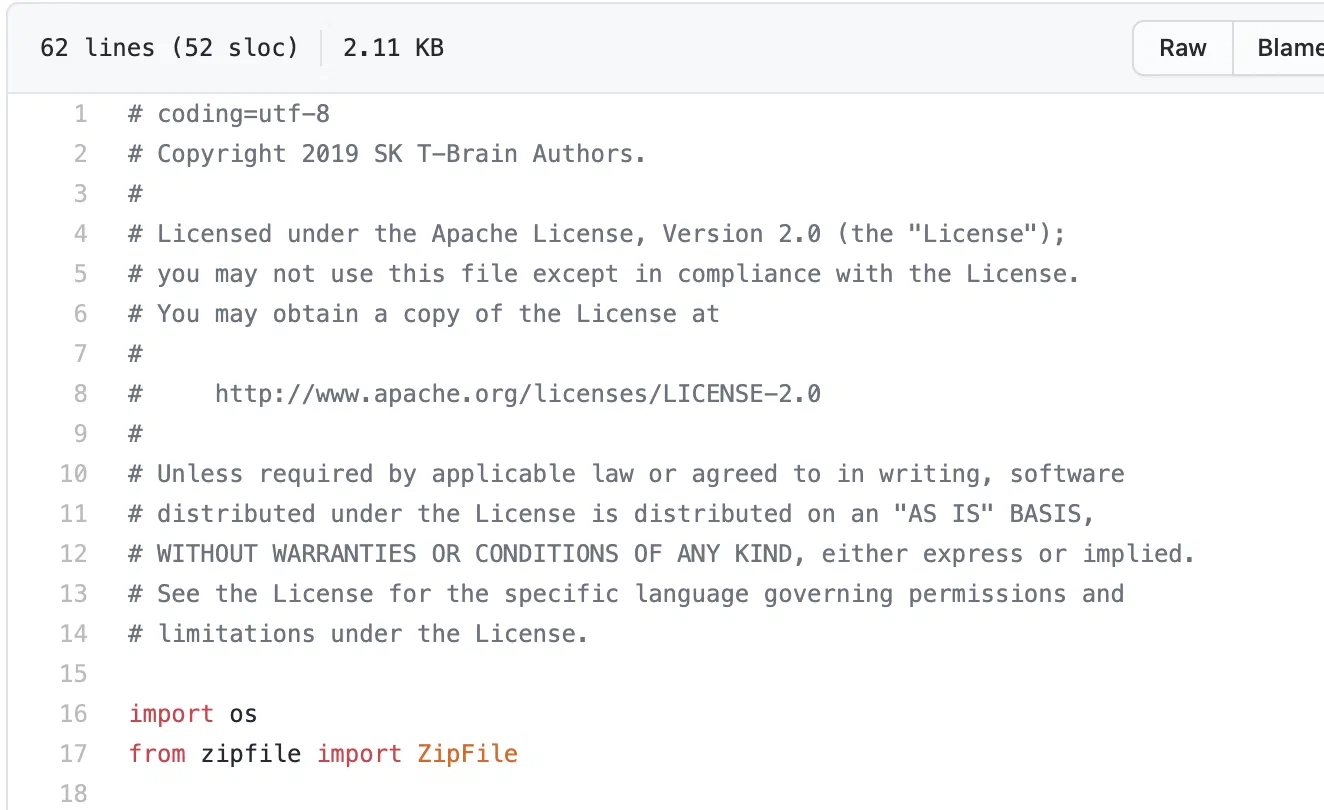 (
(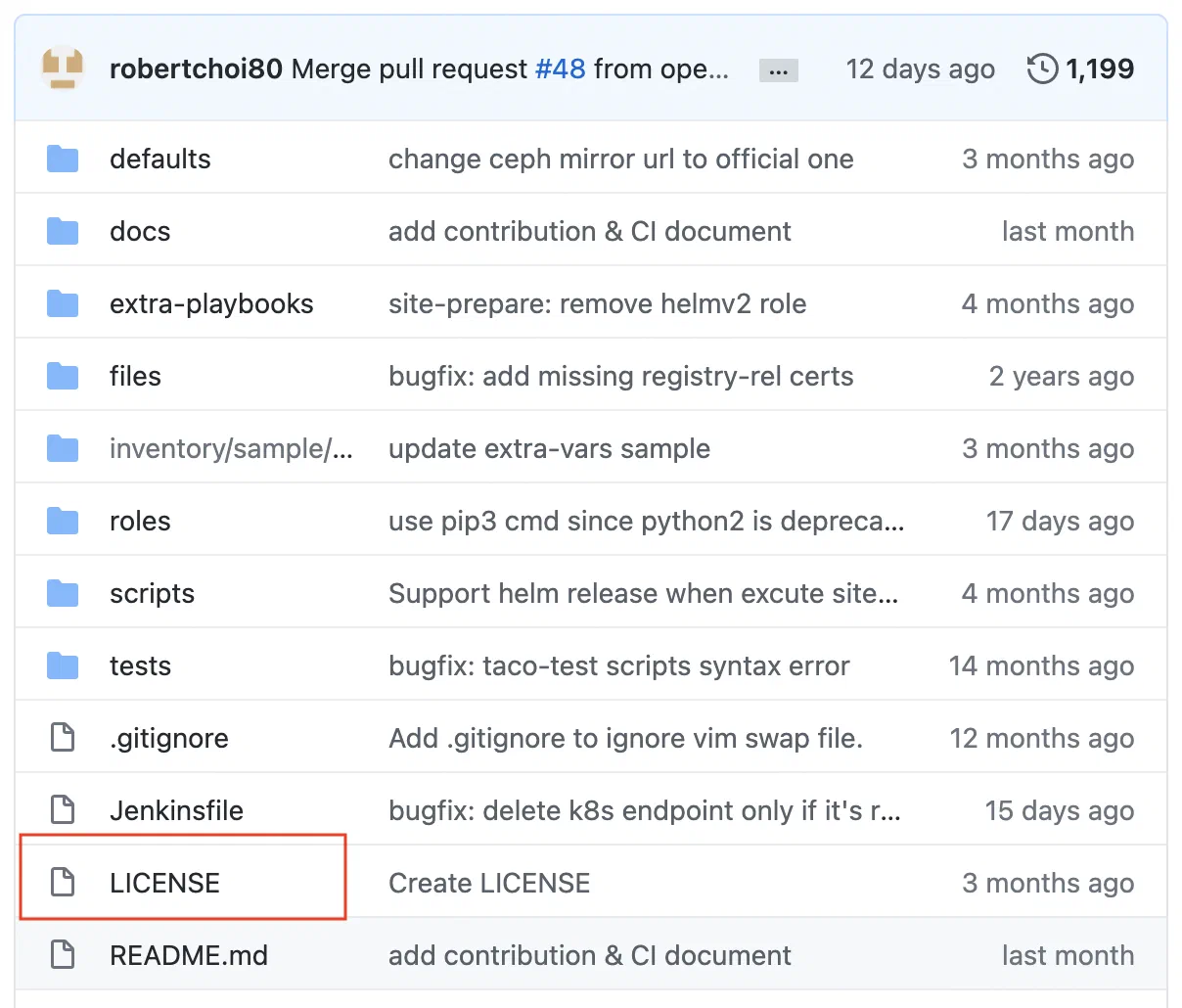 (
( (
(