Contributing to Open Source
Contributing to external open source projects
SK Telecom actively encourages its members to contribute to external open source projects, for example by submitting patches. If you find a bug or improve some code, contribute it back to the project. Contributing benefits not only individuals but the company as well.
This page is the starting point. Before you begin, use it to decide what you need to do.
Summary
- First, check whether your contribution needs approval (see the decision flow below).
- If approval is needed, get internal approval from your organization and then request a review (Contribution Process).
- Prepare your code following the SK Telecom Contribution Rules.
- Submit your contribution in the way the project requires.
Decision Flow
Find where your contribution fits and choose the process accordingly.
| Situation | What you need |
|---|
| Small fixes of 10 lines or fewer, typos, documentation improvements | Contribute directly, no approval |
| Stack Overflow Q&A, creating GitHub issues, reviewing or approving Pull Requests | Contribute directly, no approval |
| Other code contributions (new features, bug fixes, etc.) | Internal approval, then request a review |
| A project requires a CLA that demands copyright assignment | Request a review before contributing (it may not be permitted) |
When You Can Contribute Without Approval
The following carry little risk of copyright infringement, so members may contribute at their own discretion.
- Small code snippets of 10 lines or fewer
- Questions and answers on Stack Overflow
- Management activities on GitHub (creating issues, reviewing and approving Pull Requests, etc.)
The Full Process at a Glance
Inquiries
For inquiries or requests regarding open source contribution, contact OSRB: Support (opensource@sktelecom.com)
1 - SK Telecom Open Source Contribution Rules
The rules to follow when contributing to external open source projects.
SK Telecom respects the value of collaborating with the open source community and encourages its members to contribute to external open source projects. However, there are several rules to follow in order to protect SK Telecom’s intellectual property and to prevent unintentional copyright infringement.
Obtain Approval
From a copyright perspective, an open source contribution grants the project the right to modify, use, and distribute the author’s work. In some cases you may even have to assign your copyright to the project. Generally, the copyright of works created during employment is owned by the employer, so works created by SK Telecom members are owned by SK Telecom. Contributing at your own discretion can create unnecessary copyright-infringement issues.
Therefore, if there is a project you want to contribute to, follow the review request and approval steps in the Contribution Process before your first contribution.
Contribute Only Code You Have the Right to Contribute
Contribute only code you wrote yourself. Do not contribute third-party code at your own discretion.
Be Careful About Disclosing Intellectual Property
Do not contribute code or documents that risk disclosing the company’s intellectual property, such as sensitive information or patents. If the code contains a company patent, confirm whether the patent may be contributed under the project’s open source license. If anything is unclear, contact OSRB.
Note that when you contribute under a license with an explicit patent grant, such as Apache-2.0 or GPL-3.0, you may also grant a license to the company patents needed to implement the contributed code. If patents are involved, request an OSRB review before contributing.
Do Not Contribute Substandard Code
Do not contribute substandard code. It can affect the company’s reputation.
Be Careful When Signing a CLA
Some projects require all contributors to sign a CLA (Contributor License Agreement). This agreement reduces copyright disputes that may arise as a project manages works from many contributors. Projects led by large companies typically require one.
CLAs differ from project to project, but they mainly ask you to agree to the following.
- I (or my company) have the right to contribute this contribution (that is, I am its author).
- I (or my company) grant the project the authority to modify, distribute, and manage my contribution.
- I (or my company) will not revoke the authority I have granted.
- I (or my company) grant the project the authority to change the license in the future.
- I (or my company) grant the project and its users a license to any patents embodied in the contribution.
In rare cases, some CLAs also require agreement to the following.
- I (or my company) assign my copyright to the project or its managing organization upon contributing.
To protect its intellectual property, SK Telecom does not permit contributions to projects that require copyright assignment. Therefore, if a project requires a CLA, request an OSRB review before signing. Most CLAs are fine to sign, so approval does not take long.
Many projects require a DCO (Developer Certificate of Origin) instead of a CLA. A DCO does not assign or separately grant copyright or patent rights; it certifies, through a Signed-off-by line in the commit, that the contribution is yours and that you have the right to contribute it. See Submitting Contributions for how to sign off.
Indicate Copyright
The intellectual property of works a member creates during employment is, by default, owned by the company. So when contributing code to an external project, indicate SK Telecom’s copyright. When contributing one or more files, add the copyright and license at the top of the file as follows.
SPDX-FileCopyrightText: Copyright {year} SK TELECOM CO., LTD.
SPDX-License-Identifier: {SPDX_license_id}
- Use the file’s creation year for
{year}. - Set
{SPDX_license_id} according to the project’s license policy. - If you are only modifying existing code (for example, a bug fix), you do not need to add a copyright notice for that change.
This notation follows the REUSE standard and matches the format used in Copyright and License Notice.
Use Your Company Email
When contributing, use your SK Telecom email rather than a personal one. This gives members a sense of responsibility for representing the company in the community, and it improves SK Telecom’s recognition as an active open source contributor.
2 - SK Telecom Open Source Contribution Process
How to get a contribution approved and proceed.
In accordance with the SK Telecom Contribution Rules, members follow the process below when contributing to external open source projects. If your contribution falls under the cases that need no approval (see the overview decision flow), you may skip this process.
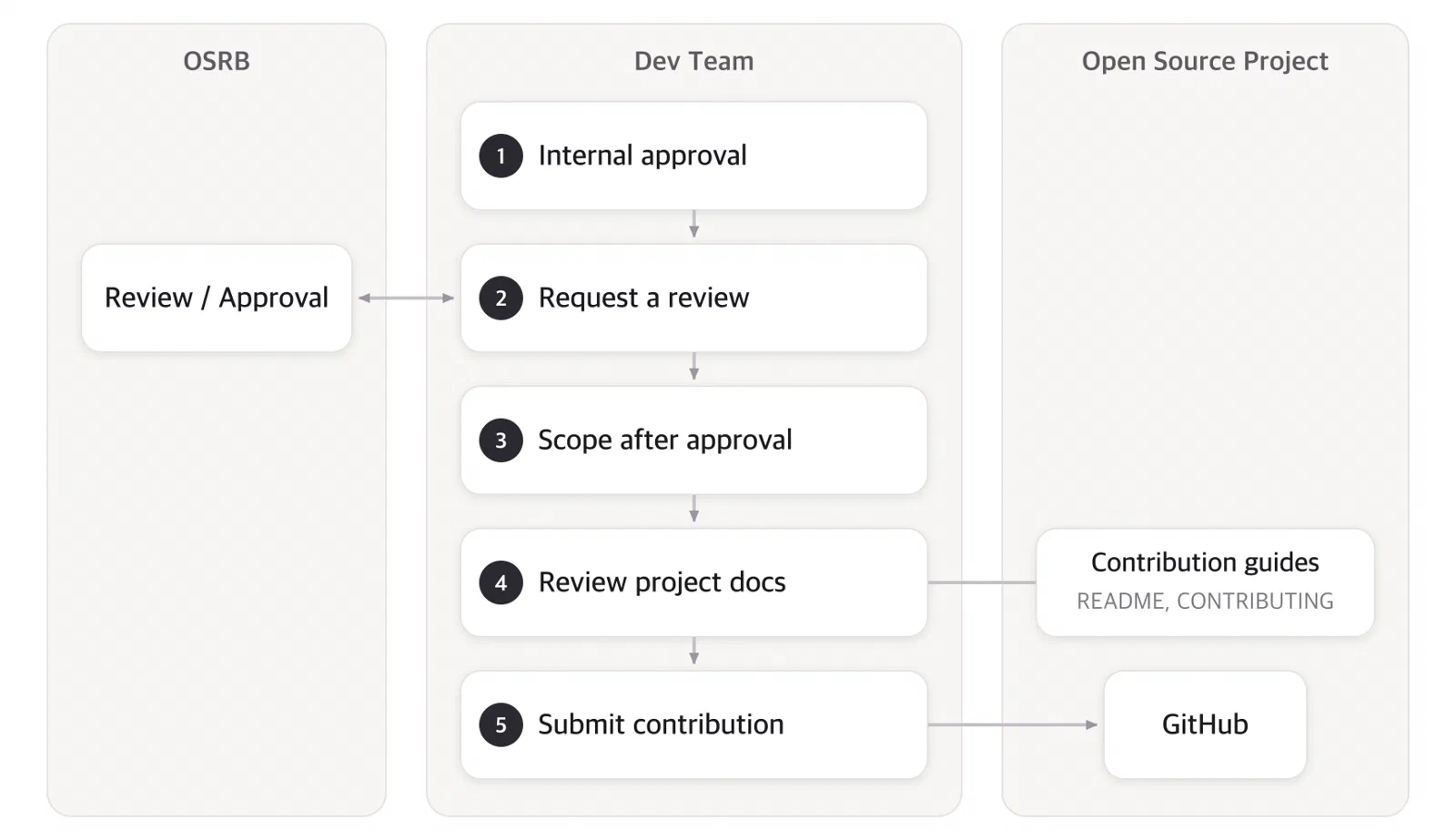
1. Internal Approval Within Your Organization
Before starting to contribute to an open source project, obtain approval from the responsible executive or leader of your organization.
2. Request a Review
After internal approval, request a review from OSRB (opensource@sktelecom.com). Filling in the checklist below speeds up the review.
Submission Checklist
GitHub Issue Template
Accepting requests through an internal issue tracker or GitHub organization with the template below lets contributors provide everything just by filling in the blanks.
### Open Source Contribution Review Request

- Project name:
- Repository:
- License:
- Purpose:
- Summary of contribution:
- Internal approval (executive/leader):
- CLA/DCO required:
Expected Turnaround
The review covers the license and any CLA. Simple checks finish quickly; cases that need further review take longer.
OSRB reviews the project’s license and CLA and approves the request if there are no issues.
3. Scope After Approval
Once a project is approved, members may contribute to it at their own discretion thereafter. Request a new review when contributing to a different project.
4. Review the Project’s Contribution Documents
The required process differs slightly between projects. Before contributing, check the project’s CONTRIBUTING or README to understand the following.
- Guidelines on coding style, language, formatting, issue/ticket management, release timing, and so on
- Whether a CLA signature or a DCO Signed-off-by is required
- How patches are submitted (GitHub Pull Request or mailing list)
5. Submit Your Contribution
After improving your code per the Contribution Rules, submit it in the way the project requires.
3 - Submitting Contributions
How to submit a contribution to an open source project.
Once you have approval and your code is ready, submit your contribution in the way the project requires. The following is the typical flow for a GitHub-based project.
Check Prior History
Check whether your contribution has been addressed before. Search the project’s README, issues, and mailing list for a few keywords. If you find nothing related, open an issue or start a conversation through a Pull Request.
Before you start, it is best to open an issue describing what you intend to do. This helps you avoid duplicate or unnecessary work.
Create an Issue
Typically, create an issue when:
- Reporting an error you cannot resolve on your own
- Proposing a new feature or idea
- Discussing the community vision or policy
Communication tips:
- If an open issue already covers your topic, comment first so others do not work on it in parallel.
- An old issue may already be resolved; check with a comment before starting.
- If you opened an issue and later found the answer yourself, post the answer and close it. That documentation is itself a contribution.
Create a Pull Request
When your files are ready, submit the contribution as a Pull Request. Opening it early to get feedback is good practice; mark “WIP” (Work in Progress) in the title and add more commits later.
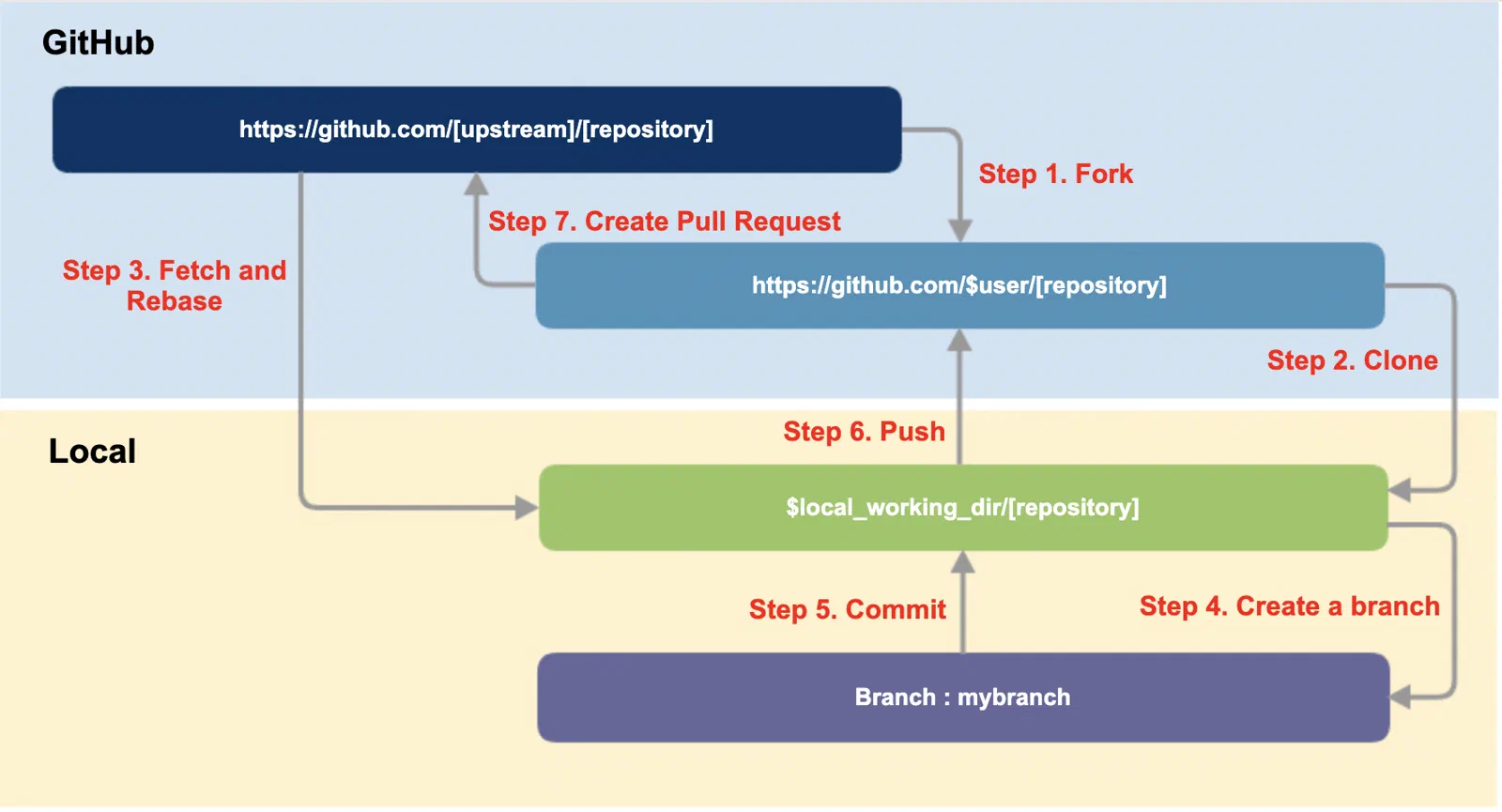
The Pull Request flow on GitHub is as follows.
Fork
Fork the upstream repository to your own GitHub account.
Clone
Clone your fork to a local working directory and add the upstream as a remote.
$ git clone https://github.com/$user/[repository]
$ cd [repository]
$ git remote add upstream https://github.com/[upstream]/[repository]
$ git remote -v
Create a branch
Bring the main branch up to date, then create a working branch.
$ git fetch upstream
$ git checkout main
$ git rebase upstream/main
$ git checkout -b myfeature
Work and commit
Make your changes and commit. If the project requires a DCO, add a Signed-off-by line with -s.
$ git commit -s -m '[commit message]'
Push
Push your branch to your own repository.
$ git push origin myfeature
Use the force option only in the rare case where you must re-push a branch you rewrote (for example, after a rebase), and never on a shared branch.
Create a pull request
On GitHub, use the Compare & pull request button on your repository to create the Pull Request. The upstream maintainer then reviews it and decides whether to merge.
DCO and CLA
Projects certify the origin of contributions with a DCO or a CLA. Check which one the project requires beforehand.
- A DCO is a lightweight Signed-off-by line in the commit, added automatically with
git commit -s. - A CLA is a separate agreement. If a CLA requires copyright assignment, request an OSRB review before signing, per the Contribution Rules.
Receive Feedback
After you submit, the project gives feedback. Treat it as a way to raise the quality of your contribution. Feedback usually falls into one of four kinds.
No response
Before contributing, check that the project is active. If you get no response for more than a week, politely ask for a review in the same thread, using an @-mention if you know the right person. Do not contact anyone privately; keep communication public. If there is still no response, look for another way to contribute or another project.
A request for changes
Being asked to explain your idea or revise your code is common. Respond promptly, since someone took time to review. If you can no longer proceed, tell the maintainer so someone else can take it over.
Rejected
A contribution may not be accepted. If the reason is unclear, ask the maintainer for an explanation, but respect their decision. If differences are never reconciled, you can fork and continue on your own project. Treat a rejection as a chance to improve your next contribution.
Accepted
Congratulations. You have contributed to open source.
References
4 - Background on Open Source Contribution
Background to help you understand open source contribution.
This section is learning material that answers “why.” It is kept separate from the action pages (Contribution Rules, Contribution Process, Submitting Contributions).
Pages
4.1 - Benefits of Open Source Contribution
What are the benefits of contributing to open source?
Today, any company that develops software naturally uses open source. And many companies do not stop at using open source; they also contribute back to the open source community. Why do they choose to contribute back to open source? Companies that encourage contribution to open source projects do so because they expect the following effects.
Why Should a Company Contribute to Open Source?
What are the purposes and benefits for a company contributing to open source? Why should a company encourage its members to contribute to open source? From a business perspective as well, the reasons a company should contribute to open source are as follows.
1. It Can Reduce Maintenance Costs.
A company uses open source to build products, fixing bugs and adding new features along the way. But what happens if it does not contribute these back to the open source project?
The open source project will keep releasing new versions, including important security patches. Each time, before applying a new version, the company must reapply its own modifications to the new version and then test every time whether the features work without problems and whether there is any impact on performance. If this effort is repeated, the management cost, including the personnel and time required, increases significantly. If the modifications had been contributed to the open source project, they would already be included when a new version is released, so there would be no need for additional maintenance.
Therefore, companies that use open source must educate their developers on the importance of contribution. Of course, contributing to an open source project can take considerable effort and time. Because of tight development schedules, developers may want to apply a patch only to the product right away and not contribute it to the open source project. However, it must be repeatedly emphasized that if the patch is not contributed, the developer will have to reapply their own patch every time a new version is released. The more this work is repeated, the more it becomes a vicious cycle of pouring in more time and effort.
2. It Can Influence the Direction of the Open Source Project.
Do you want an open source project that is important to your product development to add a feature that your company needs? If so, we recommend being active: propose the desired feature to that open source project and, in some cases, directly develop and contribute part of it. After the company contributes in this way, the participation of many people stabilizes and advances the feature, and as a result the project grows in the direction the company wants.
3. It Can Help Recruit Excellent Developers.
The best place to find excellent open source developers is the open source community itself. A company that actively contributes to open source builds a good reputation in the open source community. Excellent developers in the open source community know which companies actively contribute to open source, and they want to work at such companies. It is not easy for a company that does no open source contribution at all to recruit excellent open source developers.
Why Should a Developer Contribute to Open Source?
1. You Can Contribute to the Public Good
When you directly fix a bug or add a new feature to open source you are using, the software is improved and, moreover, everyone who uses the software benefits. With a small contribution, you contribute to the global community.
2. You Can Build Your Skills
Through contributing to open source, you can learn new technologies. Beyond that, you can improve your capabilities through repeated practice and training. Version control, unit testing, integration testing, CI/CD, and the like were born out of open source project development and are now used in almost all software development. You can learn these in open source projects. Furthermore, unlike company work, open source projects are relatively tolerant of beginners’ mistakes, so as long as your will is firm, they are the best space to build your technical capabilities. In open source projects, you can learn not only coding but also practical skills such as UI, graphic design, and writing documentation.
3. You Can Understand Open Source at a Deeper Level and Acquire the Technology
When you go beyond simply using open source and, for the sake of contribution, understand issues and solve problems, you acquire open source technology at a deeper level. Such activity makes it easy to identify and flexibly respond to future changes in the open source, and it can also help you expand your use of open source.
4. You Can Learn Collaboration
The open source community is a space where people from various regions and different time zones around the world come together. Under such constraints, a high level of collaboration ability is needed to carry out a common task. In open source projects, true collaboration that takes into account division of labor and risk management takes place. In addition, you can become familiar with the various tools that support collaboration. Issue trackers, version control systems, and mailing lists are representative examples.
5. You Can Meet New People
Open source has community. People with common interests participate and meet, and through this they can build relationships. Whom you meet can have a major impact on the direction of your career. Once you have a trusting relationship, you can lead each other to new work or jobs. This is possible because in the open source community you always collaborate professionally and can deeply understand each other’s work styles and personalities. The relationships formed while contributing to open source projects are one clear answer to why you should contribute.
6. You Can Build Your Reputation and Career
Open source work is open to everyone. Work done in open source can be shown to anyone, anywhere, which greatly helps raise an individual’s reputation.
7. You Can Learn Leadership
In open source, you can learn leadership and management skills such as team building, conflict resolution, and priority adjustment. To collaborate on an open source project, you have to explain to someone how to do a task, and there are times when you have to ask others for help. Through this process of learning and teaching, you experience leadership and taste a sense of achievement.
4.2 - Types of Open Source Contribution
What types of open source contribution are there?
In open source projects, software developers mainly contribute by modifying source code to fix bugs or improve features. However, developers are not the only ones who can contribute to open source projects. Open source projects need various types of contributions, such as documentation and design, as described below.
Writing Documentation / Translation
- Write project documentation and tutorials. (e.g., PyPA’s contributors did)
- Write the project’s newsletter or summarize key points from the mailing list.
- Translate the project’s documentation into your own language.
Testing / Creating Issues
- Test whether the software works correctly.
- Test whether it builds / installs as described in the documentation.
- Check whether the documentation and API are written consistently.
Design
- Improve the layout, menus, and so on of the project’s website. (e.g., Drupal suggest)
- Create a style guide so the project can have a consistent design.
- Contribute to creating a new logo or T-shirt. (e.g., hapi.js’s contributors did)
Writing / Reviewing Code
Marketing
- Promote the project’s purpose and usefulness in various ways, such as on social media and through seminar presentations.
Events
4.3 - Open Source Project Membership
Who is involved in an open source project?
How can an open source project continue to develop high-quality software through collaborative work? How can many people who do not know each other write code together and produce stable software? Open source projects achieve this through clearly defined roles.

Leader
Every project has a leader, and the founder usually takes on this role. The leader determines the direction of the project and is responsible for the final decision when a decision is needed. The leader may be an individual, but for large projects, a Steering Committee is organized to perform the leader’s role.
Maintainer
Maintainers are core contributors who possess the most trusted technical capabilities in the project. They are delegated specific areas by the leader and take on the role of managing them proactively.
Committer
Committers are those who sufficiently understand the code of specific modules in the project and contribute regularly. They have the authority to review and approve contributors’ contributions, and for certain modules they can merge without the maintainer’s approval.
Contributor
Anyone who has contributed, even in a small way, is a contributor. Contributors contribute to open source projects through methods such as simple bug fixes and documentation. Such contributions are reviewed and supplemented by experienced committers and maintainers, and then merged into the repository.
User
Users play the role that determines the success or failure of an open source project. No matter how well prepared a project is, it cannot succeed if no one uses it. By using the project and providing ideas such as bug reports and new feature suggestions, users give the project its reason for existing.
- If a project’s leader and contributors do not carefully listen to users’ requests, it is difficult for the project to grow healthily over the long term.
- A project can only be sustained if it grows in a direction that meets users’ needs.
4.4 - Key Documents in an Open Source Project
What documents exist in an open source project?
To contribute properly, it is important to understand how each open source project works and to act as the project expects. Most open source projects communicate these requirements through documents such as the README and CONTRIBUTING. Open source projects commonly include several such documents, usually located at the top level of the repository. Before contributing, you should use these documents to familiarize yourself with the project’s culture, code of conduct, and contribution methods.
README
The README is the file you see when you first approach a project. It introduces the project, explains why you should use it, how to use it, and more. It is a must-read document for understanding what the project is.
LICENSE (or COPYING)
The LICENSE is the file containing the open source license, which states that anyone may use the project. Every open source project must have an open source license. Without an open source license, it is not open source. In that case, the source code has been disclosed, but the right to use or distribute it has not been granted. Be aware that including such source code in a product or service carries the risk of copyright infringement.
CONTRIBUTING
If the README is a document for people who use the project, CONTRIBUTING is a document for people who contribute to the project. Because it explains what types of contributions are needed and how to contribute, you should examine this document carefully when you want to contribute to open source. Contributors must follow the contribution methods described in this document.
If the project you want to contribute to has no CONTRIBUTING file, ask the community how to contribute. If you do not receive an appropriate response, you may regard it as a project not worth contributing to and look for another project.
CODE OF CONDUCT
The CODE OF CONDUCT, also called a code of conduct or behavioral guidelines, defines the rules of conduct for participants so that the project stays healthy. For example, it emphasizes that there must be no discrimination based on gender, race, religion, age, and so on, that everyone is warmly welcomed, and that participants must act to ensure safe activity. It also explains how to report someone who breaks those rules.
Other Documents
(For large open source projects) documents such as tutorials and governance policies may also be provided.
4.5 - How to Become a Good Contributor
How can you become a good contributor?
Before getting into how to submit contributions in earnest, let’s briefly look at how to become a good contributor. Of course, since every project operates differently, there is no single right answer. Each time you join a new project, you need to invest time in learning how it operates. Even so, the following points are commonly helpful in becoming a good contributor.
Open source projects have a community of users and developers. Each community participates in slightly different ways. Read the documentation the community provides, and join its main communication channels such as the mailing list, forums, IRC, Slack, and bug tracker.
2. Observe for a While
After joining the community, take some time to get familiar with its culture before contributing. Reviewing past communications is a good approach. The more you go through this process, the more likely your first contribution is to be accepted.
3. Understand the Governance
Before contributing, use the project’s management and governance documents to understand how the project is governed. You can learn who makes decisions and how.
4. Start Small
Start with a simple bug fix or documentation change. It is good to learn the process and correct mistakes by making small, low-stakes contributions. Building on this experience, you can contribute more substantially and gradually have an impact on the project.
5. Attend Events
Building lasting relationships with other participants in the open source community is important. The best way to do this is to attend events such as conferences. Nothing builds relationships like meeting in person.
6. Contribute from the Early Stages of the Code
Some people finish developing until the amount of code becomes quite large and then try to contribute it all at once. Such contributions are not easily accepted by open source projects. It is difficult for a project to review a large amount of code at once, and the contributed code may differ from the direction the project wants. Discuss with the community starting from the idea stage, and contribute early in development and often.
4.6 - How to Identify a Good Project to Contribute To
Which projects are worth contributing to?
Naturally, you should contribute to open source projects that are related to your work or in an area of technical interest. If there are several such projects, it is also worth considering which one is worth contributing to. Otherwise, your hard-earned contribution may be buried without any response.
The following is a checklist for determining whether an open source project you are interested in is suitable for contribution activity.
1. Is There an Open Source License File?
A project to which no open source license applies is not open source. Only when the software’s copyright holder grants, through an open source license, the right for anyone to use and distribute it can a company use that software freely. Using software without an open source license at will can create legal risks such as copyright infringement.
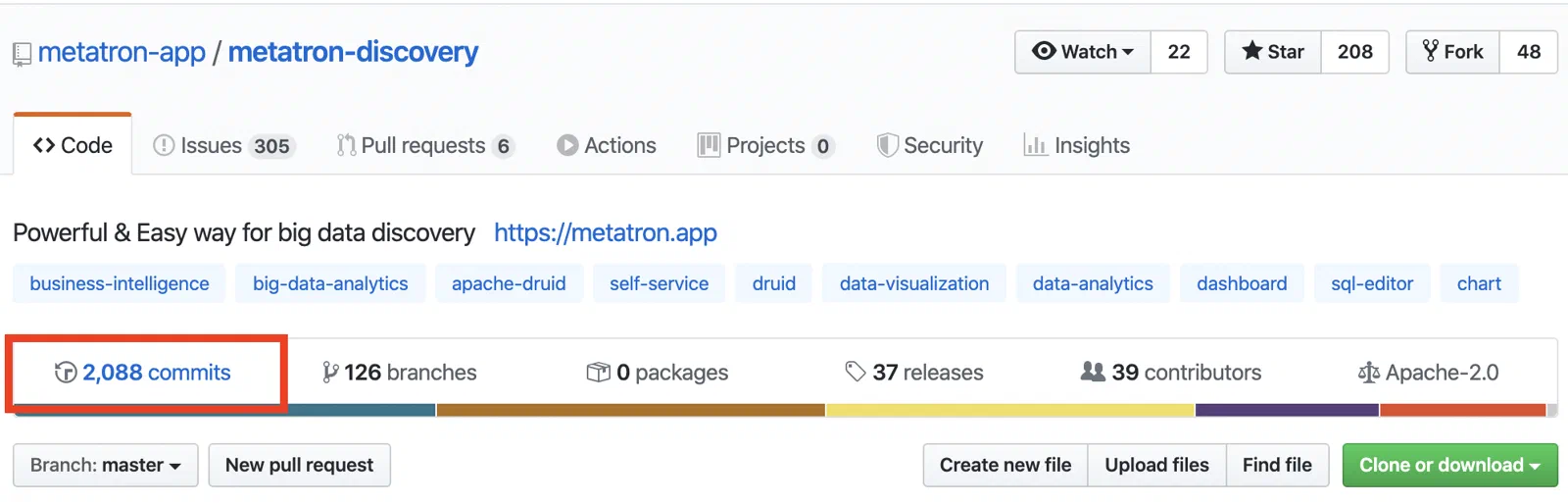
2. Is the Project Actively Receiving Contributions?
If there are few contributors or there have been no commits for several years, the project can be considered unmaintained.
On GitHub, you can check the commit status under “Commits” at the top of the screen.
3. Check the Project’s Issues
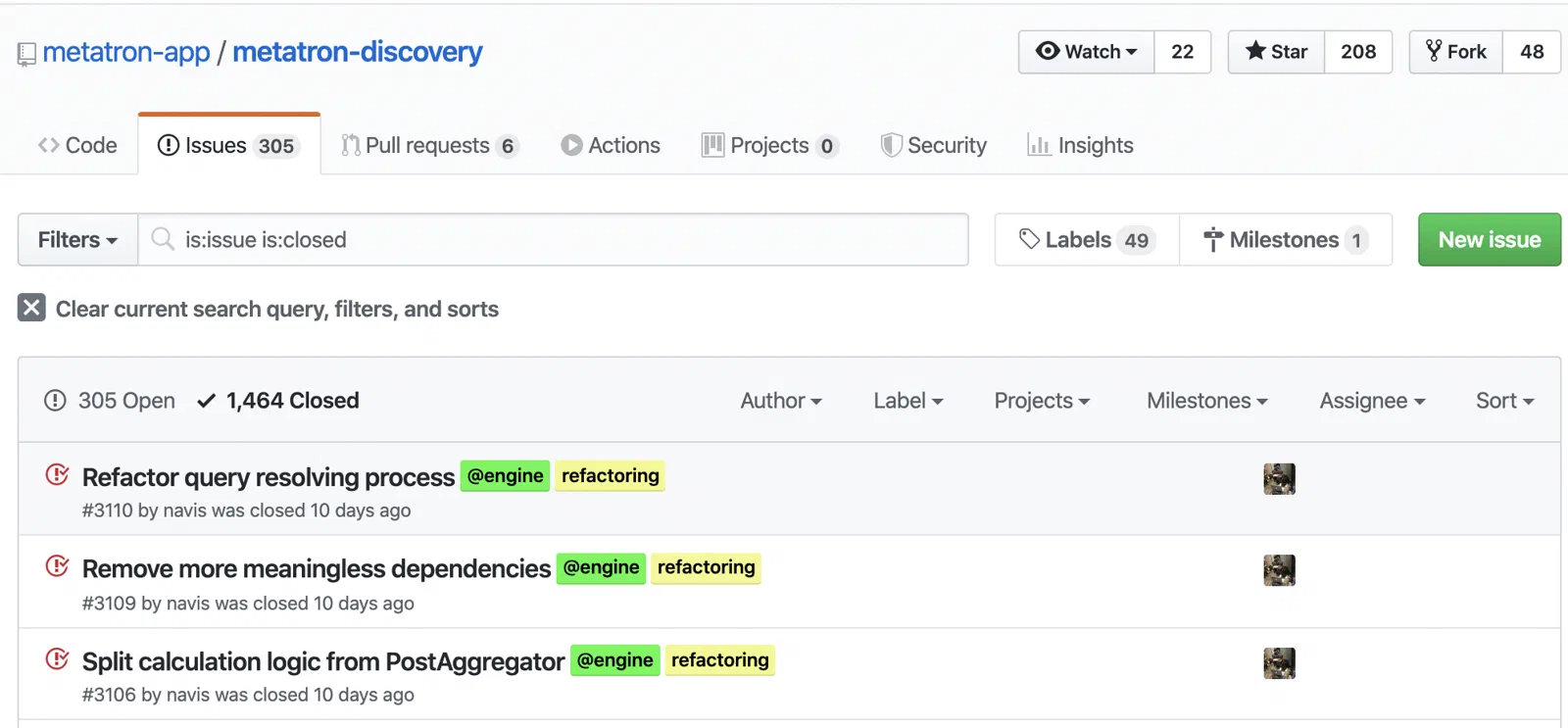
If issues are not being opened, or if they are opened but not responded to, the project can be considered unmaintained.
On GitHub, you can check the status of closed issues by looking at the “closed” tab on the Issues page.
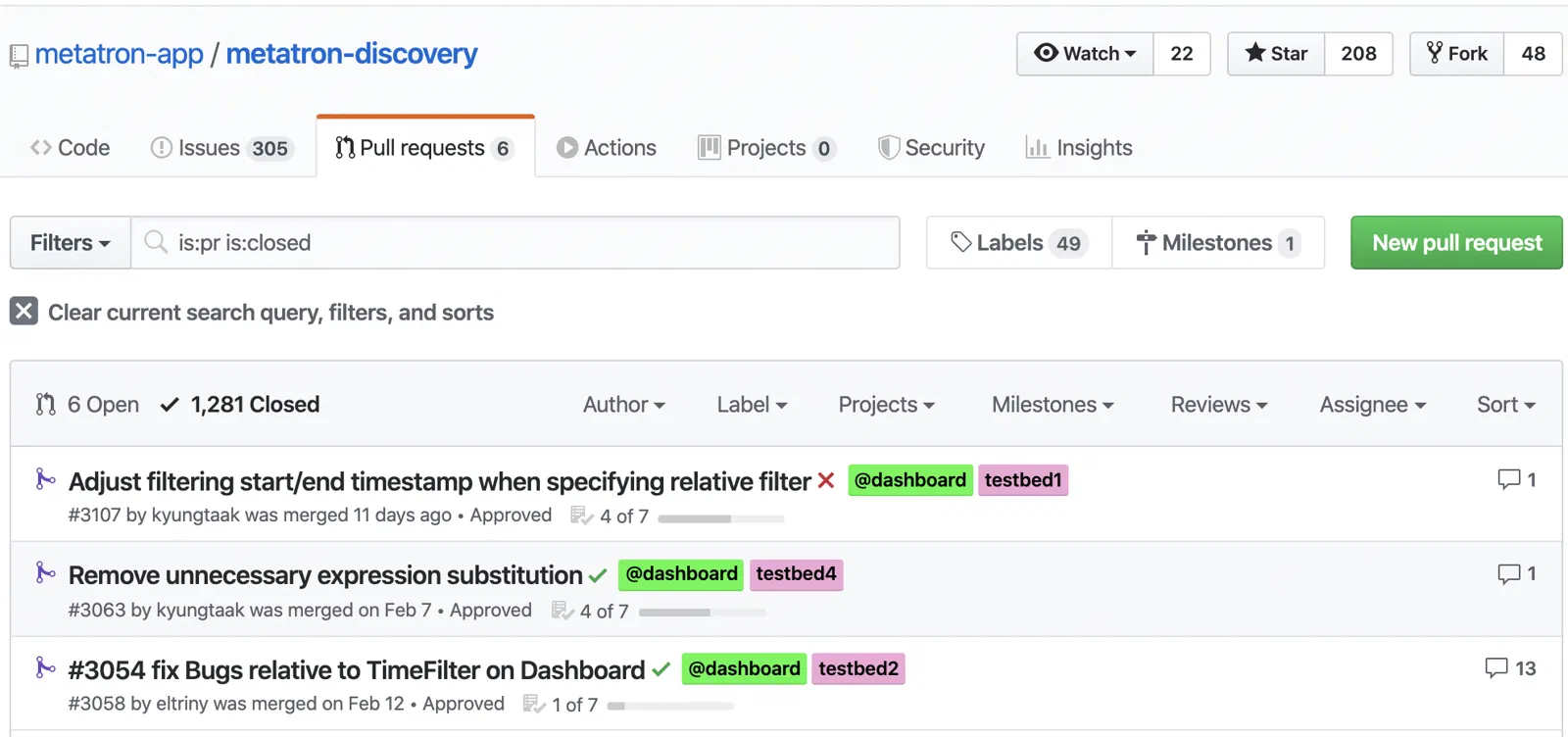
4. Check the Project’s Pull Requests
On GitHub, you can see closed Pull Requests by clicking the “closed” tab on the Pull Request page.
5. Does the Project Have a Welcoming Atmosphere for Contributions?
A project that does not have a welcoming atmosphere for contributions is unlikely to develop well over the long term. This can also be a criterion for judging whether a project is worth contributing to.
4.7 - How to Communicate
How to communicate in the open source community
Every part of the open source contribution process is a continuous series of communications with community members. First, keep the following points in mind for effective communication.
Communicate Your Intent Precisely
If you are reporting an error, explain precisely what task it occurred during and how to reproduce it. If you are proposing a new idea, explain why you think it would be useful to the project.
| Good Example | Bad Example |
|---|
| “X does not work when I try to do Y.” | “X doesn’t work. Please fix it.” |
Do Not Just Ask; First Try What You Can Do Yourself
Before asking for help, look for the answer in the project’s documentation such as the README, in issues, in the mailing list, or through a search. It is good to show this kind of effort.
| Good Example | Bad Example |
|---|
| “I’m not sure how to implement X.I checked the README and the mailing list history but couldn’t find anything about it.” | “How do I do X?” |
Keep Conversations as Concise as Possible
Every contribution you submit has to be reviewed by someone. Some projects accumulate so many contributions and requests that they are difficult to review. Therefore, the more concise your request, the more likely it is to be accepted.
| Good Example | Bad Example |
|---|
| “I’d like to help with writing the API tutorial.” | “The other day I was driving on the highway and stopped at a gas station.That’s when an amazing idea about what we should do came to me. Before I explain the idea, there’s one thing I want to show you.” |
Make All Communication Public
Contacting maintainers privately is not a good practice. Keep all conversations public. This allows more people to learn and benefit.
| Good Example | Bad Example |
|---|
| (As a comment) “@maintainer Hello, how should I proceed with this PR?” | “(By email) Hello, when will you review my PR?” |
Once You’ve Asked, Be Patient
Even maintainers cannot handle everything perfectly. They also need time to review.
| Good Example | Bad Example |
|---|
| “Thank you for reviewing this error.I followed your suggestion, but this time these errors appeared.” | “Why can’t you solve my problem?Aren’t you the maintainer?” |
Your ideas may differ from the project’s priorities or vision. The community may decide not to adopt your idea. You must accept this. If you cannot find a compromise, or can never agree, you should consider forking and starting your own new project.
| Good Example | Bad Example |
|---|
| “I’m sorry the use case I submitted wasn’t adopted, but thank you for explaining the reasons in detail.I understand.” | “Why won’t you support my use case? This is unacceptable.” |
Above All, Maintain Your Dignity
In open source projects, you collaborate with members from all over the world. Depending on language, culture, region, and time zone, there are differences in communication styles. Also, because you communicate through writing rather than face to face, it can be difficult to convey tone and mood accurately. A good way to overcome these difficulties is to always interpret others’ writing in good faith. When declining someone’s proposal, be polite, and express your own position clearly. Conduct yourself with dignity in the online space that is open source.