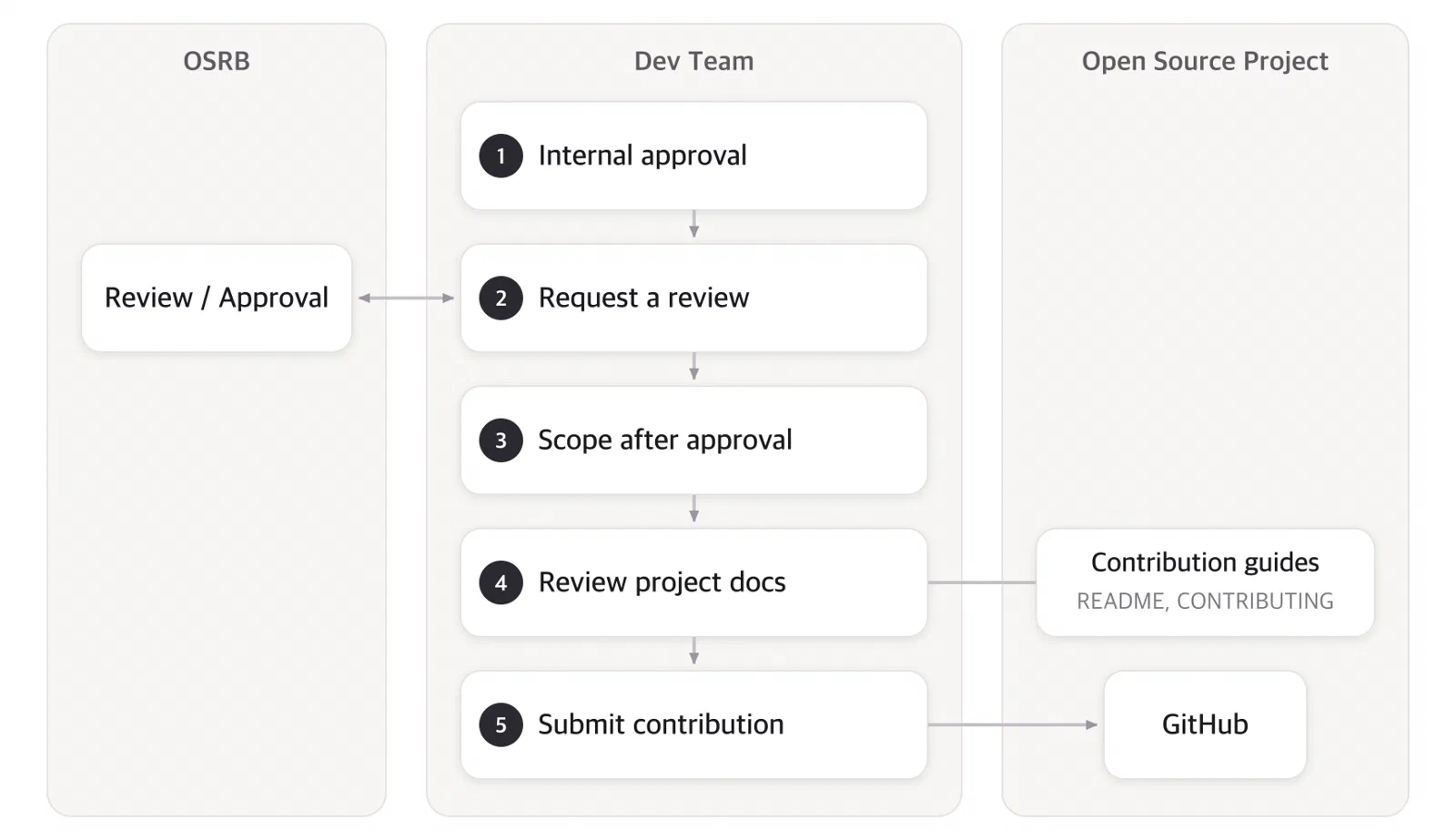
SK Telecom Open Source Contribution Process
Explains SK Telecom’s open source contribution process.
In accordance with SK Telecom’s open source contribution rules, members follow the contribution process below when contributing to external open source projects.
Contribution Process May Be Skipped
However, for simple matters such as the following, the risk of copyright infringement is not significant, so members may contribute at their own discretion without the review process.
- Small code snippets of 10 lines or fewer
- Questions / answers on Stack Overflow
- Management activities on GitHub: creating issues, reviewing / approving Pull Requests, etc.

1. Internal Approval Within Your Organization
Before starting to contribute to an open source project, obtain approval from the responsible executive or leader of your organization.
2. Request an OSPO Review
After obtaining approval within your organization, request a review from the OSPOOpen Source Program Office: Support (opensource@sktelecom.com)
- When requesting a review, include the following: [Template]
- Open source project name
- Repository
- License
- Purpose of contribution
- Details of contribution
- The OSPO reviews the open source project’s License / CLA and approves it if there are no issues.
- The OSPO compiles the status of open source projects to which SK Telecom members are contributing. The compiled data is used as an expert pool for each open source project.
Approved Projects
Once you have received an OSPO review and approval for an open source project you want to contribute to, you may contribute to that open source project at the member’s discretion thereafter.
3. Review the Project’s Contribution Documents
The required process differs slightly from one open source project to another.
- Each project has various guidelines on coding style, language, formatting, bug/ticket management, release timing, and so on.
- Some projects require signing a CLA, while others require a DCO Signed-off-by.
- As for how patches are accepted, most projects now use GitHub Pull Requests, but some still use a mailing list.
For this reason, to properly understand the process of the project you want to contribute to, you must first carefully review the documents the project provides. Most projects provide these documents as a CONTRIBUTING or README file. For example, Kubernetes provides a detailed guide for contributors. (contributing.md: a guide for contributing to Kubernetes) The better you comply with the requirements in the documents, the more likely your contribution is to be accepted.
4. Comply with the Open Source Contribution Rules
Review the SK Telecom Open Source Contribution Rules and improve the code you will contribute accordingly.
5. Submit Your Contribution
Now submit your contribution according to the process required by the project’s documentation. For how to contribute to a typical open source project, refer to the following pages.
1 - Detailed Contribution Submission Process
Explains the detailed process for submitting a contribution.
Now let’s look at how to submit a contribution. The methods and steps for submitting a contribution to a typical open source project are as follows.
1. Check Prior History
Check whether the contribution you are about to submit has been addressed before. Look through the project’s README, issues, and mailing list. You don’t need to check every document; searching for a few keywords makes it easy to verify.
If you cannot find related content in prior materials, it is time to open an issue or start communicating through a Pull Request. GitHub provides Issues and Pull Request features.
- Issues: You can start a conversation or discussion.
- Pull Request: You contribute a solution to a problem.
Before opening an Issue or Pull Request, check the documents the project provides (typically CONTRIBUTING or README) to confirm the contribution process and method. For example, they may require following a specific template or require pre-testing.
Before starting work on a contribution, it is also a good idea to open an Issue first to let community members know what you intend to work on. In some cases, this can help you avoid doing unnecessary work.
2. Create an Issue
Generally, create an Issue in the following situations.
- Reporting an error you cannot resolve on your own
- Proposing a new feature or idea
- Discussing the community vision or policy
Communication Tip
- If there is an open Issue you want to address, leave a comment first so that others do not work on it in duplicate.
- If it is an Issue that was opened long ago, it may already be resolved. Before starting work, use a comment to check whether it has been resolved.
- If you opened an Issue but later figured out the answer yourself, write a comment with the answer so that others can also know it, and close the issue. Even this kind of documentation is a contribution to the project.
3. Create a Pull Request
Once all the files for your contribution are ready, submit your contribution as a Pull Request.
When to Create a Pull Request
Generally, create a Pull Request in the following situations.
- Submitting minor fixes (e.g., typos, broken links, etc.)
- Starting work on something already discussed in an Issue
A Pull Request does not have to be made only after the work is complete. Generally, it is good to open a Pull Request early to get feedback from others. Mark “WIP” (Work in Progress) in the title line to indicate that it is still in progress, and you can add more commits at any time later.
The Pull Request Process on GitHub
If the project is on GitHub, you can refer to the following when submitting a Pull Request.

Step 1. Fork
Fork the upstream repository to your own GitHub account.
Step 2. Clone
Clone the forked repository to your own local working directory.
$ mkdir -p $working_dir
$ cd $working_dir
$ git clone https://github.com/$user/[repository]
Add the upstream repository as a remote.
$ cd [repository]
$ git remote add upstream https://github.com/[upstream]/[repository]
# Confirm that your remotes make sense:
$ git remote -v
Step 3. Create a branch
First, fetch and rebase the main branch to keep it up to date.
$ cd $working_dir/[repository]
$ git fetch upstream
$ git checkout main
$ git rebase upstream/main
Then create a development branch (myfeature).
$ git checkout -b myfeature
Step 4. Keep your branch in sync
Fetch and rebase the branch to keep it up to date.
# While on your myfeature branch
$ git fetch upstream
$ git rebase upstream/main
Then do your code work in that state.
Step 5. Commit
Commit your changes.
$ git commit -a -m '[commit message]'
Step 6. Push
Push the changes on the myfeature branch to your own GitHub repository.
git push -f origin myfeature
Step 7. Create a pull request
When you go to your repository on GitHub, you will see that the Compare & pull request button is enabled. Click it to create a Pull Request.
After that, the maintainer of the upstream repository reviews the requested Pull Request and decides whether to merge it.
4. Receive Feedback
Once you submit your contribution, you will receive feedback from the project. Feedback generally asks for an explanation of how the improvement or change works and why you adopted that approach. This feedback can sometimes be difficult to respond to, but it is best to accept it as a process that raises the level of your contribution.
Feedback usually falls into one of the following four categories.
(1) No Response?
Before contributing, it is good to first check whether the project is active. Even in a fairly active project, you may not receive a response to your contribution.
If you have not received a response for more than a week, it is good to politely ask someone in the same thread to review it. If you know the name of the appropriate person, use the @-mention feature.
Warning
However, do not contact anyone privately. Public communication is essential in open source projects.
Even so, for various reasons, no one may respond. It is not a great feeling, but there is no need to be discouraged. This can happen to anyone. Look for another way to contribute or another project.
(2) A Request for Changes?
It is common to be asked to explain your idea or to revise your code. If someone requests changes like this, respond promptly. They took their own time to review your contribution.
Leaving a PR open without responding is impolite. If you are no longer in a position to solve the problem, let the Maintainer know that you cannot proceed further. Then they can close the PR or someone else can take it over and continue.
(3) Rejected?
Your contribution may ultimately be accepted, or it may not. If you do not clearly understand the reason it was not accepted, it is reasonable to ask the Maintainer for an explanation. However, you must respect that this is their decision. Do not argue or act with hostility. If differences are never reconciled, you can always fork and work on your own project.
Warning
It may take several rounds of repeated revisions before the code is approved, and in some cases it may be rejected. In that case, rather than feeling discouraged or giving up, it is best to find out in detail why it was rejected and use it as an opportunity to improve your next contribution.
(4) Accepted!
Congratulations! You have finally succeeded in contributing to open source.