Once you have approval and your code is ready, submit your contribution in the way the project requires. The following is the typical flow for a GitHub-based project.
Check Prior History
Check whether your contribution has been addressed before. Search the project’s README, issues, and mailing list for a few keywords. If you find nothing related, open an issue or start a conversation through a Pull Request.
Before you start, it is best to open an issue describing what you intend to do. This helps you avoid duplicate or unnecessary work.
Create an Issue
Typically, create an issue when:
- Reporting an error you cannot resolve on your own
- Proposing a new feature or idea
- Discussing the community vision or policy
Communication tips:
- If an open issue already covers your topic, comment first so others do not work on it in parallel.
- An old issue may already be resolved; check with a comment before starting.
- If you opened an issue and later found the answer yourself, post the answer and close it. That documentation is itself a contribution.
Create a Pull Request
When your files are ready, submit the contribution as a Pull Request. Opening it early to get feedback is good practice; mark “WIP” (Work in Progress) in the title and add more commits later.
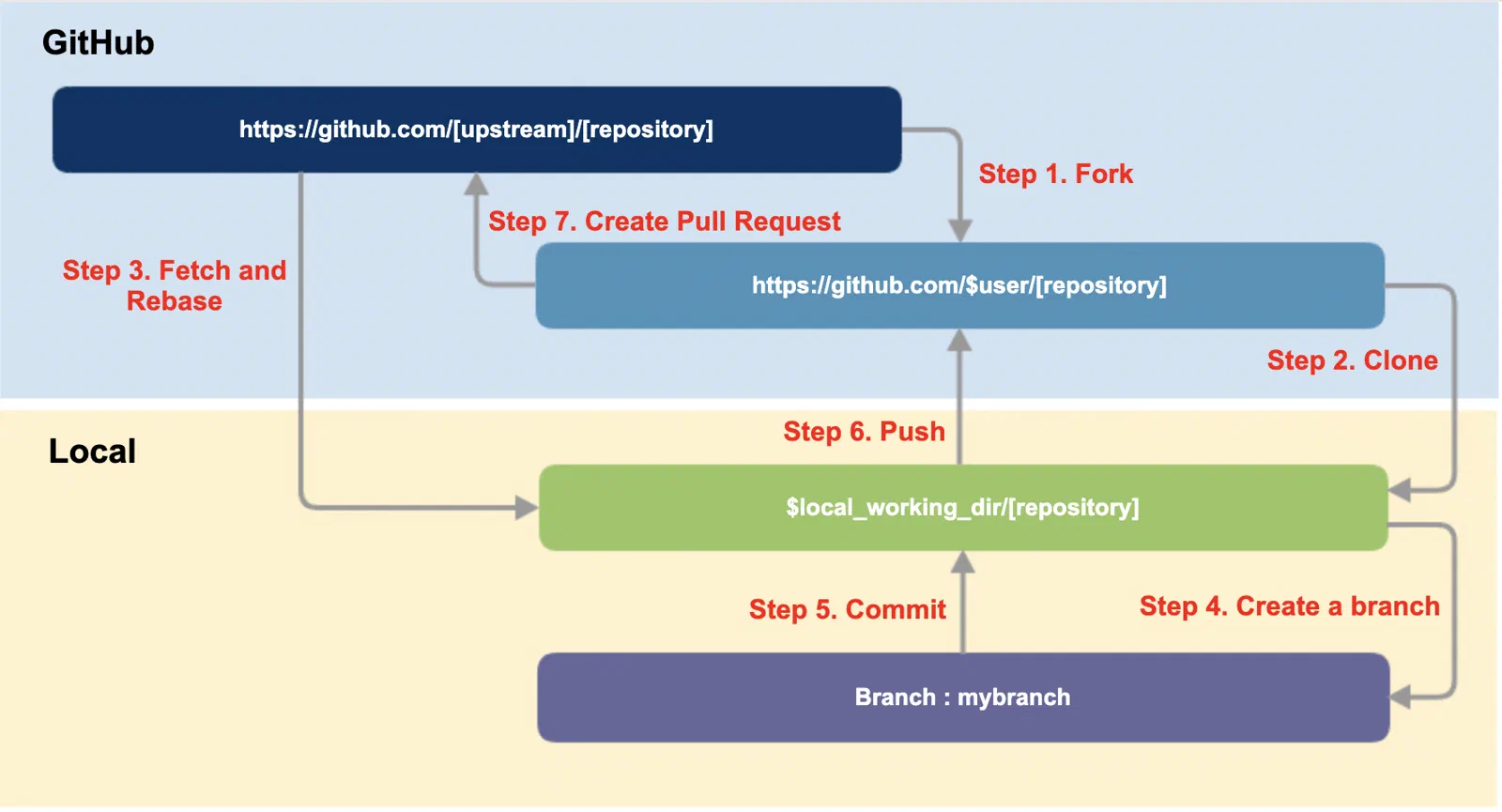
The Pull Request flow on GitHub is as follows.
Fork
Fork the upstream repository to your own GitHub account.
Clone
Clone your fork to a local working directory and add the upstream as a remote.
$ git clone https://github.com/$user/[repository]
$ cd [repository]
$ git remote add upstream https://github.com/[upstream]/[repository]
$ git remote -v
Create a branch
Bring the main branch up to date, then create a working branch.
$ git fetch upstream
$ git checkout main
$ git rebase upstream/main
$ git checkout -b myfeature
Work and commit
Make your changes and commit. If the project requires a DCO, add a Signed-off-by line with -s.
$ git commit -s -m '[commit message]'
Push
Push your branch to your own repository.
$ git push origin myfeature
Use the force option only in the rare case where you must re-push a branch you rewrote (for example, after a rebase), and never on a shared branch.
Create a pull request
On GitHub, use the Compare & pull request button on your repository to create the Pull Request. The upstream maintainer then reviews it and decides whether to merge.
DCO and CLA
Projects certify the origin of contributions with a DCO or a CLA. Check which one the project requires beforehand.
- A DCO is a lightweight Signed-off-by line in the commit, added automatically with
git commit -s. - A CLA is a separate agreement. If a CLA requires copyright assignment, request an OSRB review before signing, per the Contribution Rules.
Receive Feedback
After you submit, the project gives feedback. Treat it as a way to raise the quality of your contribution. Feedback usually falls into one of four kinds.
No response
Before contributing, check that the project is active. If you get no response for more than a week, politely ask for a review in the same thread, using an @-mention if you know the right person. Do not contact anyone privately; keep communication public. If there is still no response, look for another way to contribute or another project.
A request for changes
Being asked to explain your idea or revise your code is common. Respond promptly, since someone took time to review. If you can no longer proceed, tell the maintainer so someone else can take it over.
Rejected
A contribution may not be accepted. If the reason is unclear, ask the maintainer for an explanation, but respect their decision. If differences are never reconciled, you can fork and continue on your own project. Treat a rejection as a chance to improve your next contribution.
Accepted
Congratulations. You have contributed to open source.