BomLens
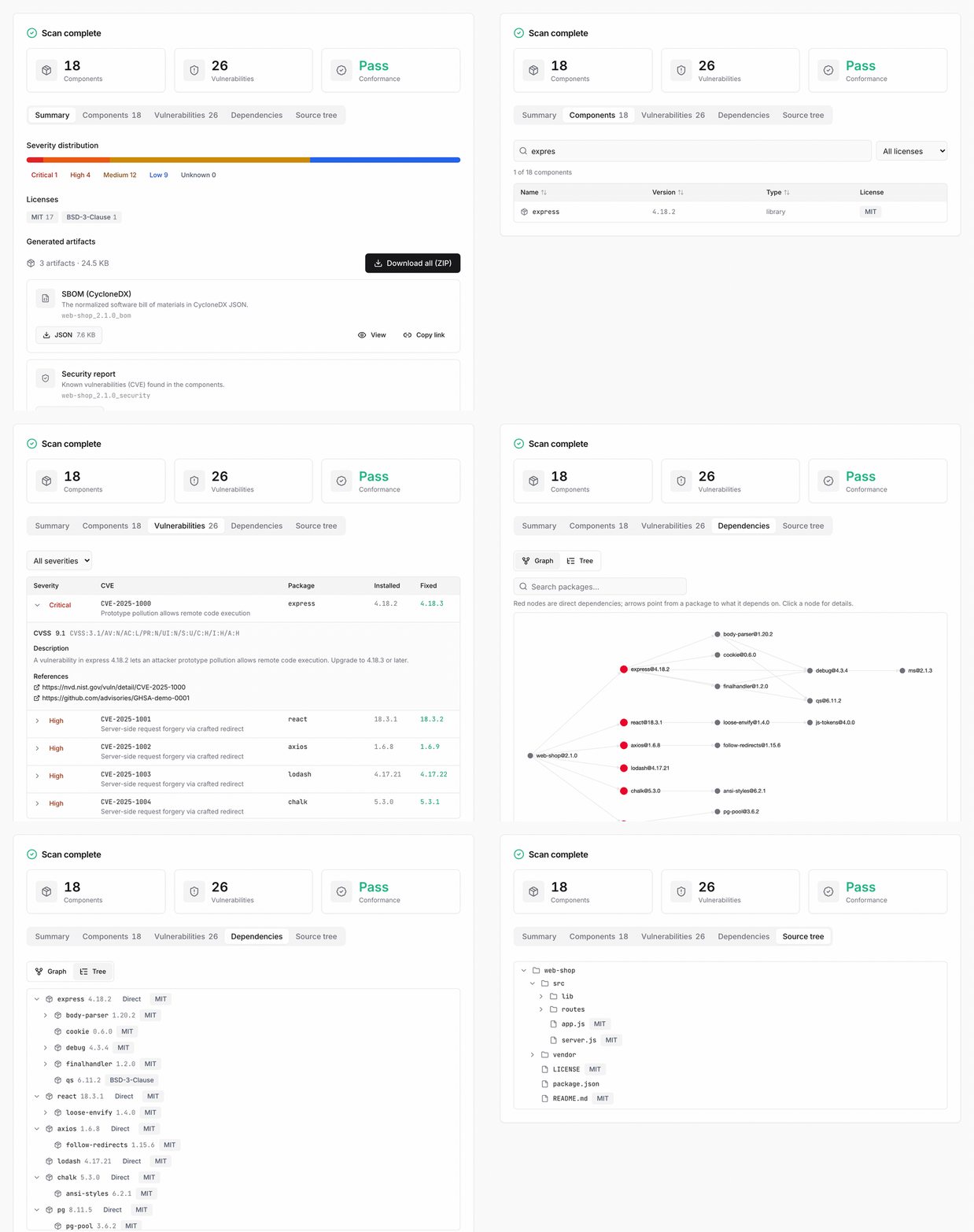
BomLens is a supply chain security tool that analyzes the components of your software and automatically produces a CycloneDX 1.6 SBOM (Software Bill of Materials). It scans source code, container images, or binaries to generate an SBOM along with an open-source notice and a security report, and it can also analyze an SBOM or firmware you receive from a supplier to produce an open-source risk report. It was developed by SK Telecom for supply chain security and released as open source.
Project Information
- Developer: SK Telecom
- License: Apache License 2.0
- GitHub: https://github.com/sktelecom/bomlens
- Container image:
ghcr.io/sktelecom/sbom-generator
Key Features
Two Jobs in One Tool
- Generate: scan source code, a container image, or a binary to produce a CycloneDX SBOM, an open-source notice, and a security report
- Assess open-source risk: analyze an SBOM or firmware received from a supplier to produce an open-source risk report covering licenses and known vulnerabilities
- Every scan emits the risk report by default
Broad Input and Language Support
- Inputs: source folder, GitHub URL, ZIP archive, Docker image, binary and RootFS, existing SBOM, firmware
- Languages: Java, Python, Node.js, Ruby, PHP, Rust, Go, .NET, C/C++ (Conan, vcpkg)
Multiple Form Factors
- Web UI: scan in the browser, watch live logs, and download the results
- Command-line interface (CLI): integrate into CI/CD pipelines
- Desktop app: double-click to run on Windows and macOS (no console window; it checks Docker, pulls the image, and opens the UI automatically)
Deliverables
bom.json: CycloneDX SBOMNOTICE.txt,NOTICE.html: open-source noticerisk-report.md,risk-report.html: open-source risk reportsecurity.json,security.md,security.html: security vulnerability report
Installation and Usage
A Docker engine (20.10 or later) is required. On Windows, the free Rancher Desktop is recommended.
Setup
git clone https://github.com/sktelecom/bomlens.git
cd bomlens
docker pull ghcr.io/sktelecom/sbom-generator:latest
Web UI
# Run from the folder where results should be saved; it opens http://localhost:8080
/path/to/bomlens/scripts/scan-sbom.sh --ui

# On Windows, double-click scripts\sbom-ui.bat
In the browser, enter the project name and version, pick a scan target (current folder, GitHub URL, ZIP, SBOM, firmware upload, or Docker image), run the scan, and then view or download the results.
CLI
# Generate all deliverables for the current project
./scripts/scan-sbom.sh --project MyApp --version 1.0.0 --all --generate-only

# Other inputs (GitHub URL, source archive, Docker image, firmware)
./scripts/scan-sbom.sh --git https://github.com/org/repo --project MyApp --version 1.0.0 --all --generate-only
./scripts/scan-sbom.sh --target ./src.zip --project MyApp --version 1.0.0 --all --generate-only
./scripts/scan-sbom.sh --target nginx:latest --project MyApp --version 1.0.0 --all --generate-only
./scripts/scan-sbom.sh --target dev.bin --firmware --project MyApp --version 1.0.0 --all --generate-only
License
Apache License 2.0 - Commercial use allowed
Resources
- GitHub: https://github.com/sktelecom/bomlens
- Getting started: getting-started.en.md
- Usage guide: usage-guide.en.md
- Desktop app download: Releases
- Issues: GitHub Issues
Feedback
Was this page helpful?
Glad to hear it! Please tell us how we can improve.
Sorry to hear that. Please tell us how we can improve.