AI model SBOM guide
How to generate a CycloneDX ML-BOM (machine-learning bill of materials) for a HuggingFace model and read the result. You give a model id; BomLens fetches the model-card metadata over the network — no source code and no model-weight download.
How it works
An AI model's "bill of materials" is its model card: identifier, architecture, task, license, supplier, datasets, and the integrity of its files. BomLens uses the OWASP AIBOM Generator to read a HuggingFace model card and build a CycloneDX 1.7 ML-BOM centered on the model and the datasets it references. It then adds a G7 minimum-element conformance check (advisory). Because a model has no package dependencies, there is no security (CVE) report.
The full tool flow is in Pipeline by input type.
The G7 checklist
"G7 Software Bill of Materials for AI — Minimum Elements" is a guideline published in May 2026 under the G7, led by Germany's BSI and Italy's ACN. It defines 50 minimum elements, grouped into seven clusters, that an SBOM for an AI model should carry: who made the model, what it is, what data it was trained on, how it is secured, and how it performs. It is a non-binding recommendation, not a regulation.
It still matters for regulation. The EU AI Act's high-risk and transparency obligations apply from 2 August 2026, and the technical documentation its Annex IV asks for overlaps substantially with the G7 clusters. BomLens does not certify compliance with either text. What the conformance report gives you is visibility: element by element, it shows what your model's documentation already covers and what a person still has to supply — a concrete way to prepare, not a compliance verdict.
BomLens shows the 50 elements as 51 checks. Model openness (whether weights, architecture, training data and training process are disclosed) is one facet of the Model license element in the G7 text, but it is worth seeing on its own, so it gets a separate row.
| Cluster | Checks | Of which need human review |
|---|---|---|
| Metadata | 10 | 0 |
| System-level properties | 9 | 4 |
| Models | 14 | 0 |
| Dataset properties | 10 | 5 |
| Infrastructure | 2 | 0 |
| Security properties | 4 | 3 |
| Key performance indicators | 2 | 1 |
Thirteen elements have no automated source — things like the intended application area or dataset sensitivity, which no model-card field can prove. BomLens lists them as requiring human review instead of guessing.
Preparing the image
AI model SBOM generation needs a separate image that bundles the OWASP AIBOM Generator. It is opt-in and reaches the network (HuggingFace), so it ships as its own image rather than in the base one.
This image is the default for AI-model scans, so --model pulls it without any extra setting. To use a different tag, set the environment variable SBOM_AIBOM_IMAGE.
Running it
From the web UI
Launch the UI from the aibom image — that is what enables the AI model tile — then enter the model id and run:
SBOM_SCANNER_IMAGE=ghcr.io/sktelecom/bomlens-aibom:latest ./scripts/scan-sbom.sh --ui
#   Windows: set SBOM_SCANNER_IMAGE before double-clicking sbom-ui.bat
Choose AI model under the New scan source tiles, enter the HuggingFace model id as org/model (for example google-bert/bert-base-uncased or Qwen/Qwen2.5-0.5B — not a collection name or a full URL), and run.
From the CLI
Pass the model id to --model:
./scripts/scan-sbom.sh --project bert-base --version 1.0.0 \
  --model "google-bert/bert-base-uncased" --generate-only
--model is mutually exclusive with --target, --analyze, --git, and --merge. It pulls the bomlens-aibom image automatically, produces the notice and the risk report, and skips the security report (a model has no package CVEs).
Reading the result
In the web UI, an AI/ML SBOM adds two sections to the left rail.
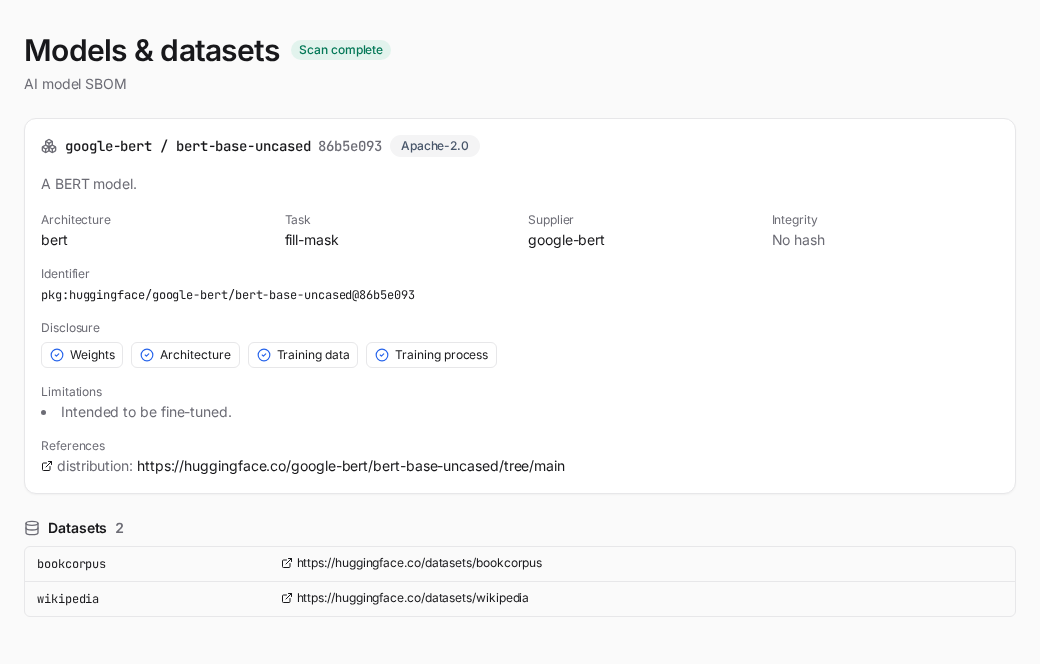
Models & datasets — each model card's identifier, architecture, task, license, supplier and integrity, a four-axis disclosure panel (weights / architecture / training data / training process, as documented in the BOM), and the datasets the model references.
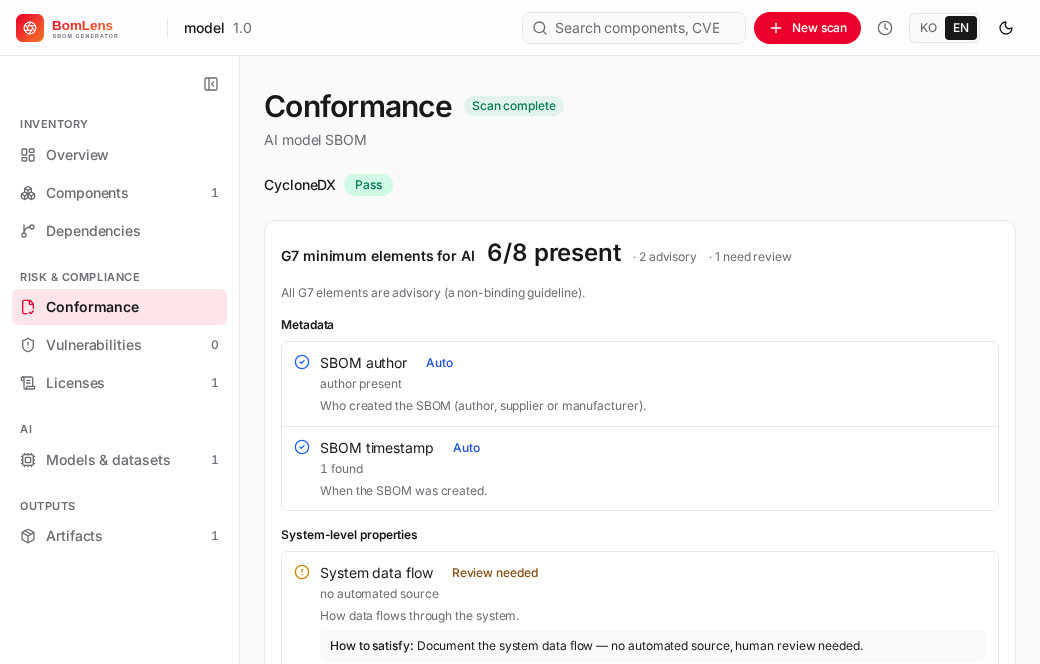
Conformance — for an AI-model SBOM this section adds the G7 minimum-element checks (all advisory), grouped by the seven G7 clusters, alongside the base format-conformance checks. Each element shows what it is and how to satisfy it. The next section explains what the numbers and badges mean.
The same data is in the artifacts: the ML-BOM (_bom.json, CycloneDX 1.7) and the conformance report (_conformance.*).
Reading the conformance report
The G7 block leads with a headline such as "N / 38 present". The denominator counts only the checks that have an automated source — 38 of the 51 — so the number states what the tool could verify on its own. The 13 review-only elements appear next to it as a separate "need review" count, and any automated check that found nothing is counted as advisory.
Each check has one of three statuses. Pass means the element is present in the ML-BOM. Warn means it is missing or could not be confirmed; the 13 review-only elements always show this status, labeled as requiring human review. Fail does not occur for G7 checks in practice: every G7 element is advisory, so a missing one never fails the SBOM as a whole. An overall fail verdict can only come from the base format checks — the required CycloneDX ones.
A source badge on each row says where a satisfied value comes from:
- Auto (20 checks) — read directly from a field of the ML-BOM.
- Inferred (14) — derived from signals in the BOM rather than a single dedicated field.
- Declared (4) — present only when a person or a manifest supplied the value.
- Review needed (13) — no automated source exists; a person has to confirm it.
The same result ships in three formats: {Project}_{Version}_conformance.json for machines (CI gates, diffing), _conformance.md as a readable table, and _conformance.html as a visual summary.
Limits
- The result is only as complete as the HuggingFace model card. A sparse card yields a sparse ML-BOM, and the G7 checks reflect what the card documents — not an audit of the model. The tool generates the report; interpreting it, and answering the 13 review-only elements, is a person's job.
- The conformance report does not certify compliance with the EU AI Act or any other regulation. It makes documentation gaps visible so a person can close them.
- It fetches metadata over the network; private or gated models need access (a HuggingFace token in the environment), and offline use is not supported.
- The model id must be
org/model. A collection name or a full URL will not resolve.
Related: Pipeline by input type | Web UI reference | CLI reference