Identify bundled open source (C/C++)
Use this when you scan a C/C++ embedded source tree and BomLens finds almost nothing.
When you need it
A normal scan reads a package manager (npm, Maven, pip, Go, Conan, and so on) to learn what open source a project uses. C/C++ embedded firmware usually has no package manager: the open source is copied straight into the source tree (this is called vendored source — for example a copy of openssl, zlib, or liblfds under third_party/). cdxgen cannot name those files, so the SBOM comes back almost empty, with each file listed as an unidentified pkg:generic entry.
When that happens, BomLens prints a one-line hint suggesting this option, and the web UI shows the same hint after the scan. You do not need to recognize the situation yourself.

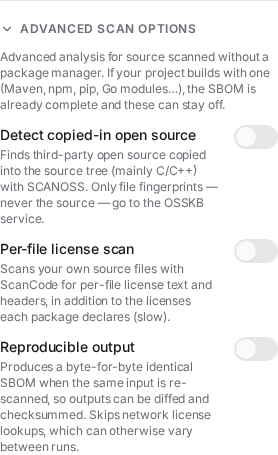
--identify-vendored matches the file fingerprints of your sources against the public OSSKB knowledge base and records each match as a real component (name, version, PURL), so the copied-in open source shows up in the SBOM — and, where the library has known CVEs, in the security report.
What is sent
Only file fingerprints (hashes) are sent to the OSSKB service. Your source code never leaves the machine. The supplier can run this in their own environment before any contract.
On a package-managed project
This option is for source with no package manager. If your project uses npm, Maven, pip, Go, and so on, the normal scan already resolves your dependencies and you do not need it. If you turn it on anyway, BomLens reconciles the results: dependency and build directories (node_modules, vendor, dist, and the like) are skipped, and any match whose name a package-manager component already carries is dropped in favor of that authoritative identity. So enabling it on a managed project does not duplicate known dependencies or inflate the vulnerability count — at most it adds genuinely copied-in source the package manager could not see.
Matches are recorded read-only, tagged with their source and confidence. BomLens does not provide an accept/reject audit workflow; if you need to confirm or triage matches, upload the SBOM to a vulnerability management system (Dependency-Track, TRUSCA, etc.) and do it there.
Prerequisites
The published bomlens image (v1.4.0 and later) already includes the SCANOSS client, so no extra setup is needed. If you build the image yourself with a minimal configuration, add the build arg:
Run it
scan-sbom.sh --project trelay --version 26.4.0 --target ./src \
  --identify-vendored --all --generate-only
In the web UI or desktop app, open Advanced and turn on File-level identification (SCANOSS) — the on-screen label differs from this guide's title, but it is the same feature. The option appears only for a source scan (current directory, git URL, or ZIP upload) when the image supports it.
If you are on Windows and new to the command line, follow the desktop-app steps in Quick start without the CLI first.
What you get
- Copied-in open source appears in the SBOM as named components with versions, each tagged
vendored(abomlens:layer=vendoredproperty). - Components that map to a known product get a CPE, so the Trivy security report lists their CVEs. For example a vendored
openssl 1.1.1wshows up with its advisories. - Niche libraries with no entry in the vulnerability databases (for example
liblfds,libaes,djbdns) are still identified by name and version; they simply have no CVEs to report, which is a limit of the public data, not of the scan.
Only full-file matches become components. Partial (snippet) matches are noisy and are left out, so the report stays clean.

Endpoint and limits
The default endpoint is the free OSSKB API, which is rate-limited and intended for identification only. From the CLI, you can point at a SCANOSS commercial or self-hosted endpoint with environment variables for high-volume or air-gapped use:
SCANOSS_API_URL=https://your-scanoss-endpoint \
SCANOSS_API_KEY=your-key \
scan-sbom.sh --project trelay --version 26.4.0 --target ./src --identify-vendored --all --generate-only
In the web UI and desktop app, you can supply only the token from the screen. If you hit the free OSSKB rate limit, turn on File-level identification (SCANOSS) and paste a token from scanoss.com into the field that appears below the toggle, then run again. The token is used once for that scan and is never stored or logged.
The endpoint URL (SCANOSS_API_URL) and the reporting threshold (SCANOSS_MIN_FILES) are set through CLI or container environment variables only; neither the web UI nor the desktop app exposes a field for them. In particular, the desktop app does not forward SCANOSS_API_URL into the container, so a commercial or self-hosted endpoint cannot be used from the desktop app today. If you need one, run from the CLI or sbom-ui.bat with the variable set.
Version precision is approximate. A file match reports the release where that file content first appeared, so different files of the same library can resolve to slightly different versions and a copied-in library may be reported a point release off. Treat the version (and any CVEs derived from it) as a starting point for review, not a final verdict.
Attribution can also point at the wrong project. A file that many projects copy (for example zlib's deflate.c) may match a downstream project that vendored it rather than the canonical upstream. To cut that noise, BomLens reports a library only when at least two files agree on it (configurable with SCANOSS_MIN_FILES; set 1 to keep every match) and resolves the version and PURL from the consensus across those files, so scattered one-off fork matches are dropped and a library split across forks collapses to a single component. This helps but does not fully fix it — a real copy can still be reported under another name, and its CVEs missed. It is a ranking and coverage limit of the knowledge base, more pronounced on the free OSSKB; for higher-fidelity attribution, point SCANOSS_API_URL at a SCANOSS commercial or self-hosted endpoint. Relatedly, scanning source that is itself published in a public repository will match that repository (your own first-party files can match your own public project) — this does not occur for the intended case of private supplier source.
Results are a best-effort estimate that benefits from human review. See the OSSKB terms and license notes in THIRD_PARTY_LICENSES.md.