Architecture
This document describes the overall system structure of BomLens and explains which tool runs at which step of the scan pipeline, and in what order.
For the per-input tool flow (source code with the ScanCode and SCANOSS options, firmware, a received SBOM, and an AI model), see Pipeline by input type.
This document reflects the 2-stage architecture as currently implemented. The Stage 1 routing in the source code (detect the language, then run the official cdxgen language image) is implemented and working in
scripts/scan-sbom.sh.
At a glance
BomLens is a 2-stage pipeline in which two kinds of Docker images work together.
- Stage 1, generation: for source code, the official per-language cdxgen images generate the SBOM (CycloneDX 1.6 by default, or 1.7 with
--spec-version 1.7); for container images, binaries, and directories, syft does. - Stage 2, post-processing: the lightweight
bomlensimage takes the SBOM and runs normalization, optional deep license detection, notice generation, the security report, signing, and upload in order.
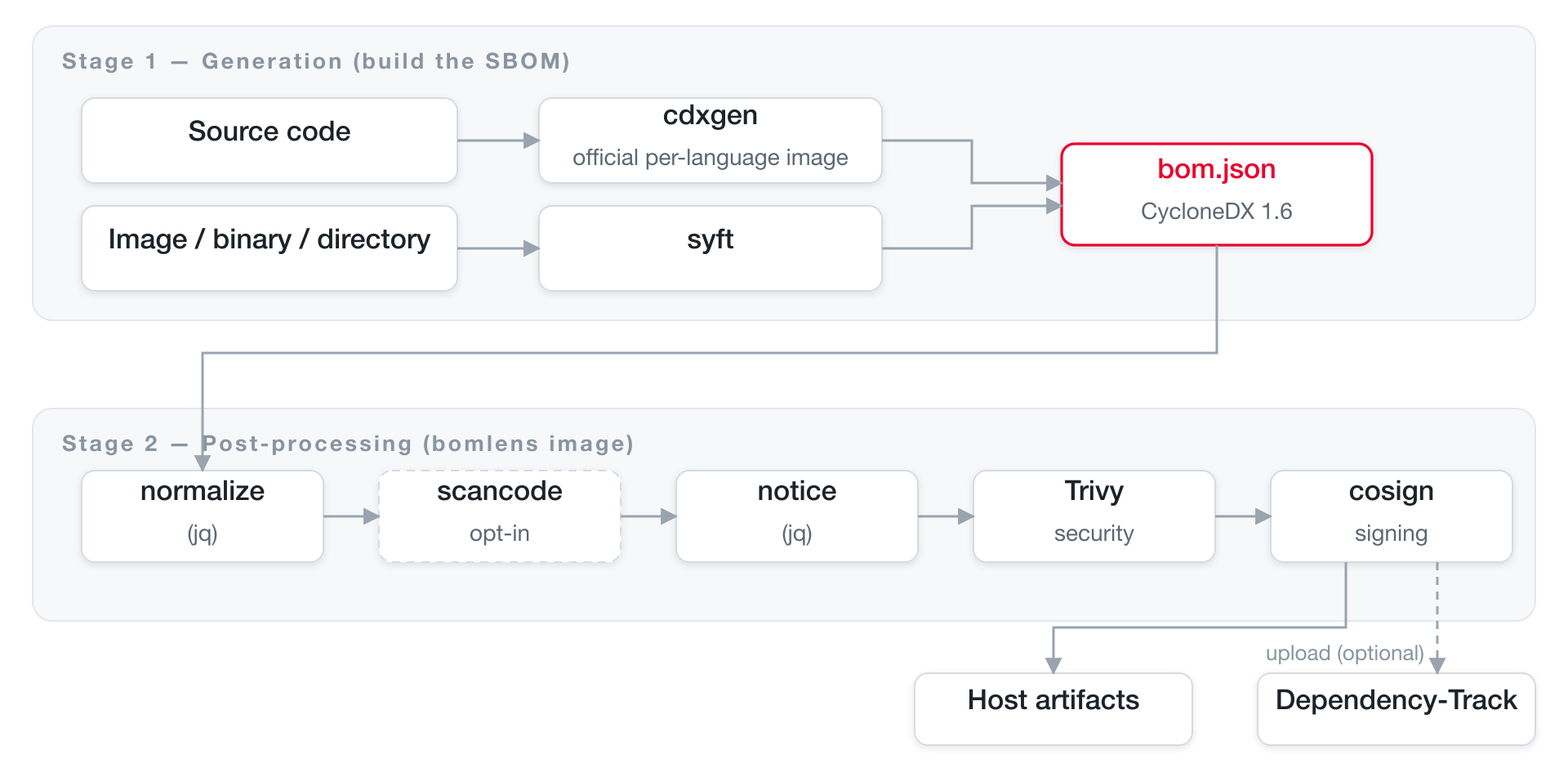
The single entry point for orchestration is scripts/scan-sbom.sh (scan-sbom.bat on Windows); this is the only script users invoke.
Why two stages
Previously, every language runtime plus every analysis tool lived in a single huge image. The redesigned pipeline splits the responsibilities in two.
| Stage 1 image | Stage 2 image (bomlens) |
|
|---|---|---|
| Role | Generates the SBOM from source | SBOM post-processing (normalization, notice, security, signing, upload) plus syft scans |
| Contents | Official per-language cdxgen images (java, python, node, ...) | No language toolchain, lightweight python:3.12-slim |
| Acquisition | Pulled on demand after detecting the project language | Pulled once and reused |
| Benefit | cdxgen maintains up-to-date per-language toolchains | Small image; pinned tool versions ensure reproducibility |
build-prep.shruns the ecosystem's build tool before cdxgen (Cargo, Bundler, Composer and Swift only when no lock file is committed), so that cdxgen sees the full dependency graph instead of only the manifest's direct dependencies. What runs for each ecosystem is in How dependencies are resolved. To compare this against running cdxgen alone, seetests/compare-cdxgen-vs-docker.sh.
Tool inventory
The tools the pipeline invokes.
| Tool | Stage | Role | Enabled when |
|---|---|---|---|
| cdxgen | Stage 1 | Generates the SBOM from source code (--spec-version 1.6, or 1.7 when the scan asks for it) |
MODE=SOURCE |
| build-prep.sh | Stage 1 | Runs the ecosystem's build tool before cdxgen (some steps only when no lock file is committed) and narrows the SBOM to what ships | MODE=SOURCE |
| syft | Stage 1 | Scans images, binaries, and root filesystems | MODE=IMAGE/BINARY/ROOTFS |
jq (normalize-sbom.sh) |
Stage 2 | Normalizes and sorts the SBOM | Always |
| ScanCode Toolkit | Stage 2 | Precise license detection on first-party source | --deep-license (opt-in build) |
| SCANOSS | Stage 2 | Identify vendored open source in C/C++ source with no package manager | --identify-vendored |
jq (generate-notice.sh) |
Stage 2 | Generates the open source notice (NOTICE) | --notice / --all |
| Trivy | Stage 2 | Vulnerability (CVE) security report | --security / --all |
| Cosign | Stage 2 | Detached SBOM signature | --sign |
| curl | Stage 2 | Upload to Dependency-Track | Default (unless --generate-only) |
Versions are pinned as
ARGs indocker/Dockerfileand listed in Docker image. To keep the image lean, ScanCode is an opt-in build arg (--build-arg SBOM_DEEP_LICENSE=true). The SCANOSS client is included by default; build with--build-arg SBOM_SCANOSS=falseto drop it. Firmware unpacking/identification (unblob, cve-bin-tool) ships in the separate opt-inbomlens-firmwareimage, and AI-model SBOM generation (OWASP AIBOM Generator) inbomlens-aibom. For the per-input tool flow, see Pipeline by input type.
Full pipeline flow
The order in which tools are invoked, in one diagram. Dashed boxes are optional steps enabled by flags.
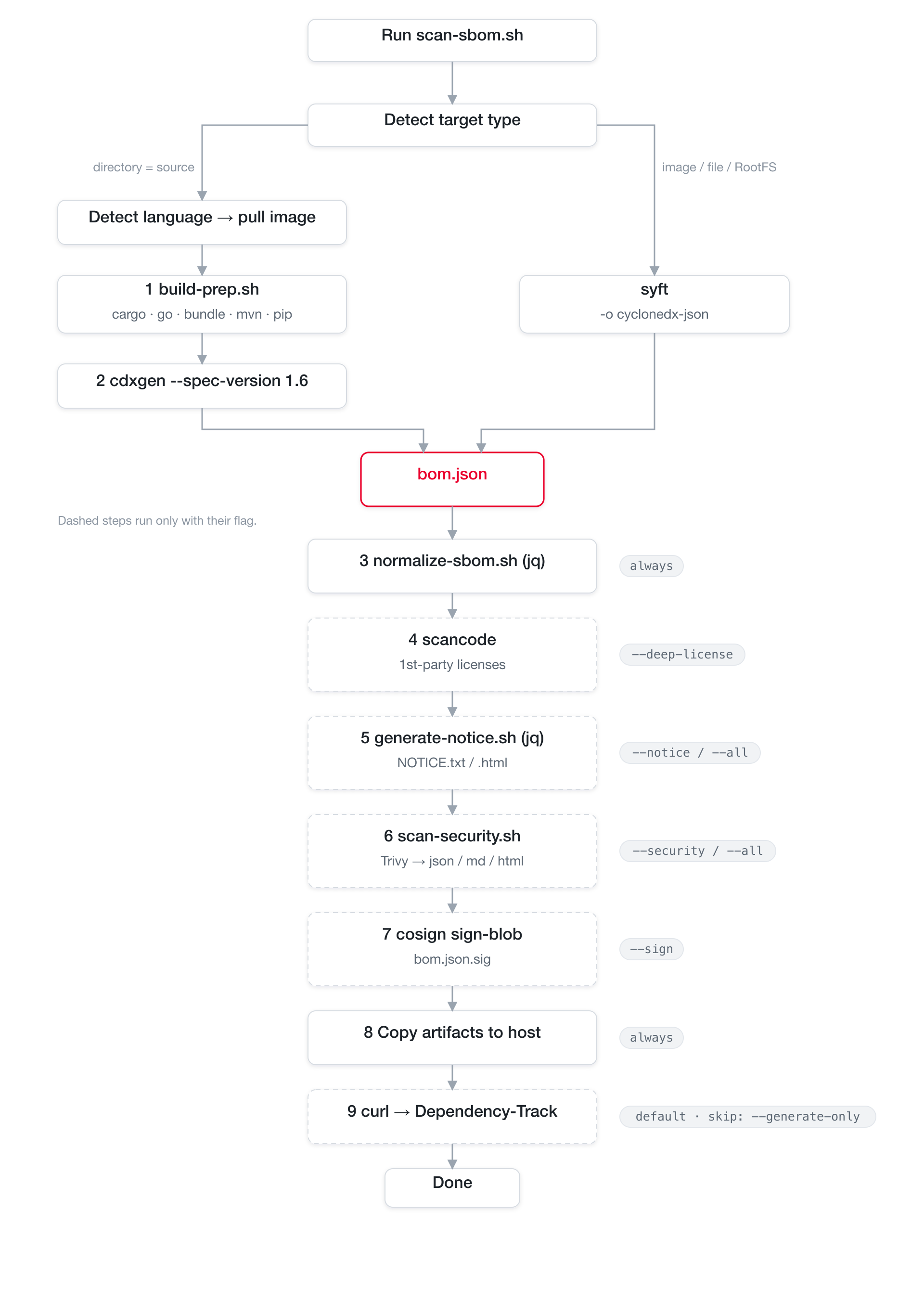
The sequence from the user's invocation through post-processing:
sequenceDiagram
    autonumber
    actor U as User
    participant S as scan-sbom.sh
    participant D as Docker
    participant L as Stage 1 language image
    participant P as bomlens (run-scan)

    U->>S: scan-sbom.sh --project App --version 1.0 --all
    S->>S: Parse arguments, detect target type
    rect rgb(227,242,253)
    note over S,L: Stage 1: Generation
    S->>D: (source) docker run the language image
    D->>L: build-prep.sh → cdxgen
    L-->>S: bom.json
    end
    rect rgb(241,248,233)
    note over S,P: Stage 2: Post-processing
    S->>D: bomlens docker run (MODE=POSTPROCESS)
    D->>P: run-scan (entrypoint)
    P->>P: normalize → scancode → notice → Trivy → cosign
    P->>P: Copy artifacts to host
    P-->>U: (optional) upload to Dependency-Track
    end
Stage 1: SBOM generation
The generation tool depends on the target type.
Source code (MODE=SOURCE): cdxgen language image
scan-sbom.sh detects the project language with detect_lang(), picks the matching official cdxgen language image with img_for_lang(), pulls it, and runs build-prep.sh inside that image (scripts/scan-sbom.sh, with the detection in docker/lib/source-detect.sh). The lightweight post-processing image has no language toolchain, so generation is handled entirely by the language image.
The per-language cdxgen image mapping is as follows (img_for_lang() in docker/lib/source-detect.sh; the tag is pinned via CDXGEN_TAG). The images are published by the cdxgen project on ghcr.io/cdxgen and pulled on the first scan of each language; see How dependencies are resolved.
| Detected language | Image |
|---|---|
| rust | cdxgen-debian-rust |
| go | cdxgen-debian-golang124 |
| ruby | cdxgen-debian-ruby34 |
| java | cdxgen-temurin-java21 |
| python | cdxgen-python312 |
| node | cdxgen-alpine-node24 |
| php | cdxgen-debian-php84 |
| dotnet | cdxgen-debian-dotnet9 |
| swift | cdxgen-debian-swift |
| android | bomlens-android-sdk<API>, built on the scanning machine because the Android SDK cannot be redistributed (compileSdk extracted automatically) |
| mixed / unknown | cdxgen all-in-one (CDXGEN_ALLINONE) |
Two steps run inside the image:
-
build-prep.sh(docker/lib/build-prep.sh) prepares the project right before cdxgen: it runs the ecosystem's build tool (some steps only when no lock file is committed), and after cdxgen it narrows the SBOM to what ships. A failure in it never stops the scan. What runs for each ecosystem is in How dependencies are resolved. -
Run cdxgen:
build-prep.shauto-detects the cdxgen binary path, which differs per image, and runscdxgen -r --spec-version 1.6 -o bom.json(1.7instead with--spec-version 1.7). The generated SBOM is then handed to the Stage 2 (MODE=POSTPROCESS) post-processing image.
Image / binary / directory: syft
syft, included in the bomlens image, generates the SBOM directly. (docker/entrypoint.sh)
| MODE | Input | syft invocation |
|---|---|---|
IMAGE |
Docker image | syft <image> -o cyclonedx-json (from the Docker daemon with the docker.sock mount, otherwise from the registry or an archive) |
BINARY |
Single file | syft file:<path> -o cyclonedx-json (falls back to a minimal SBOM on failure) |
ROOTFS |
Directory | syft dir:<path> -o cyclonedx-json |
Stage 2: post-processing pipeline
The bomlens image's entry point run-scan (docker/entrypoint.sh) takes the SBOM and runs the steps in a fixed order. Each step is enabled by an environment variable (equivalent to a CLI flag), and outputs accumulate in the ARTIFACTS list.
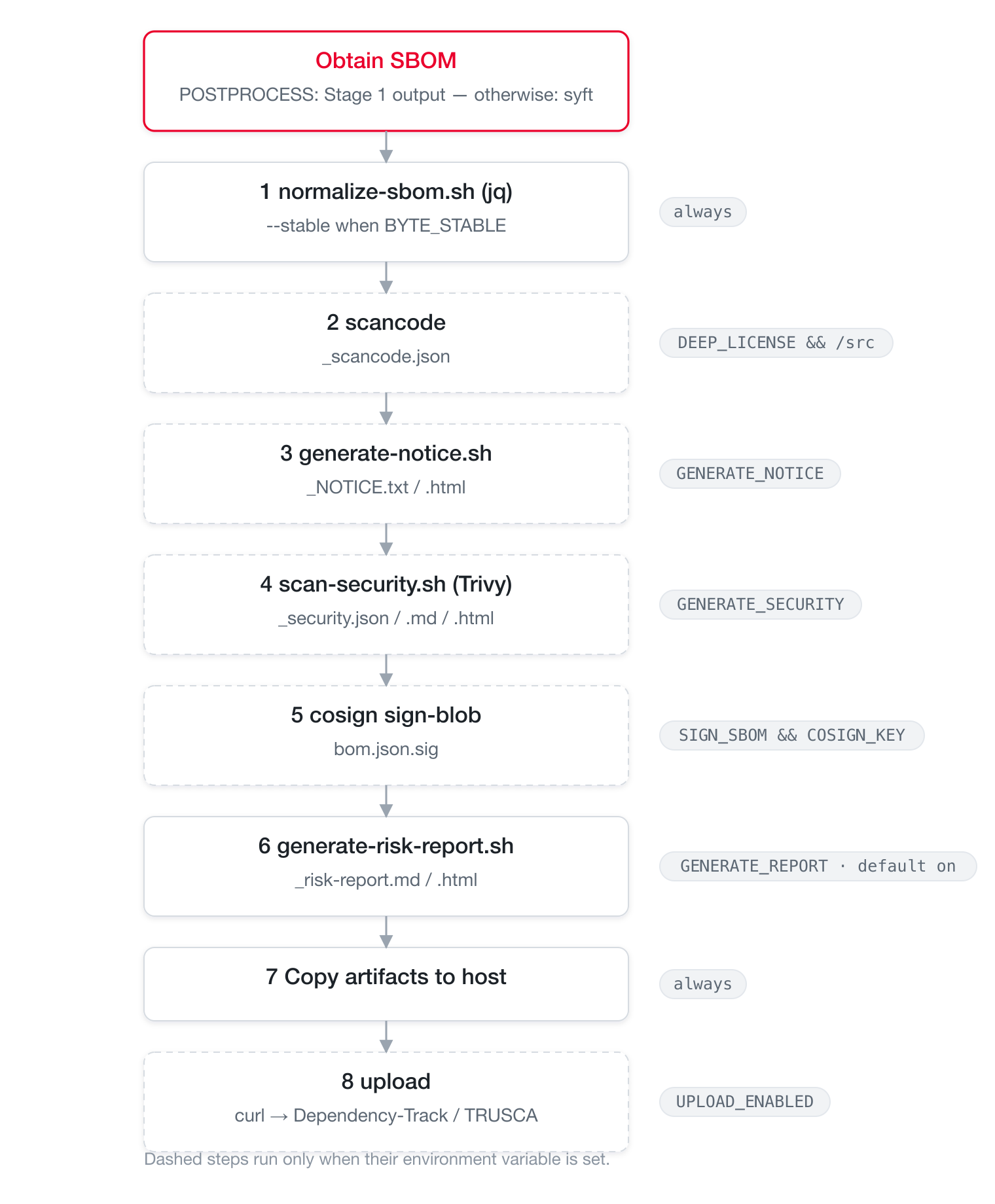
Step details:
| # | Step | Script / tool | Condition | Output |
|---|---|---|---|---|
| ① | Normalize | normalize-sbom.sh (jq) |
Always (deterministic mode with --byte-stable) |
Updates bom.json |
| ② | Deep license | scancode |
--deep-license and /src exists |
_scancode.json |
| ③ | Notice | generate-notice.sh (jq) |
--notice / --all |
_NOTICE.txt, _NOTICE.html |
| ④ | Security report | scan-security.sh (Trivy) |
--security / --all |
_security.{json,md,html} |
| ⑤ | Signing | cosign sign-blob |
--sign and COSIGN_KEY |
bom.json.sig |
| ⑥ | Risk report | generate-risk-report.sh |
Default (skip with --no-report) |
_risk-report.{md,html} (plus _conformance.* in ANALYZE mode) |
| ⑦ | Copy to host | cp |
Always | Copied to HOST_OUTPUT_DIR |
| ⑧ | Upload | curl |
Default (skipped with --generate-only) |
Upload to a Dependency-Track server or TRUSCA's native ingest (select with UPLOAD_TARGET) |
Why the order is fixed: normalization stabilizes the input for every later step, so it runs first; signing must target the final
bom.json, so it runs last. Each step is best-effort: failures are handled with|| trueor a warning and do not abort the whole scan (signing and upload excepted).
Branching by input type
scan-sbom.sh determines the mode automatically from --git/--analyze/--firmware and the --target value.
The checks run top to bottom; the first matching branch wins.
flowchart TD
    D1{"--git URL<br/>or URL-like target?"} -->|yes| R1["clone → MODE=SOURCE"]
    D1 -->|no| D2{"--target<br/>*.zip / *.tar.gz?"}
    D2 -->|yes| R2["extract → MODE=SOURCE"]
    D2 -->|no| D3{"--analyze sbom?"}
    D3 -->|yes| R3["MODE=ANALYZE<br/>validate + convert to CDX"]
    D3 -->|no| D4{"target omitted?"}
    D4 -->|yes| R4["MODE=SOURCE<br/>current directory → cdxgen"]
    D4 -->|no| D5{"existing file?"}
    D5 -->|"yes · --firmware/extension"| R5["MODE=FIRMWARE<br/>opt-in firmware image"]
    D5 -->|"yes · otherwise"| R6["MODE=BINARY → syft"]
    D5 -->|no| D6{"existing directory?"}
    D6 -->|yes| R7["MODE=ROOTFS → syft"]
    D6 -->|no| R8["MODE=IMAGE → syft"]
Independently of the branching above,
--uistartsMODE=UI(the web serverserver.py) and runs subsequent scans through the form or file upload.
| Mode | Trigger | Generation tool | Notes |
|---|---|---|---|
SOURCE |
No target, --git <url>, or --target *.zip/*.tar.gz |
cdxgen | Language detection selects the per-language image. Git targets are cloned; archives are extracted and treated as source. (The web UI's SOURCE uses syft dir: inside the container) |
ANALYZE |
--analyze <sbom> (alias --sbom) |
— | Validates a supplier SBOM (CycloneDX/SPDX), converts it to CDX, and re-aggregates. Produces _conformance.* |
FIRMWARE |
--target <file> --firmware, or a firmware file extension |
unblob + syft + cve-bin-tool | Opt-in image bomlens-firmware. Details in the firmware analysis guide |
BINARY |
--target <file> |
syft | file: scheme |
ROOTFS |
--target <directory> |
syft | dir: scheme |
IMAGE |
--target <image name> |
syft | Docker daemon (docker.sock mount), or the registry |
AIBOM |
--model <owner/name> |
OWASP AIBOM Generator | Opt-in image bomlens-aibom. CycloneDX 1.7 ML-BOM from a HuggingFace model card; adds a G7 conformance check |
MODELFILE |
--model-file <path> |
identify-model-file.py (stdlib) |
Base image, offline. CycloneDX 1.7 ML-BOM read from a model file's own header (GGUF, safetensors, PyTorch, pickle, npz, npy, ONNX); adds the same G7 check |
DATASET |
--model <Figshare item> or --model datasets/<owner>/<name> |
scan-figshare.py, scan-hf-dataset.py (stdlib) |
Base image. A published research dataset read from the public Figshare item endpoint (no account): licence, DOI, authors and a per-file MD5 digest become a CycloneDX 1.7 data component. A HuggingFace dataset (datasets/<owner>/<name>, https://huggingface.co/datasets/<owner>/<name> or hf:<owner>/<name>) becomes the same data component with its licence, hub revision and per-file SHA-256 digests, and the datasets its card lists under source_datasets are read with it |
AIDECLARE |
--ai-declare <file> alone (no --model, --model-file or --target) |
declare-ai-model.py (stdlib) |
Base image. A model that has no hub repository or file yet, described from its publisher's declaration: the model is metadata.component, named by the project and version and marked bomlens:origin=declared-input; the base models and HuggingFace datasets the declaration names are read from the hub by id, as in a model scan. Most declared values go only into the SPDX 3.0.1 AI document; a declared service and the model's input and output kinds, training compute and adversarial testing also reach the CycloneDX SBOM, marked as the publisher's declaration |
UI |
--ui |
— | Browser UI; runs every scan target type through the form or file upload |
Flag-to-step mapping
How CLI flags translate into environment variables and which steps they enable (scan-sbom.sh converts them and passes them to entrypoint.sh).
| Flag | Environment variable | Steps enabled |
|---|---|---|
| (default) | GENERATE_REPORT=true (plus notice and security) |
normalize + risk report + upload |
--no-report |
GENERATE_REPORT=false |
Does not force-enable the risk report, notice, or security steps |
--notice |
GENERATE_NOTICE=true |
③ notice |
--security |
GENERATE_SECURITY=true |
④ security report |
--all |
Both of the above | ③ + ④ |
--git <url> / --branch |
(cloned on the host) | SOURCE input collection |
--analyze <sbom> |
MODE=ANALYZE |
Supplier SBOM validation, conversion, and report |
--firmware |
MODE=FIRMWARE (firmware image) |
Unpack, then syft + cve-bin-tool |
--model <owner/name> |
MODE=AIBOM (aibom image) |
Generate an ML-BOM from a HuggingFace model, plus a G7 check |
--model-file <path> |
MODE=MODELFILE |
Read one model file's header into an ML-BOM, offline, plus a G7 check |
--model <Figshare item>, --model datasets/<owner>/<name> |
MODE=DATASET |
Describe a published dataset from its Figshare item or its HuggingFace dataset page, no account needed for a public one |
--ai-declare <file> alone |
MODE=AIDECLARE |
Describe a model not yet published from its declaration, plus a G7 check and the SPDX 3.0.1 AI document |
--deep-license |
DEEP_LICENSE=true |
② scancode |
--byte-stable |
BYTE_STABLE=true |
① deterministic normalization (also the UI's Reproducible output toggle) |
--sign |
SIGN_SBOM=true (plus COSIGN_KEY/COSIGN_PASSWORD) |
⑤ signing |
--generate-only |
UPLOAD_ENABLED=false |
⑦ skips the upload |
--ui |
MODE=UI |
Web UI |
The risk report (
_risk-report.{md,html}) is generated by default in every mode (it aggregates licenses and vulnerabilities). To support it, the notice and security scans are turned on automatically alongside it; disable with--no-report.
For how to use each feature, see the notice and security report guide.
Artifacts
{P} is the project name, {V} the version (special characters are normalized to _).
| File | Generated when |
|---|---|
{Project}_{Version}_bom.json |
Always (CycloneDX 1.6, or 1.7 with --spec-version 1.7; a 1.7 ML-BOM for AI models) |
{Project}_{Version}_NOTICE.txt / .html / .pdf |
--notice / --all / default risk report generation (PDF only in an SBOM_PDF build) |
{Project}_{Version}_security.json / .md / .html |
--security / --all / default risk report generation |
{Project}_{Version}_risk-report.md / .html |
Default (all modes); skip with --no-report |
{Project}_{Version}_conformance.json / .md / .html |
--analyze (supplier SBOM validation) |
{Project}_{Version}_scancode.json |
--deep-license |
{Project}_{Version}_bom.json.sig |
--sign |
Extension points
Adding support for a new language
- Check whether an official cdxgen image exists for the language; if so, add it to the routing table.
- If cdxgen cannot resolve transitive dependencies automatically, add preparation logic to
docker/lib/build-prep.sh. - Add an example project under
examples/{language}/and a test case intests/cases/test-{language}.sh.
For the full procedure, see the package manager guide.
Adding a new post-processing step
Add a helper script under docker/lib/, call it from the shared pipeline section of entrypoint.sh (after normalization) behind an environment variable guard, and append its outputs to ARTIFACTS. Place it before the signing step so its outputs are covered by the signature.
Design principles
- Isolation: all analysis runs in Docker containers; the host environment stays untouched.
- Separation of concerns: generation (Stage 1) and post-processing (Stage 2) are split, keeping the post-processing image small.
- Reproducibility: tool versions are pinned via
ARG;--byte-stableproduces byte-identical output. - Standards compliance: conforms to the CycloneDX specification, 1.6 by default and 1.7 with
--spec-version 1.7. - Robustness: post-processing steps are best-effort and do not abort the whole scan.
- Single interface: every language and mode is invoked through the one
scan-sbom.sh.
Division of roles (TRUSCA)
BomLens specializes in generation. Governance (company-wide project management, vulnerability triage, and license policy gates) is delegated to the sister project TRUSCA (formerly TrustedOSS Portal). Both tools share cdxgen and Trivy, so the artifacts (CycloneDX) are directly compatible.
flowchart TB
    subgraph dev["Developer · single project"]
        direction LR
        A["Source / image / binary"] --> B["BomLens"]
        B --> C["SBOM"]
        B --> D["Notice"]
        B --> E["Security report"]
    end
    subgraph org["Organization · central management"]
        direction LR
        F["TRUSCA"] --> G["Vulnerability triage"]
        F --> H["License policy gate"]
        F --> I["Project dashboard"]
    end
    C -. upload .-> F
Related: Pipeline by input type | Getting started | CLI reference | Use the Docker image directly